Picture your first sign-in to the Azure portal. Before you create anything, the questions start. Which directory am I in? Why can I see two subscriptions? Is a resource group a folder, a security boundary, or a line on the bill? Why does a role that works in one place fail in another?
Azure rarely feels hard because one service is mysterious. It feels hard because everything is connected. Identity lives in Microsoft Entra ID. Permissions are granted at scopes that Azure Resource Manager enforces. Networking decides what can reach what. The bill records every choice. Learn those pieces in a random order, and each tutorial seems to contradict the last.
Many learners end up with one of two outcomes: a pile of disconnected quickstarts that never add up to a working system, or a certification badge without the hands-on judgment to back it up.
This series takes a third route: one ordered path from “What is the cloud?” to designing, shipping, securing, and operating a production-shaped platform on Microsoft Azure.
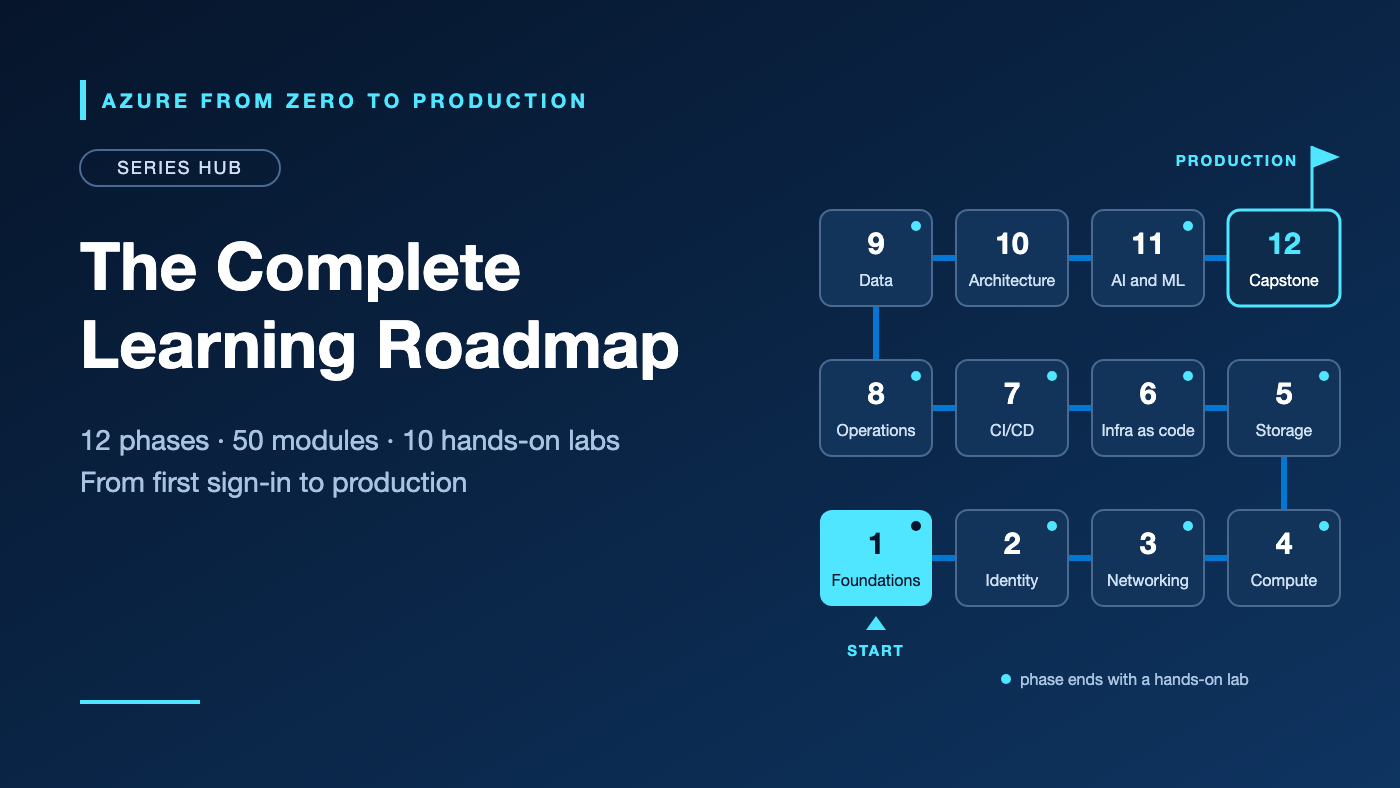
It spans 12 phases with 50 concept articles, 10 hands-on labs, and a closing certification and capstone roadmap. Each article builds on the previous one, and the labs grow a single system you can rebuild, explain, and show.
This page is the hub, with every part listed in reading order. Bookmark it and come back whenever you are ready for the next step.
Who this series is for
- Complete beginners who want to learn Azure properly, starting from cloud fundamentals
- Developers who deploy to Azure and want to understand the identity, networking, and cost decisions underneath
- Administrators and platform engineers who want a structured, end-to-end refresher
- DevOps engineers who want secret-free pipelines, infrastructure as code, and rollbacks they have rehearsed
- Data engineers who want to build and govern a data platform on Azure, not only query one
- Engineers coming from AWS who want to learn Azure on its own terms instead of translating service names
You don’t need prior Azure experience. You do need some comfort with a terminal (or the patience to build it) and an Azure subscription where you are allowed to create resources. Part 1.4 explains the account options, and Part 1.5 secures your sandbox before you create anything billable.
How each article works
Every article follows the same pattern, so you always know where to look:
- A real problem you are likely to meet at work.
- The concepts, in plain language first, then with technical precision.
- The tradeoffs: when to use a service, when not to, and why.
- Hands-on practice. Concept articles include one short, low-risk exercise. Labs walk through numbered steps, each ending with a ✅ checkpoint that tells you whether it worked.
- Security, with Microsoft Entra roles, Azure role-based access control (Azure RBAC), and data-plane permissions kept separate.
- Cost: what can appear on your bill, and how to keep it small.
- Troubleshooting: at least five realistic failures, each with a cause, a diagnosis, and a fix.
- A production readiness checklist organized by the five pillars of the Azure Well-Architected Framework.
- Cleanup in a dependency-safe order, plus a check that nothing billable was left behind.
- Key takeaways and a quick self-check, so you can confirm what stuck.
Hands-on sections default to Azure CLI in bash, with the eastus region and consistent variable names and tags, so later labs can build on earlier ones. Phase 6 adds Bicep and Terraform.
A note on cost: Labs are designed to be low-cost, and every lab ends with cleanup steps. Set up a budget alert before your first lab; Part 1.5 shows you how. Remember that an Azure budget sends alerts; it does not stop resources or cap charges. Check current prices with the Azure Pricing Calculator before you create anything, and delete lab resources as soon as you finish.
What you’ll build by the end
Each phase adds a piece to one architecture. By the end, you will be able to build, run, and explain this:
GitHub Actions workflow
        |
        | OIDC token via workload identity federation
        | (no client secret stored in GitHub)
        v
Microsoft Entra ID
        |
        | short-lived Azure access token
        v
Deployment identity (Azure RBAC on lab resource groups only)
        |
        +--> Azure Container Registry
        |          |
        |          | image pull with managed identity
        |          v
        +--> Azure Container Apps (managed identity)
        |          |
        |          +--> Azure Key Vault (secrets)
        |          |
        |          +--> Azure Database for PostgreSQL
        |               Flexible Server (private access only)
        |
        +--> Azure Data Factory (ingest)
                   |
                   v
             ADLS Gen2 data lake (raw and curated zones)
                   |
                   v
             Azure Databricks (transform with Delta Lake)
                   |
                   v
             Synapse serverless SQL (query curated files)

             Governed with Microsoft Purview (catalog, lineage)

Monitoring: Azure Monitor, Log Analytics, Application Insights
Audit:      Activity Log (who changed what, and when)
In plain English: when you push code, a GitHub Actions workflow requests a signed OpenID Connect (OIDC) token from GitHub. Microsoft Entra ID accepts it only from your repository and environment and returns a short-lived Azure access token, so no client secret is stored anywhere. The deployment identity behind that token can change the lab resource groups and nothing else.
The application runs in Azure Container Apps. Its managed identity pulls images from Azure Container Registry and reads secrets from Azure Key Vault, so no credentials sit in code or configuration. Its PostgreSQL database has no public endpoint.
On the data side, Azure Data Factory lands raw data in Azure Data Lake Storage Gen2 (ADLS Gen2). Azure Databricks turns it into curated Delta Lake tables, and Synapse serverless SQL lets analysts query those files in place with plain SQL. Microsoft Purview records what each dataset contains, who owns it, and where it came from.
Across everything, Azure Monitor gathers metrics and routes logs to Log Analytics, Application Insights traces each request through the API, and the Activity Log records control-plane changes: who changed what, and when.
None of these pieces is exotic. Together they form the shape many production teams run, scaled down to lab size and assembled one phase at a time.
The full roadmap
Ten of the twelve phases end with a lab, marked Lab below. Phase 10 replaces its lab with a design review of the application and data platform you have already built, and Phase 12 closes the series with a capstone.
Phase 1: Cloud and Azure Foundations
Build the mental model first, then a sandbox you can safely experiment in.
1.1 — The Cloud Concepts Every Azure Engineer Must Know Public, private, and hybrid cloud; infrastructure, platform, and software as a service; shared responsibility; elasticity; disaster recovery; and consumption billing. Read →
1.2 — Azure Regions and Availability Zones: Where Your Workload Lives Regions, availability zones, regional versus global services, data residency, quotas, region pairs, and tools from the portal to SDKs. Read →
1.3 — Tenant, Subscription, Resource Group: The Azure Hierarchy Explained Microsoft Entra tenants versus subscriptions, management groups, Azure Resource Manager, resource providers, landing zones, tags, and locks. Read →
1.4 — Understand Your Azure Bill Before You Deploy Pay-as-you-go, reservations, savings plans, Spot, free-account limits, Cost Management budgets, Azure Advisor, support plans, and hidden cost drivers. Read →
1.5 — Set Up a Secure Azure Sandbox Before Building Anything · Lab Pick the right subscription, enable multifactor authentication, create a tagged resource group, set a budget alert, and sign in with Azure CLI. Read →
Phase 2: Identity, Security, and Governance
Identity is the first boundary in Azure. Learn to grant exactly enough access, and to prove it.
2.1 — Access Denied? Understand Microsoft Entra ID and Azure RBAC Identities and app registrations, authentication versus authorization, Entra roles versus Azure RBAC, scopes, inheritance, and control versus data plane. Read →
2.2 — Beyond Contributor: Design Least-Privilege Azure Access Custom roles, access reviews, Privileged Identity Management, Conditional Access, RBAC conditions, deny assignments, and Azure Lighthouse. Read →
2.3 — Stop Storing Client Secrets: Azure Workload Identity Federation OIDC basics, app registrations versus managed identities, federated credentials (issuer, subject, audience), and trust scoped to one GitHub environment. Read →
2.4 — Azure Key Vault and Managed Identities: Secrets Without Hardcoding Managed identity types; Key Vault secrets, keys, and certificates; customer-managed keys; rotation; soft delete and purge protection. Read →
2.5 — Azure Policy and Defender for Cloud: Guardrails That Scale Policy initiatives and remediation, management-group guardrails, Defender for Cloud posture and paid plans, and diagnostic settings as audit evidence. Read →
2.6 — Deploy from GitHub Actions to Azure Without a Client Secret · Lab
A federated identity trusted only by a GitHub dev environment, scoped to one resource group, and tested for success and denial.
Read →
Phase 3: Networking
Learn how traffic and names travel, then keep private services private.
3.1 — Connection Timed Out: Networking Fundamentals for Azure IP addressing, CIDR, ports, DNS, routing, NAT, firewalls, load balancing, layered troubleshooting, and address plans that never overlap. Read →
3.2 — Azure VNets, Subnets, and Private Endpoints Explained Subnets, network and application security groups, user-defined routes, NAT Gateway, private versus service endpoints, and Private DNS zones. Read →
3.3 — Beyond One VNet: Hub-Spoke and Hybrid Azure Networking VNet peering, hub-spoke design, VPN Gateway, ExpressRoute, Virtual WAN, Azure Firewall, Azure Bastion, and Network Watcher connectivity tests. Read →
3.4 — Azure DNS, Load Balancing, and Front Door: Choose the Right Layer Load Balancer versus Application Gateway, Front Door versus Traffic Manager, TLS, web application firewalls, health probes, and caching. Read →
3.5 — Build a Private Azure Network and Prove the DNS Works · Lab Segmented subnets, explicit security rules, and a private endpoint with Private DNS, tested from inside and outside the network. Read →
Phase 4: Compute and Application Hosting
Choose where your code runs, from full virtual machines to event-driven functions.
4.1 — Azure Virtual Machines: More Than a Server in the Cloud Sizes, images, disks, availability options, quotas, secure administration, patching, and why “stopped” is not “deallocated.” Read →
4.2 — Handle Traffic Spikes with Azure VM Scale Sets Orchestration modes, health and upgrade policies, autoscale signals, zone-aware deployment, stateless design, and when Spot capacity fits. Read →
4.3 — Run Containers Without Managing Kubernetes: Azure Container Apps Azure Container Registry, environments, revisions, ingress, scaling, managed-identity image pulls, and Container Apps versus Container Instances. Read →
4.4 — Do You Need AKS? Kubernetes on Azure Explained Kubernetes primitives, node pools, networking and ingress, workload identity, upgrades, cost drivers, and when you don’t need Kubernetes. Read →
4.5 — App Service or Functions? Choose Your Azure Hosting Model App Service plans and slots, Functions triggers, bindings, and hosting plans, Logic Apps, and choosing among all compute options. Read →
4.6 — Ship a Containerized API to Azure Container Apps · Lab Push an image to Azure Container Registry, pull it with a managed identity, and verify health, logs, and revisions. Read →
Phase 5: Storage and Databases
Store files and records safely, and prove you can get them back.
5.1 — Azure Blob Storage: Access, Redundancy, and Lifecycle Explained Access tiers, lifecycle rules, redundancy, versioning, immutability, Entra ID access instead of keys and shared access signatures, and transaction costs. Read →
5.2 — Disks, Files, and Backups: Restore Before You Trust Managed Disks versus Azure Files versus Blob Storage, snapshots, Azure Backup vaults, retention, and restore testing. Read →
5.3 — Azure SQL or PostgreSQL? Choose and Operate a Relational Database Azure SQL Database, SQL Managed Instance, PostgreSQL Flexible Server, authentication, connection pooling, private access, high availability, and point-in-time restore. Read →
5.4 — Cosmos DB and Caching: Model Access Before Scaling Cosmos DB APIs, partition keys, consistency, request units, hot partitions, Azure Managed Redis, cache-aside, and time-to-live expiry. Read →
5.5 — Connect Your Azure Container App to a Private PostgreSQL Database · Lab Deploy PostgreSQL privately, connect an internal Container App with managed identity, and verify a least-privilege read. Read →
Phase 6: Infrastructure as Code and Automation
Replace portal clicks with code you can review, repeat, and roll back.
6.1 — Stop Clicking: Declare Azure Infrastructure with Bicep Declarative deployments, scopes, parameters, modules, outputs, what-if previews, secret handling, and diagnosing failures from deployment history. Read →
6.2 — Terraform on Azure: State, Identity, and Repeatable Deployments The AzureRM provider, authentication, remote state in Azure Storage with locking, imports, drift, environment isolation, and safe destroys. Read →
6.3 — Reuse Azure Infrastructure Safely with Modules and Deployment Stacks Bicep modules and registries, Azure Verified Modules, deployment stacks and deletion safeguards, parameter files, and Bicep versus Terraform. Read →
6.4 — Manage Your Fleet with Azure Automation, Update Manager, and Arc Runbooks and schedules, Azure Update Manager patching, Azure Arc-enabled servers for hybrid governance, and automation that is safe to rerun. Read →
6.5 — Rebuild Your Azure Application Stack with Terraform · Lab The network, registry, app, and database in Terraform with remote state, a Bicep comparison, and a repeat plan that shows no changes. Read →
Phase 7: CI/CD and DevOps
Ship small changes often through continuous integration and delivery (CI/CD), with gates that catch problems before users do.
7.1 — Merge, Build, Deploy: CI/CD Fundamentals for Azure Source control, tests, build artifacts, environment promotion, immutable releases, approvals, rollback, deployment strategies, and pipeline identity. Read →
7.2 — GitHub Actions and Azure: Build a Secure Delivery Workflow OIDC sign-in, environments and permissions, container build and deploy, infrastructure previews, concurrency, version pinning, and artifact provenance. Read →
7.3 — Azure Pipelines: Service Connections, Approvals, and Environments Azure Repos, YAML pipelines, service connections with workload identity federation, approvals and checks, and hosted versus self-hosted agents. Read →
7.4 — Shift Security Left Without Giving CI/CD Unlimited Access Dependency, secret, container, and infrastructure scanning, policy checks, software bills of materials, and keeping credentials out of logs. Read →
7.5 — One Push to Azure: Build, Approve, Deploy, and Roll Back · Lab Tests, image publishing, an infrastructure preview, approval, smoke tests, a blocked bad build, and a known-good rollback. Read →
Phase 8: Monitoring, Reliability, and Operations
See problems early, find causes fast, and design for the failures you will eventually face.
8.1 — Azure Monitor, Log Analytics, and Application Insights Explained Metrics, logs, and traces, Kusto Query Language (KQL), diagnostic settings, alerts and action groups, and ingestion and retention costs. Read →
8.2 — What Changed? Audit and Troubleshoot Azure Failures Activity Log, resource logs, and Entra sign-in logs, Resource Health, Service Health, access-denied diagnosis, and incident runbooks. Read →
8.3 — Design for Failure: Reliability Engineering on Azure Service-level objectives, error budgets, timeouts, retries with backoff, circuit breakers, zone-aware design, restore tests, and safe fault experiments. Read →
8.4 — Is Your Azure Architecture Actually Well-Architected? The five pillars, Azure Advisor, review tradeoffs, ownership, remediation backlogs, and how the Cloud Adoption Framework differs. Read →
8.5 — Build an Azure Dashboard and Alert You Can Act On · Lab Instrument the sample API, query failures, build a dashboard and alert, trigger a controlled error, and write a runbook. Read →
Phase 9: Data Engineering on Azure
Turn raw data into datasets that are trusted, queryable, and governed.
9.1 — OLTP, OLAP, ETL, ELT: Foundations for Azure Data Engineering Transactional versus analytical systems, transform-then-load versus load-then-transform, batch and streaming, warehouses versus lakehouses, medallion layers, and data contracts. Read →
9.2 — Build a Data Lake, Not a Data Swamp: ADLS Gen2 Hierarchical namespace, Azure RBAC versus access control lists, raw and curated zones, Parquet, partitioning, and transaction costs. Read →
9.3 — Azure Data Factory: Pipelines Without the Guesswork Pipelines, activities, linked services, integration runtimes, triggers, managed identity, and how it differs from Data Factory in Microsoft Fabric. Read →
9.4 — Query Lake Data with Azure Synapse Serverless SQL Querying lake files in place, authorization, file formats, partition pruning, scan-based costs, and when another engine fits better. Read →
9.5 — Synapse or Microsoft Fabric? Choose an Analytics Platform Dedicated SQL pools versus Fabric Warehouse and Lakehouse, OneLake, capacity-based billing, workspaces, and Fabric’s tenant prerequisites. Read →
9.6 — Spark on Azure: Databricks, Delta Lake, and Compute Choices Spark partitions and shuffles, Databricks compute and jobs, Delta Lake, Unity Catalog, and Databricks versus Synapse and Fabric Spark. Read →
9.7 — Data That Never Stops: Event Hubs and Stream Processing Partitions, consumer groups, checkpoints, delivery semantics, Stream Analytics, Structured Streaming, and Event Hubs versus Service Bus and Event Grid. Read →
9.8 — Reliable Data Pipelines: Orchestration, Backfills, and Quality Schedules, backfills, idempotent loads, schema checks, quarantine, Data Factory and Databricks orchestration, when to use Airflow, and freshness monitoring. Read →
9.9 — Get Data into Azure: Integration and Migration Patterns Batch and API ingestion, change data capture, self-hosted integration runtimes, Azure Database Migration Service, reconciliation, cutover, and rollback. Read →
9.10 — Who Owns This Dataset? Data Governance with Microsoft Purview Cataloging, classification, lineage, and ownership, why access control stays with each underlying service, and handling sensitive data. Read →
9.11 — Build an End-to-End Data Platform on Azure · Lab Synthetic data through Data Factory into ADLS Gen2, Databricks transformations, Synapse serverless SQL queries, quality checks, and an optional Purview scan. Read →
Phase 10: Architecture and Advanced Azure
Combine services into systems that survive failure and justify their cost.
10.1 — Service Bus, Event Grid, or Event Hubs? Design Event-Driven Azure Systems Queues, topics, event routing, and streams, delivery guarantees, ordering, dead-lettering, duplicate handling, and Functions or Logic Apps consumers. Read →
10.2 — Design Azure Systems That Handle Partial Failure Consistency, idempotency, sagas, the transactional outbox, Azure API Management, backpressure, and why services should not share a database. Read →
10.3 — When an Azure Region Fails: Plan and Test Recovery Recovery time and recovery point objectives, zonal versus regional failure, service-specific replication, Azure Site Recovery, failover drills, and failback. Read →
10.4 — Your Azure Bill Is an Architecture Signal Rightsizing, autoscaling, commitment discounts, Spot, attributing storage, query, logging, and network costs, load tests, and capacity planning. Read →
Phase 11: Artificial Intelligence and Machine Learning
Add AI features with the same discipline you apply to everything else.
11.1 — AI Without the Hype: Models, Embeddings, and RAG Training versus inference, evaluation, tokens, embeddings, vector retrieval, retrieval-augmented generation (RAG), responsible AI, prompt injection, and usage-based cost. Read →
11.2 — Choose Azure AI Services for Training, Inference, and Retrieval Azure Machine Learning, Azure OpenAI and other Microsoft Foundry models, Azure AI Search, identity and network controls, and quota checks. Read →
11.3 — Build and Evaluate a Small RAG Application on Azure · Lab Index synthetic documents in Azure AI Search, answer with citations, and test missing context, access denial, and prompt injection. Read →
Phase 12: Certification Path and Capstone
Certifications are optional checkpoints; the capstone is the proof.
12.1 — Your Azure Certification Roadmap and Production-Shaped Capstone Current Microsoft credentials mapped to the series, a portfolio built from your labs, and a capstone that ties every phase together. Read →
Suggested timeline
At about five hours a week alongside a full-time job, the path takes roughly a year. Budget two to three hours per concept article and four to six hours per lab, including cleanup.
- Weeks 1–3, Phase 1: foundations, billing, and the sandbox lab
- Weeks 4–7, Phase 2: identity, access, secrets, governance, and the GitHub OIDC lab
- Weeks 8–11, Phase 3: networking, private access, and the private network lab
- Weeks 12–15, Phase 4: virtual machines, containers, AKS, App Service, Functions, and the container lab
- Weeks 16–18, Phase 5: storage, backup, databases, and the private PostgreSQL lab
- Weeks 19–22, Phase 6: Bicep, Terraform, fleet automation, and the Terraform lab
- Weeks 23–26, Phase 7: CI/CD, DevSecOps, and the delivery pipeline lab
- Weeks 27–30, Phase 8: monitoring, reliability, architecture reviews, and the dashboard lab
- Weeks 31–38, Phase 9: data engineering and the data platform lab
- Weeks 39–41, Phase 10: event-driven design, partial failure, disaster recovery, and cost
- Weeks 42–44, Phase 11: AI fundamentals, Azure AI services, and the RAG lab
- Weeks 45–52, Phase 12: certification planning and the capstone
Faster or slower is fine, as long as you finish each lab, including its cleanup, before moving on. After Phase 8 the order can flex: take Phase 11 before Phase 9 if AI matters more to your role. Keep Phase 10 after Phase 9, because its design review covers both the application and the data platform.
Optional: the certification path
Certifications are optional. They are useful external checkpoints, and they carry more weight when lab work backs them up. This sequence lines up with the phases:
- Start: Microsoft Certified: Azure Fundamentals (AZ-900), after Phase 1.
- Core administration: Azure Administrator Associate (AZ-104), after Phase 5, plus Phase 8 for monitoring.
- Development: Azure AI Cloud Developer Associate (AI-200), after Phase 11, since it spans containers, databases, messaging, monitoring, and AI. It replaced Azure Developer Associate (AZ-204).
- Security: Cloud and AI Security Engineer Associate (SC-500), after Phase 8, plus Phase 11 for AI security. It replaced Azure Security Engineer Associate (AZ-500).
- Networking (optional): Azure Network Engineer Associate (AZ-700), after Phase 3 and extra hybrid-connectivity practice.
- Expert: DevOps Engineer Expert (AZ-400) after Phase 8, or Azure Solutions Architect Expert (AZ-305) after Phase 10. Each requires a prerequisite associate certification, and Azure Administrator Associate satisfies both.
- Data engineering: Fabric Data Engineer Associate (DP-700) suits teams standardized on Microsoft Fabric; it is not a general Azure data-engineering credential. Azure Data Fundamentals (DP-900) is an optional warm-up. For Databricks-specific credentials, check the current Microsoft Learn catalog before planning an exam.
- AI: Azure AI Fundamentals (exam AI-901) after Part 11.1, then Azure AI Apps and Agents Developer Associate (AI-103) or Machine Learning Operations Engineer Associate (AI-300) after Phase 11.
Microsoft reshaped its Azure certifications in 2026. Azure Developer Associate (AZ-204), Azure Security Engineer Associate (AZ-500), Azure AI Engineer Associate (AI-102), and Azure Data Scientist Associate (DP-100) were retired, and Azure AI Fundamentals moved from exam AI-900 to AI-901. Azure Data Engineer Associate (DP-203) retired in March 2025. Study guides that still recommend those exams are out of date. This list was checked on Microsoft Learn on 2026-11-01, and exam details change. Verify credential names, exam codes, prerequisites, and availability in the current Microsoft Azure documentation before you plan an exam. Start with the Microsoft Learn credentials catalog and the exam retirement list. Part 12.1 covers the full path and study plans.
How to get the most out of this series
- Follow the order. Each phase assumes the ones before it, and labs reuse earlier work.
- Do the hands-on parts. Reading explains a service; building with it teaches judgment.
- Secure your sandbox first. Part 1.5 sets up multifactor authentication, a tagged resource group, and a budget alert.
- Clean up after every lab. Leftover resources keep billing. Check outside the resource group too: role assignments, app registrations, federated credentials, and budgets can outlive it.
- Keep a lab journal. Your commands, errors, and fixes become a troubleshooting guide and the start of a portfolio.
- Stay out of production. Use a dedicated development subscription, and never paste real IDs or secrets into public repositories or comments.
- Ask in the comments. Reader questions shape revisions of the series.
Start here
Ready? Begin with Phase 1, Part 1:
The Cloud Concepts Every Azure Engineer Must Know Start reading →
If this roadmap helps you, share it with someone who is starting their Azure journey.
Disclaimer: Azure services, SKUs, interfaces, limits, and pricing change over time. Verify details in the current Microsoft Azure documentation before implementation. Microsoft certification names, exam codes, and retirement dates also change; check Microsoft Learn before you plan an exam.