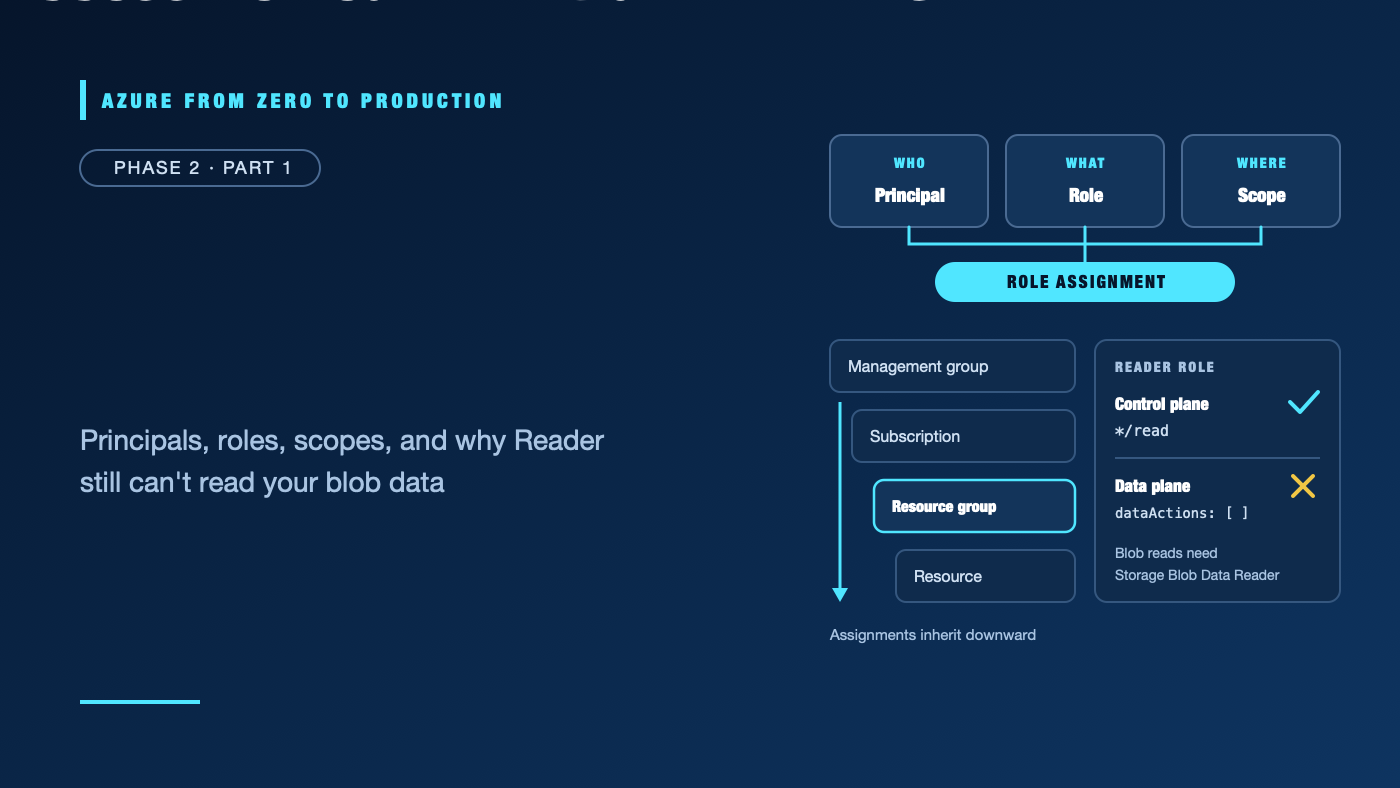
You can open a virtual machine in the Azure portal, but a script running on it cannot read a blob. A teammate can sign in to Microsoft Entra ID, but cannot create a resource group. Someone else can create resources, but cannot grant a colleague access.
These are not necessarily contradictory permissions. Azure separates identity, resource management, and access to service data. Knowing which system made the decision is the first step to fixing “Access denied” without handing out broad permissions.
This article introduces Microsoft Entra ID and Azure role-based access control (Azure RBAC), then uses read-only Azure CLI commands to inspect the subscription context and its role assignments. The exercise creates no Azure resources and changes no permissions.
What you’ll learn
- Distinguish authentication from authorization.
- Explain the difference between Microsoft Entra directory roles and Azure RBAC roles.
- Identify users, groups, app registrations, service principals, and managed identities.
- Read a role assignment as who + what + where.
- Explain scope inheritance and why a management-plane Reader role may not read service data.
- Inspect role assignments at a subscription scope without changing the environment.
Where this fits
This is Module 5 and Phase 2, Part 1. Phase 1 covered tenants, subscriptions, and resource groups. This article uses those boundaries to explain access. Next, Beyond Contributor: Design Least-Privilege Azure Access goes deeper into custom roles, privileged administration, access reviews, and constrained delegation.
Prerequisites
- Knowledge: Basic familiarity with Azure tenants, subscriptions, and resource groups.
- Azure access: Optional for the read-only exercise. Use a development subscription you are authorized to inspect.
- Microsoft Entra roles: None needed to run the read-only Azure CLI exercise. Managing users, groups, or app registrations requires appropriate directory permissions and may be restricted by tenant policy.
- Azure RBAC: To inspect assignments, your signed-in identity needs read access to the relevant scope. A Reader assignment is typically sufficient; the subscription owner can confirm the right access.
- Data-plane roles: None for this exercise. They are separate from the management-plane assignments being inspected.
- Tools: Azure CLI 2.91.0 or later, a terminal, and an authorized Azure sign-in. Command syntax was checked offline; the commands have not been run against a live subscription.
- Estimated cost: None. No resources are created.
Do not use a production subscription for experimentation. The commands below are read-only, but assignment output can reveal sensitive names and access patterns; do not paste it into a public issue or commit it to source control.
Identity answers “who”; authorization answers “what can they do?”
Authentication verifies an identity. For a person, this may involve a password, multifactor authentication, or a passkey. For a workload, it may involve a managed identity or a federated token.
Authorization evaluates whether the authenticated identity is allowed to perform a particular operation on a particular resource. A successful sign-in does not automatically grant access to an Azure subscription, and permission to manage a resource does not necessarily grant permission to read its data.
Microsoft Entra ID is the identity provider for Azure. It authenticates users and workloads and issues tokens. Azure services then use those identities and their permissions to make access decisions.
The identity objects you will encounter
- User: An identity for a person in a Microsoft Entra tenant. A user can belong to groups and receive directory roles or Azure RBAC assignments.
- Group: A collection of users or other supported principals. Assigning Azure RBAC to a group is usually easier to review and maintain than assigning it separately to every person.
- App registration: The application object that describes an app’s identity configuration in its home tenant: for example, sign-in behavior and requested permissions.
- Service principal: The tenant-local security principal representing an application or workload. An app registration is not itself the identity that receives an Azure RBAC assignment; the service principal is.
- Managed identity: A Microsoft Entra identity whose credentials Azure manages for a supported Azure workload. It is represented by a service principal. A system-assigned identity follows its Azure resource’s lifecycle; a user-assigned identity is a separate resource that can be associated with more than one supported workload.
For example, an app registration is like an application’s identity blueprint. Its service principal is the instance that exists in a tenant and can be assigned permissions there. A managed identity is a service principal provisioned and operated by Azure for a workload, so your code does not need to store a client secret. Module 7 covers federated workload identity; Module 8 covers managed identities and Key Vault in more detail.
Two role systems, two different jobs
Microsoft Entra roles administer the directory
Microsoft Entra roles authorize administrative tasks in the identity directory. They govern actions such as managing users, groups, or application registrations. Their scope is the tenant or a supported administrative unit.
Examples include User Administrator and Application Administrator. An Entra role is not the same as an Azure resource role, even if the names sound similar.
Azure RBAC governs access to Azure resources
Azure RBAC is Azure Resource Manager’s authorization system for Azure resources. It controls management operations such as viewing, creating, updating, and deleting resources. Some Azure roles also grant data access through explicit data actions.
An Azure RBAC assignment has three parts:
- Security principal — who: a user, group, service principal, or managed identity.
- Role definition — what: a built-in or custom collection of allowed operations.
- Scope — where: the management group, subscription, resource group, or individual resource to which the role applies.
Security principal  +  Role definition  +  Scope
       who                 what             where
                         |
                         v
                  Role assignment
An assignment is a grant at a scope; it is not a separate identity. Azure evaluates the identity, the requested action, the resource scope, and applicable restrictions when the request arrives.
Common Azure roles are not interchangeable
- Reader can view many management-plane resources but cannot change them. It does not automatically grant permission to read the contents of every service.
- Contributor can manage Azure resources within its scope, but it does not grant permission to assign Azure roles to other principals.
- Owner can manage resources and grant access at its scope. It is powerful; do not use it as a default troubleshooting fix.
- Storage Blob Data Reader grants read access to blob data at its assigned scope. This is a data-plane role, not a substitute for control-plane management access.
The role name alone is not enough. Check its definition, scope, and whether the attempted operation is a management action or a data action.
Scope and inheritance: access flows down, not up
Azure RBAC scopes form a hierarchy:
Management group
└── Subscription
    └── Resource group
        └── Resource
A role assignment on a parent scope is inherited by its descendants. A subscription-level assignment can therefore apply to its resource groups and resources. A role assigned to one resource group does not grant access to its parent subscription or sibling resource groups.
Prefer the narrowest scope that lets the person or workload do its job. A resource-specific data-reader assignment is usually safer than subscription-wide Contributor access.
Azure RBAC generally combines applicable grants: overlapping role assignments can add permissions together. Other controls can still limit a request, including deny assignments, role-assignment conditions where supported, service-specific authorization, and network restrictions. An allow on one layer does not guarantee that the operation will succeed through every layer.
Control plane and data plane: a common source of “Access denied”
The control plane manages the Azure resource itself through Azure Resource Manager. Examples include listing a storage account, changing a setting, or creating a virtual machine.
The data plane operates on the contents or capabilities of a service. Examples include downloading a blob, reading a secret value, or querying a database.
Some Azure roles grant control-plane actions, often represented by Actions in a role definition. A role that grants data access can include DataActions. These permissions are evaluated by the service’s data endpoint and are not implied just because a user can view the resource in the portal.
For example:
- Reader can let an operator see a storage account’s configuration without granting permission to download its blobs.
- Storage Blob Data Reader, assigned at an appropriate scope, can grant blob reads without granting permission to reconfigure the storage account.
- Azure SQL also has database-level authorization. An Azure management role does not automatically make a user a database user with query permissions.
Some services support both Entra-based data permissions and other authorization mechanisms, such as access keys, service-specific ACLs, or database grants. Prefer Entra-based access when supported, and inspect the service’s own authorization model rather than assuming one Azure role covers everything.
What happens when access is evaluated?
At a high level, an application or person obtains an identity token from Microsoft Entra ID. The request reaches the Azure management endpoint or a service data endpoint. That endpoint evaluates the identity and the permissions relevant to the requested operation and scope. The service can also apply its own authorization and network controls.
Person or workload
        |
        | authenticate
        v
Microsoft Entra ID
        |
        | identity token
        v
Azure Resource Manager or service endpoint
        |
        | evaluate role, scope, and applicable controls
        v
Allowed operation or access denied
Role changes are not always visible to an already-running session immediately. A refreshed token or renewed sign-in may be necessary, and role assignment changes can take time to propagate. Avoid repeatedly adding broader roles while waiting for a change to take effect.
Hands-on: inspect subscription role assignments
This is a read-only exercise. It does not create resources, add role assignments, or test data-plane access. Use an account and subscription you are authorized to inspect.
1. Sign in and select the intended subscription
If you are not already signed in:
az login
List the subscriptions available to the signed-in identity. This query deliberately omits IDs:
az account list \
  --query "[?state=='Enabled'].{Name:name, IsDefault:isDefault}" \
  --output table
Select one of your authorized development subscriptions. Replace the quoted value with its name or ID:
az account set --subscription "<YOUR_DEVELOPMENT_SUBSCRIPTION_NAME_OR_ID>"
Confirm the selected context. Do not publish the output; it contains tenant and subscription identifiers:
az account show \
  --query "{Name:name, State:state, Tenant:tenantId}" \
  --output table
2. Review assignments visible at the subscription
Set the scope from the selected account, then list assignments at that subscription and inherited from its parent scope:
SUBSCRIPTION_ID="$(az account show --query id --output tsv)"
SUBSCRIPTION_SCOPE="/subscriptions/$SUBSCRIPTION_ID"

az role assignment list \
  --scope "$SUBSCRIPTION_SCOPE" \
  --include-inherited \
  --fill-principal-name false \
  --query "[].{Role:roleDefinitionName, PrincipalType:principalType, Scope:scope}" \
  --output table
This displays the role, principal type, and scope. It does not prove that a particular data-plane operation will work, show every possible group membership path, or reveal service-specific permissions. To examine assignments at a resource group, use that resource group’s full resource ID as --scope, and make sure you are authorized to inspect it.
3. Interpret one assignment
Choose an assignment you recognize and answer:
- Who? Is the principal a user, group, application/service principal, or managed identity?
- What? Is the role Reader, Contributor, a data role, or a custom role?
- Where? Is the assignment at a management group, subscription, resource group, or resource?
- Which plane? Does the role permit the management operation, the data operation, or both?
- What else applies? Could a deny assignment, condition, service ACL, database grant, or network rule prevent access?
✅ Checkpoint: You can identify a role’s principal, permissions, and scope, and explain whether its grants inherit to the resource you care about. No Azure resource or permission was changed.
Security and least privilege
- Assign access to managed groups where practical, and review group membership as part of access governance.
- Grant roles at the narrowest useful scope. Avoid subscription-wide roles when a resource group or resource scope is enough.
- Separate permission to manage Azure resources from permission to read or change their data.
- Prefer managed identities for supported Azure-hosted workloads. Use workload identity federation for supported external workloads instead of storing long-lived credentials.
- Avoid Owner as a shortcut. Contributor cannot grant access, so role assignment should be handled by a principal with an appropriate access-administration role and only when needed.
- Review both direct assignments and inherited grants. A narrow assignment does not cancel a broader role already granted above it.
- Treat assignment listings and identity details as sensitive operational information.
Cost implications
This exercise has no Azure resource cost. Signing in and listing role assignments does not deploy billable infrastructure.
In real environments, identity administration and governance features can have licensing, configuration, or operational requirements. Check current Microsoft Entra licensing and service documentation before adopting optional capabilities such as Privileged Identity Management or Conditional Access; those topics are covered in the next module.
Troubleshooting “Access denied”
You can sign in but cannot open the subscription
- Likely cause: The identity is authenticated but has no Azure RBAC assignment at the subscription or an ancestor scope, or the CLI is using a different tenant/subscription.
- Diagnose: Run
az account showand compare the selected tenant and subscription with the intended environment. Ask an administrator to verify the identity’s assignments. - Resolve: Select the correct subscription or request the smallest role at the correct scope. Do not request Owner by default.
You can see a resource but cannot read its data
- Likely cause: You have control-plane read access but lack the service’s data-plane permission.
- Diagnose: Identify the endpoint and operation that failed, then check whether the service uses Azure RBAC data actions, database permissions, ACLs, or another authorization mechanism.
- Resolve: Request the least-privilege data role or service-specific grant at the appropriate scope. Do not grant broad resource-management rights just to read data.
The portal shows a role, but the operation still fails
- Likely cause: The role is assigned at a different scope, covers a different permission plane, or another control such as a deny assignment or network rule blocks the request.
- Diagnose: Verify the principal, role definition, full scope, requested operation, and service-specific controls.
- Resolve: Correct only the missing scope or permission. Keep the network and data authorization checks in the investigation.
A newly assigned role has no effect yet
- Likely cause: The role assignment has not propagated, or the current session is still using a token issued before the change.
- Diagnose: Confirm that the assignment exists at the intended scope. Check current Microsoft troubleshooting guidance for propagation behavior.
- Resolve: Refresh the sign-in or obtain a new token, then retry after propagation. Do not create duplicate assignments or escalate privileges while waiting.
You cannot add a role assignment
- Likely cause: Your current role lacks permission to create role assignments at that scope, or an assignment condition constrains which roles or principals you can grant.
- Diagnose: Ask an administrator to check the access-administration permissions and any conditions on your assignment.
- Resolve: Have an authorized access administrator make the narrowly scoped assignment, or delegate only the specific access-administration capability required. Contributor alone cannot grant Azure RBAC roles.
A workload cannot authenticate as the expected principal
- Likely cause: The workload is using a different identity than expected, its identity is not enabled or associated with the resource, or the application’s tenant-local service principal is missing.
- Diagnose: Check the workload’s configured identity and tenant context without printing tokens or credentials. Verify the principal ID used for the Azure RBAC assignment.
- Resolve: Configure the intended managed identity or service principal, then grant only the needed role at the needed scope. Never paste an access token or secret into logs or tickets.
Production-readiness checklist
- Reliability: Document the identity used by each workload and how it obtains tokens; test identity changes without depending on an operator’s interactive session.
- Security: Separate Entra directory administration, Azure resource management, and service data access. Use narrow scopes and remove unused assignments.
- Cost Optimization: Use groups and role scoping to reduce operational overhead; do not buy optional identity capabilities without confirming current licensing and need.
- Operational Excellence: Record the principal, role, scope, owner, and business purpose for each non-obvious assignment. Review access periodically and investigate denied operations by plane.
- Performance Efficiency: Prefer managed identity or federation where supported rather than building and maintaining a custom credential-rotation path; validate token and service behavior against current service guidance.
Cleanup
No Azure resources, role assignments, or identity objects were created or changed. There is nothing to delete. If you changed the active Azure CLI subscription, restore your previous context if needed:
az account set --subscription "<YOUR_PREVIOUS_SUBSCRIPTION_NAME_OR_ID>"
The angle-bracketed value is intentionally a placeholder; replace it with the subscription you used before this exercise. Do not delete shared groups, service principals, managed identities, or role assignments as part of this read-only exercise.
Key takeaways
- Microsoft Entra ID authenticates identities; authorization is evaluated separately for the requested operation.
- Entra directory roles administer identity objects; Azure RBAC roles govern Azure resources.
- A role assignment is a principal, a role definition, and a scope.
- Azure RBAC assignments inherit down the scope hierarchy, not upward.
- Control-plane access does not automatically grant data-plane access.
- Managed identities are service principals with Azure-managed credentials; they still need appropriate authorization.
- A denied request can involve role scope, role contents, token state, service permissions, or network controls.
Quick self-check
- An engineer can view a storage account but cannot download a blob. Which permission plane should you investigate?
- A role is assigned to a resource group. Does it grant access to the parent subscription?
- Does Contributor let a user grant another user an Azure role?
- What three elements make up an Azure RBAC assignment?
Answers
- The data plane and the storage service’s data authorization model.
- No. The assignment applies at that resource group and its descendants, not to its parent.
- No. Contributor manages resources but does not grant Azure RBAC assignments.
- Security principal, role definition, and scope.
References
- What is Azure role-based access control (Azure RBAC)? — Microsoft Learn
- Understand Azure role definitions — Microsoft Learn
- Understand scope for Azure RBAC — Microsoft Learn
- Azure built-in roles — Microsoft Learn
- Apps and service principals in Microsoft Entra ID — Microsoft Learn
- Troubleshoot Azure RBAC — Microsoft Learn
What’s next
The next article, Beyond Contributor: Design Least-Privilege Azure Access, explores custom roles, access reviews, privileged administration, role conditions, and cross-tenant access patterns.
Which permission boundary has caused the most confusion for you: directory roles, Azure resource roles, or data access?
Series navigation
- ← Previous: Set Up a Secure Azure Sandbox Before Building Anything
- → Next: Beyond Contributor: Design Least-Privilege Azure Access
- 📚 Full series roadmap
Disclaimer: Azure services, roles, interfaces, limits, and licensing change over time. Verify details in the current Microsoft Azure documentation before implementation.