Picture a design review for a small internal app moving to Azure: one virtual machine, a managed database, and a storage account.
Then the questions start. Who patches the virtual machine’s operating system? What happens if its datacenter loses power? If someone shuts it down on Friday, does billing stop for the weekend? Is the database replica a disaster-recovery plan or just a copy?
Each question is about a cloud concept, not an Azure feature. This article explains each plainly, with concrete Azure examples. No subscription needed; nothing gets created.
What you’ll learn
- Compare on-premises and cloud, and match a deployment model to a constraint.
- Classify Azure services as IaaS, PaaS, or SaaS, and name the security tasks you keep.
- Distinguish scalability from elasticity, and scaling up from scaling out.
- Separate high availability, fault tolerance, and disaster recovery, and define RTO and RPO.
- Calculate the composite availability of chained components.
- Explain how CapEx, OpEx, and consumption billing shape engineering decisions.
Where this fits
The series hub, “Microsoft Azure from Zero to Production: The Complete Learning Roadmap”, laid out the 12 phases; this part builds their shared vocabulary. Next, “Azure Regions and Availability Zones: Where Your Workload Lives” maps these ideas onto Azure’s physical footprint.
Prerequisites
- Knowledge: General IT familiarity: what a server, a database, and a network are.
- Azure access: None. No Microsoft Entra tenant or Azure subscription needed.
- Microsoft Entra roles: None
- Azure RBAC (role + scope): None
- Data-plane roles: None
- Tools: A notepad. Optional: Python 3 for the math; Azure CLI (checked against 2.91.0) for read-only troubleshooting.
- Estimated cost: No billable resources.
What the cloud is, and when on-premises still wins
Cloud computing means renting computing capacity, such as servers, storage, databases, and networks, on demand over a network. You pay for what you use, and the provider runs the facilities. NIST sums up the traits: self-service, network access, pooled resources, rapid elasticity, and metered usage.
On Azure, self-service is literally an API. Every create, update, or delete request, from the portal, Azure CLI, or a template, goes to Azure Resource Manager: the control plane. Using a resource, such as reading a file or querying a database, goes to the resource’s own endpoint: the data plane. Each plane has separate permissions.
Compared with owning on-premises hardware:
- Getting a server: weeks of purchasing and racking, versus an API call that usually completes in minutes.
- Paying: a large upfront purchase sized for a predicted peak, versus a metered bill for what runs today.
- Hardware failure: your team swaps parts, versus Microsoft replacing hardware while you design to survive a failed host.
- Control: everything down to firmware, versus what each service exposes, within quotas.
On-premises still wins for data that must stay in a specific facility, very steady workloads where owned hardware is cheaper over its lifetime, very low latency to local equipment, and hardware not yet paid off.
Public, private, hybrid, and multicloud
- Public cloud: provider-owned infrastructure shared by many isolated customers, such as Azure regions.
- Private cloud: cloud-style self-service on infrastructure dedicated to one organization.
- Hybrid cloud: on-premises and public cloud run as one estate, linked by a VPN or Azure ExpressRoute, often with on-premises Active Directory accounts synchronized to Microsoft Entra ID.
- Multicloud: workloads spread across several public cloud providers.
Azure Arc projects servers and Kubernetes clusters outside Azure into Azure Resource Manager, so the same policies and monitoring apply. Azure Local extends Azure services to hardware in your own locations.
Start with public cloud unless data residency, latency, or an existing investment pushes you elsewhere. Treat hybrid as a normal, often multiyear phase where networking, identity, and latency become the hard problems.
IaaS, PaaS, and SaaS: how much of the stack you run
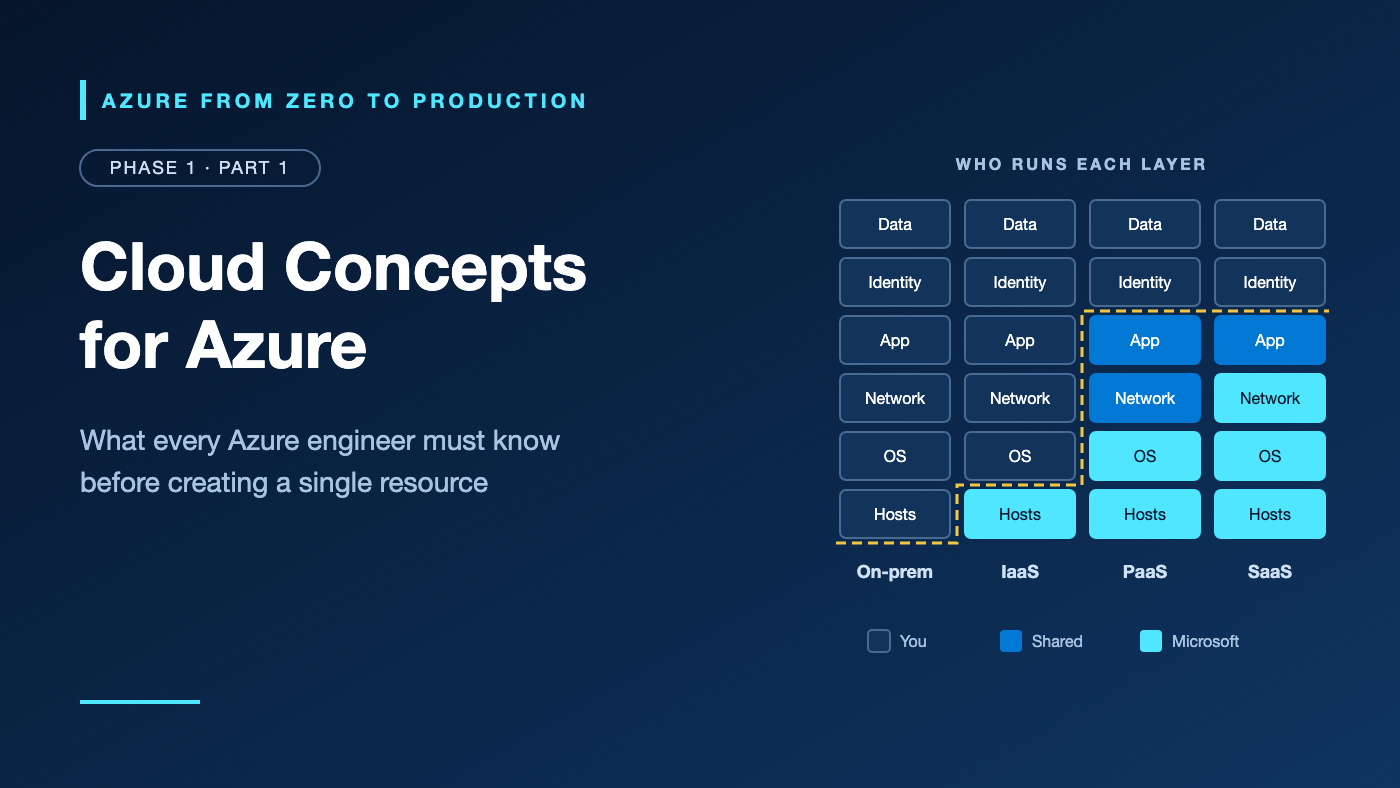
Service models define which layers you operate and which Microsoft operates:
                          On-premises  IaaS        PaaS        SaaS
Data                      You          You         You         You
Identities and access     You          You         You         You
Settings you configure    You          You         You         You
Client devices            You          You         You         Shared
Application               You          You         Shared      Shared
Network controls          You          You         Shared      Microsoft
Operating system          You          You         Microsoft   Microsoft
Hosts, network, building  You          Microsoft   Microsoft   Microsoft
Read it left to right: the bottom row moves to Microsoft once you leave your datacenter, middle rows move as services get more managed, and the top three never move.
Infrastructure as a service (IaaS) rents virtual hardware: Azure Virtual Machines, managed disks, and virtual networks. You run the operating system and everything above it. Use it for lift-and-shift migrations or software needing OS access.
Platform as a service (PaaS) runs your code or data on a managed platform: Azure App Service for web apps, Azure SQL Database for relational data, and Azure Functions for event-driven code. Skip it if you need kernel access or an unsupported runtime. Serverless PaaS also removes instance management: Azure Functions on the Flex Consumption plan scales to zero and, in on-demand mode, bills only while code runs.
Software as a service (SaaS) is a finished application, such as Microsoft 365; you manage users, settings, and data.
Rule of thumb: choose the most managed option that meets your requirements, and move toward IaaS only for a reason you can name.
The shared responsibility model on Azure
Microsoft secures the physical datacenters, hosts, network, and hypervisor. You secure what you deploy and configure, and the service model moves the line:
- Azure Virtual Machines: you patch the guest OS, configure network security groups, and set up backups. Azure Update Manager can schedule patching, but you must enable it.
- Azure App Service: Microsoft patches the OS and applies many runtime patches, but new major and minor language versions install side by side, so upgrading your app is your task.
- Azure SQL Database: Microsoft patches the engine and takes automated backups; you choose retention, network exposure, authentication, and who reads which data.
Two things never move: your identities in Microsoft Entra ID and your data. Common breach patterns, such as storage open to the internet, leaked credentials, and over-broad permissions, sit on your side of the line.
Scalability and elasticity
Scalability is handling more load by adding resources:
- Scale up (vertical): a bigger machine. Simple, but sizes run out, and resizing a running Azure VM restarts it.
- Scale out (horizontal): more instances behind a load balancer. Your app must run as several copies, but scales much further.
Elasticity is scaling that happens automatically in both directions, so idle capacity stops costing money. Virtual Machine Scale Sets and App Service plans use autoscale rules, which change instance counts, not sizes; Azure Functions scales for you.
Scalability is the capability; elasticity is the automation.
Elastic doesn’t mean unlimited or instant: autoscale has a maximum instance count, new instances take time to start, and subscriptions have quotas, such as vCPUs per region. A quota is permission to use capacity, not a guarantee that the capacity exists.
Availability, fault tolerance, and disaster recovery
Availability is the share of time users can successfully use a system. Each extra “nine” cuts allowed downtime tenfold and usually costs more redundancy:
Availability   Allowed downtime per year
99%            ~3.65 days
99.9%          ~8.8 hours
99.95%         ~4.4 hours
99.99%         ~53 minutes
99.999%        ~5.3 minutes
Microsoft’s service-level agreement (SLA) for each service is a contractual commitment, usually backed by service credits, to a narrow definition of “available”; it doesn’t promise your application stays up. Your own target is a service-level objective (SLO). Availabilities of chained components multiply, so the result is always below the weakest link.
High availability (HA) keeps the service running through everyday failures, such as a host reboot or a failed rack, with redundant instances across failure boundaries and automatic failover. On Azure, those boundaries include availability zones: physically separate datacenter groups in one region, each with its own power, cooling, and networking.
Fault tolerance is stricter: no interruption and no data loss. Zone-redundant storage (ZRS) acknowledges a write only after it reaches multiple zones, so a zone failure loses no acknowledged data, though clients should retry briefly. Full fault tolerance is expensive, so most designs accept a short blip.
Disaster recovery (DR) restores service after a rare, large event, such as a regional outage, ransomware, or a mass deletion. Two numbers define it:
- Recovery time objective (RTO): the longest acceptable outage.
- Recovery point objective (RPO): the most data you can lose, measured in time. A 15-minute RPO means losing at most 15 minutes of writes.
Azure Backup keeps restorable copies; Azure Site Recovery replicates VMs to another location for failover.
Replication copies mistakes as faithfully as it copies data. HA covers failed components, DR covers lost sites, and backups cover deleted or corrupted data. Production systems need all three.
CapEx, OpEx, and consumption-based billing
Capital expenditure (CapEx) buys long-lived assets, such as servers, upfront. Operational expenditure (OpEx) pays for consumption as you go. The cloud moves most infrastructure spending to OpEx, which means:
- Starting is cheap: no hardware purchase stands between an idea and a prototype.
- Cost follows decisions: every size, instance count, and retention setting shows up on the bill. Architecture choices are financial choices.
- There’s no natural ceiling: forgotten resources keep billing, and Azure budgets alert without stopping anything.
Consumption-based billing uses meters: compute time while a VM is allocated, gigabytes stored, transactions, executions, and outbound data. Provisioned resources, such as VMs and App Service plans, bill while allocated, busy or idle. Usage-based resources, such as Functions in on-demand mode, bill per unit of work. For steady usage, Azure Reservations and savings plans trade a one- or three-year commitment for lower rates (Part 1.4).
Try it: Draw the responsibility line and calculate composite availability
This exercise creates nothing in Azure and costs nothing.
Part A. For each workload, name the service model, who patches the OS, and who controls network access:
1. A legacy Windows app moved as-is onto Azure Virtual Machines
2. A Python web API on Azure App Service
3. Company email and documents in Microsoft 365
4. A product catalog in Azure SQL Database
5. An image-resize job on Azure Functions, triggered by uploads
Part B. Using these illustrative figures (not current Azure SLAs), calculate this chain’s end-to-end availability. Then recalculate with two independent copies of the web tier, and again with two copies of both tiers.
User --> Web front end --> API --> Database
         99.95%            99.95%  99.99%
Two independent copies of a component with availability A give 1 − (1 − A)². Check your math by saving this script as availability.py:
def pair(a):
    return 1 - (1 - a) ** 2


web, api, db = 0.9995, 0.9995, 0.9999  # illustrative, not current SLAs

for label, total in [
    ("Single instances", web * api * db),
    ("2x web", pair(web) * api * db),
    ("2x web, 2x API", pair(web) * pair(api) * db),
]:
    print(f"{label:<17} {total:.4%}  ~{(1 - total) * 8760:.1f} h down/year")
python3 availability.py
Expected output:
Single instances  99.8900%  ~9.6 h down/year
2x web            99.9400%  ~5.3 h down/year
2x web, 2x API    99.9900%  ~0.9 h down/year
Part A answers: (1) IaaS: you patch the OS and set network security group rules. (2) PaaS: Microsoft patches the OS; you set access restrictions. (3) SaaS: Microsoft runs the app and network; you manage users and sharing. (4) PaaS: Microsoft patches the engine; you control firewall rules or private access. (5) Serverless PaaS: Microsoft runs hosts and scaling; you own code, identity, and access restrictions.
✅ Checkpoint: Each result sits below its weakest component, and doubling only the web tier helps little while the API remains a single point of failure. Copies in one rack fail together, which is why availability zones matter.
Security considerations
- Identity is the boundary you always own. Keep three permission systems apart: Microsoft Entra roles administer the directory; Azure RBAC roles grant control-plane access at a scope such as a resource group; data-plane roles, such as Storage Blob Data Reader, grant access to data inside a resource.
- PaaS removes OS patching, not security work: dependencies, settings, network exposure, and secrets stay yours. Prefer managed identities over stored credentials (Part 2.4).
- IaaS adds host duties: guest OS patching, endpoint protection, and network security group rules.
- Hybrid widens the attack surface to include the private link and identity synchronization.
Cost considerations
- This article creates nothing, so it costs nothing.
- Idle provisioned capacity still bills, including stopped-but-allocated VMs; deallocated VMs still bill for disks.
- Redundancy multiplies spend: a second instance roughly doubles that tier’s compute; weigh each extra nine against the cost of downtime.
- Data transfer is asymmetric: inbound data is generally free, while outbound and cross-region transfer is metered per gigabyte. Verify this value in the current Microsoft Azure documentation before implementation.
- Use the tools: Azure Pricing Calculator to estimate, Microsoft Cost Management to analyze and budget, Azure Advisor for rightsizing, and
ownertags everywhere. Budgets alert but don’t cap spending, and cost data lags by hours.
Common mistakes and troubleshooting
The optional commands are read-only and need Azure CLI with at least Reader access to the subscription. First, confirm the active subscription:
az account show --query "{name:name, subscriptionId:id, tenantId:tenantId}" --output table
Problem: The app went down during a zone outage even though it runs “in the cloud”
Likely cause: Everything depends on one instance, or on resources in a single zone or datacenter. Azure supplies redundancy building blocks but doesn’t apply them for you.
How to diagnose: In the portal, check Service Health > Health history and the resource’s Resource Health, then look for single points of failure:
az vm list --query "[].{name:name, resourceGroup:resourceGroup, zone:zones[0]}" --output table
az storage account list --query "[].{name:name, redundancy:sku.name}" --output table
One VM per tier, or all VMs in one zone, is a single point of failure; Standard_LRS keeps every copy in one datacenter.
Resolution: Run at least two instances across zones behind a load balancer, use zone-redundant options such as ZRS, and test failover.
Problem: A VM shut down from inside the OS still shows compute charges
Likely cause: An OS shutdown leaves the VM Stopped but allocated, and allocated VMs bill for compute.
How to diagnose:
az vm list --show-details --query "[].{name:name, resourceGroup:resourceGroup, powerState:powerState}" --output table
VM stopped means allocated and billed; VM deallocated means compute billing has stopped.
Resolution: Deallocate idle VMs with az vm deallocate, recheck the power state, and delete unneeded disks and public IP addresses.
Problem: Rows deleted by mistake also vanished from the replica
Likely cause: Replication was treated as backup. Replicas faithfully apply deletes and corruption.
How to diagnose: Find a restore point older than the mistake; Azure SQL Database point-in-time restore reaches back only to the earliest restore point in your retention period. The Activity log shows control-plane operations, such as deleting a database, not a DELETE query.
Resolution: Restore to a point before the mistake, set backup retention to match the agreed RPO, and test restores regularly.
Problem: VMs missed months of security updates because “Azure handles patching”
Likely cause: On IaaS, the guest OS is yours; Microsoft patches the hosts, not your VM.
How to diagnose: Open Azure Update Manager in the portal, review pending updates per machine, and enable periodic assessment.
Resolution: Schedule patching in a maintenance window with Azure Update Manager, or enable automatic VM guest patching where supported. If you don’t need OS control, move to PaaS.
Problem: Autoscale didn’t keep up with a traffic spike
Likely cause: No autoscale rule, a reached maximum instance count, an exhausted regional vCPU quota, or slow instance startup.
How to diagnose: Check the autoscale setting’s Run history tab, then compare usage with quota:
az vm list-usage --location eastus --output table
Resolution: Set realistic instance limits, scale on a leading metric such as queue length, pre-scale for known events, and request quota increases early.
Production readiness checklist
- [ ] Reliability: Every workload has an agreed RTO and RPO, recorded with its owner.
- [ ] Reliability: Critical paths meet their SLOs on paper, and test restores prove the backups.
- [ ] Security: A responsibility matrix records who patches (including every IaaS guest OS), who controls network exposure, and who manages access.
- [ ] Cost Optimization: Every resource has an owner tag, idle VMs are deallocated, and budget alerts reach someone who acts.
- [ ] Operational Excellence: Azure Service Health alerts cover your regions and services, and each IaaS choice has a documented reason.
- [ ] Performance Efficiency: Scale-out limits, startup time, and quotas are load-tested against expected peaks.
Cleanup
No resources were created in this article, so there is nothing to clean up.
Key takeaways
- Cloud computing is metered, self-service infrastructure behind an API; on Azure, Azure Resource Manager is the control plane.
- IaaS, PaaS, and SaaS describe how much of the stack you run; choose the most managed option that fits.
- Data, identities, and configuration stay yours under every service model.
- Elasticity is automated scalability, bounded by quotas and instance limits.
- HA absorbs everyday failures, DR recovers from disasters, and backups undo mistakes that replication copies.
- Chained availabilities multiply, and budgets alert rather than cap spending.
Quick self-check
- Your app automatically adds instances during a sale, then removes them. Scalability or elasticity?
- You run SQL Server on an Azure VM. Who patches its operating system?
- The business can lose at most 5 minutes of orders. RTO or RPO?
- Three chained components each offer 99.9%. Roughly what is the end-to-end availability?
Answers
- Elasticity: automatic scaling in both directions.
- You. With Azure SQL Database instead, Microsoft would patch the OS and engine.
- RPO: the maximum acceptable data loss, measured in time.
- About 99.7% (0.999 × 0.999 × 0.999), roughly 26 hours of downtime a year.
References
- Shared responsibility in the cloud — Microsoft Learn
- What are business continuity, high availability, and disaster recovery? — Microsoft Learn
- Architecture strategies for defining reliability targets — Azure Well-Architected Framework
- States and billing status of Azure Virtual Machines — Microsoft Learn
- Tutorial: Create and manage budgets — Microsoft Learn
- The NIST Definition of Cloud Computing (SP 800-145) — NIST
What’s next
Availability depends on where your resources physically run. “Azure Regions and Availability Zones: Where Your Workload Lives” maps these ideas onto regions and zones and shows how to choose where a workload runs.
Which of these concepts confused you most when you started? Share it in the comments.
Series navigation
Disclaimer: Azure services, SKUs, interfaces, limits, and pricing change over time. Verify details in the current Microsoft Azure documentation before implementation.