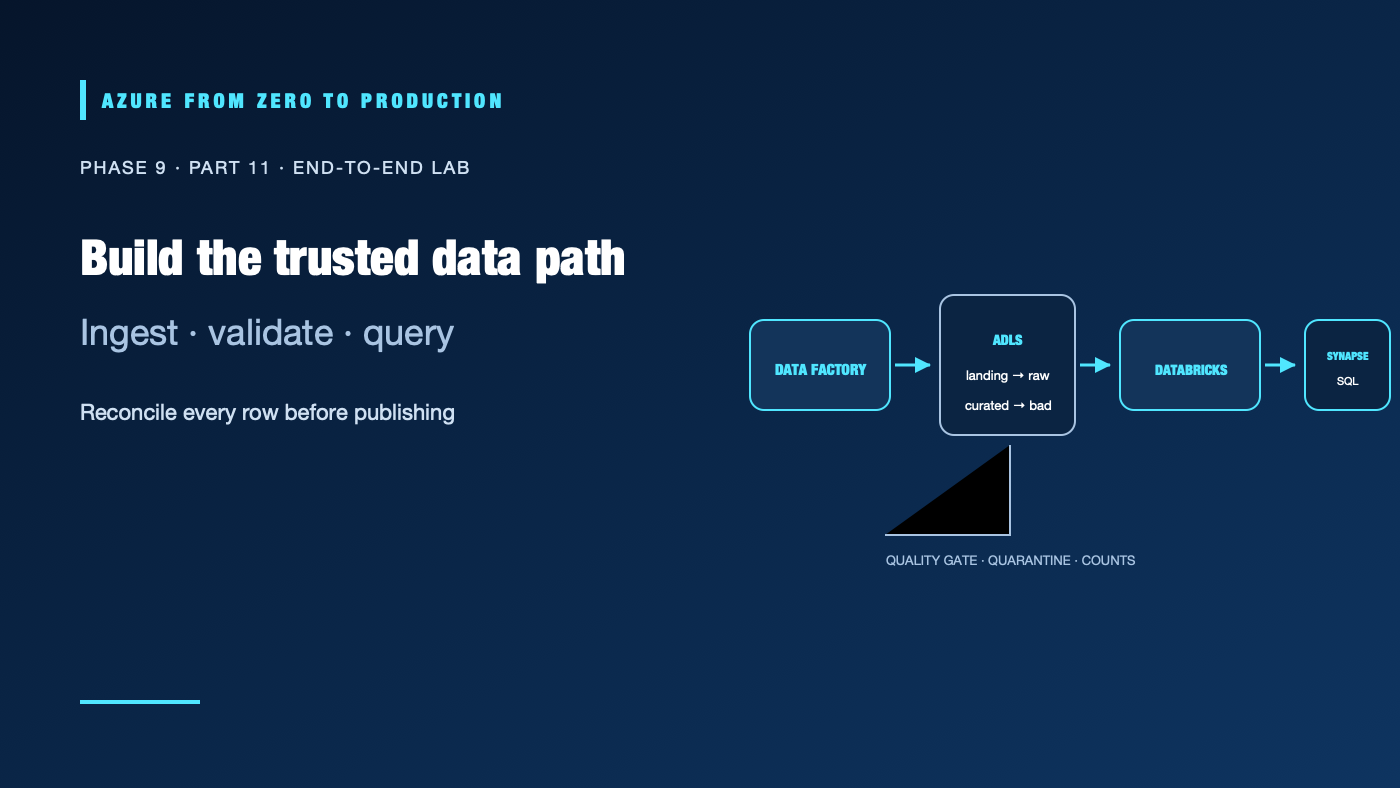
This lab follows one small dataset from a landing zone to an analytical query. Azure Data Factory copies a staged CSV into ADLS Gen2, a Databricks Spark job validates and writes curated Parquet, and Synapse serverless SQL queries the result. The pipeline also quarantines invalid data and reports counts so a successful run means more than “the job returned zero.”
The lab creates billable Azure Storage, Data Factory, Azure Databricks, and Synapse resources. Databricks compute and Synapse queries can incur charges even when the data volume is small. Use a disposable development subscription, set a cleanup date, check current regional pricing and quotas, and never use production data. The instructions are architecture-reviewed; no live Azure pipeline or deployment was run.
What you’ll build
- An HNS-enabled ADLS Gen2 account with landing, raw, curated, and quarantine containers.
- A Data Factory copy pipeline that promotes a staged synthetic CSV into the raw zone.
- A Databricks job that removes exact duplicates, quarantines invalid rows, and writes curated Parquet.
- A Synapse serverless SQL query over the curated files.
- Optional Purview source registration and scan, plus count reconciliation and cleanup.
Synthetic CSV -> landing -> Data Factory -> raw -> Databricks quality + transform
                                                        |             |
                                                        v             v
                                                   quarantine       curated Parquet
                                                                        |
                                                                        v
                                                        Synapse serverless SQL
Prerequisites and safeguards
- Azure CLI 2.91.0+ and portal access; Azure Databricks, Data Factory, ADLS Gen2, and Synapse are enabled for the subscription.
- Permission to create the resources, assign scoped data roles, and create Synapse SQL credentials/external data sources, or administrators who can perform those steps.
- A region where all selected services and required features are available.
- A dedicated resource group and a documented cleanup owner.
This lab uses Entra ID and managed identities, but its exact network path depends on tenant policy. Use an approved private network design if required. Do not solve connectivity failures by making production storage public or adding broad subscription roles. If a service, connector, SKU, or region is unavailable, stop and choose a supported alternative before creating billable resources.
Step 1: Create the lake and sample data
Create a general-purpose v2 storage account with hierarchical namespace enabled. Create four containers named landing, raw, curated, and quarantine. Create an Azure Data Factory instance, an Azure Databricks workspace with Unity Catalog enabled, and a Synapse workspace with its serverless SQL endpoint. Use separate development workspaces or resource groups if that is your organization’s standard.
Create sales.csv locally and upload it to landing/incoming/ using the Azure portal or an approved storage client:
order_id,customer_region,order_date,amount
o-100,west,2026-10-28,125.50
o-101,east,2026-10-28,70.00
o-102,west,2026-10-29,240.00
o-103,east,2026-10-29,-5.00
o-104,west,2026-10-29,80.25
o-104,west,2026-10-29,80.25
The file contains six rows: one exact duplicate and one invalid negative amount. These values are synthetic. Do not replace them with customer or employee data.
Step 2: Configure identities and storage access
Enable the Data Factory system-assigned managed identity. Grant it Storage Blob Data Reader on landing and Storage Blob Data Contributor on raw, scoped to those containers. Configure the linked service to use that identity and test the connection. Keep its control-plane role separate from these data-plane permissions.
Create or use the Azure Databricks Access Connector and its managed identity. Grant it Storage Blob Data Reader on raw and Storage Blob Data Contributor on curated and quarantine, scoped to those containers. In Unity Catalog, configure a storage credential and external locations for the lab paths; grant the job identity the required read/write privileges. Do not put an account key in a notebook or Spark configuration.
Grant the Synapse workspace managed identity read access to the curated container. The Synapse serverless SQL principal that executes queries and the workspace identity that reads storage are distinct authorization checks. Test both. If the storage account uses private endpoints, confirm that each service’s runtime can resolve and reach the endpoint.
Step 3: Build the Data Factory copy pipeline
Create an ADLS Gen2 linked service using the Data Factory managed identity. Create a source dataset for the landing/incoming/sales.csv delimited text file and a sink dataset for the raw/sales/ directory. Add a Copy activity that preserves the header and writes the staged input to the raw path. Parameterize the source file and destination run folder if you want to test more than one run.
Run the pipeline manually and inspect the activity input/output, row counts, duration, and errors. Configure the lab sink to replace its deterministic destination file, or clear only the lab’s raw destination after verifying its contents before a rerun. The purpose of this stage is to record a reproducible landing-to-raw run; the local upload is the controlled source for the exercise. In production, connect an approved producer or API and define its incremental watermark and arrival contract.
Step 4: Validate and transform with Databricks
Create a Databricks notebook or job that reads raw/sales/ through its Unity Catalog external location. Use explicit types, retain a run identifier, remove exact duplicate rows, and quarantine invalid values:
from pyspark.sql import functions as F

raw_path = "abfss://raw@<storage-account>.dfs.core.windows.net/sales/"
curated_path = "abfss://curated@<storage-account>.dfs.core.windows.net/sales/"
quarantine_path = "abfss://quarantine@<storage-account>.dfs.core.windows.net/sales/"

source = (
    spark.read.option("header", True).csv(raw_path)
    .withColumn("order_date", F.to_date("order_date", "yyyy-MM-dd"))
    .withColumn("amount", F.col("amount").cast("decimal(12,2)"))
)
source_count = source.count()
deduplicated = source.dropDuplicates(
    ["order_id", "customer_region", "order_date", "amount"]
)
duplicate_rows = source_count - deduplicated.count()

invalid_condition = (
    F.col("order_id").isNull()
    | F.col("order_date").isNull()
    | F.col("amount").isNull()
    | (F.col("amount") < 0)
)
invalid = deduplicated.filter(invalid_condition)
valid = deduplicated.filter(~invalid_condition)

if valid.groupBy("order_id").count().where("count > 1").limit(1).count():
    raise ValueError("Conflicting rows share an order_id; review before publishing")

invalid.withColumn("quarantine_reason", F.lit("invalid required field or amount")) \
    .write.mode("overwrite").parquet(quarantine_path)
valid.write.mode("overwrite").parquet(curated_path)

print({
    "source_rows": source_count,
    "exact_duplicate_rows": duplicate_rows,
    "quarantined_rows": invalid.count(),
    "curated_rows": valid.count(),
})
This full-snapshot example uses overwrite so rerunning the same input replaces the same lab output. For incremental production data, do not overwrite a whole dataset; use a stable key, bounded partition replacement or a supported transactional table merge, and a late-arrival policy. If duplicate order IDs conflict, the job fails before publishing rather than choosing an arbitrary winner.
Run the job on short-lived, appropriately sized compute. Confirm the role and external-location permissions belong to the job identity, inspect the run output, and stop compute after the test. Do not leave an interactive cluster running while continuing the lab.
Step 5: Query with Synapse serverless SQL
In the Synapse SQL endpoint, create a database-scoped credential and external data source for the curated container using the workspace managed identity. Grant that identity read access to the container first:
CREATE DATABASE SCOPED CREDENTIAL WorkspaceIdentity
WITH IDENTITY = 'Managed Identity';
GO

CREATE EXTERNAL DATA SOURCE CuratedLake
WITH (
    LOCATION = 'https://<storage-account>.dfs.core.windows.net/curated',
    CREDENTIAL = WorkspaceIdentity
);
GO

SELECT
    order_date,
    customer_region,
    COUNT_BIG(*) AS orders,
    SUM(amount) AS revenue
FROM OPENROWSET(
    BULK 'sales/*.parquet',
    DATA_SOURCE = 'CuratedLake',
    FORMAT = 'PARQUET'
) AS sales
GROUP BY order_date, customer_region
ORDER BY order_date, customer_region;
Replace the account name and path. Confirm that the query principal can use the database objects and the workspace identity can read the files. This small lab output is intentionally unpartitioned; for production, choose a partition layout only after measuring representative queries, then align the BULK pattern and predicates with the actual folders. Review bytes processed before repeating queries; serverless SQL charges based on data processed under the applicable pricing model.
Step 6: Reconcile quality and optional governance
Expected counts for the supplied file:
| Measure | Expected |
|---|---|
| Source rows | 6 |
| Exact duplicate rows removed | 1 |
| Quarantined invalid rows | 1 |
| Curated rows | 4 |
Confirm that the curated output has unique order IDs, the expected totals, and both order_date values. Query the quarantine path and verify it contains the negative amount with a reason, not secrets or unnecessary personal data. Rerun the same full-snapshot job and confirm it does not append another copy.
Optionally register the storage source in Microsoft Purview and run a scoped scan of the curated path. Use a supported scan identity, confirm network access, and review the discovered metadata. A catalog scan does not grant SQL or storage access.
Optional Fabric alternative
If the organization is standardized on Fabric, use Fabric Data Factory, a Fabric Lakehouse, and Fabric Spark as an alternative implementation of the ingestion, transformation, and query stages. Check tenant enablement, workspace access, capacity, and current feature availability first. Do not provision Synapse and Databricks just to duplicate the same lab; Fabric capacity and an Azure subscription are separate billing and access boundaries.
Cleanup
Stop and delete Databricks job compute; disable any Data Factory triggers; remove the Synapse SQL objects; remove the Purview scan/connection if created; then enumerate resources, role assignments, managed identities, private endpoints, and diagnostic settings across every resource group used. Delete only the dedicated lab resources after verifying their contents and ownership. Retain neither data copies nor shared identities created solely for the lab.
✅ Checkpoint: Reconcile the six input rows to one duplicate, one quarantined invalid row, and four curated rows; rerun without unintended duplicates; query the curated data as an authorized identity.
Next: Event-driven architecture.
Series navigation: Previous: Microsoft Purview · Current: Phase 9, Part 11 · Next: Event-driven architecture