AWS from Zero to Production — Phase 9, Part 4 of 11 · See the full series roadmap
Here’s what Amazon Athena feels like the first time: you point it at a folder of files in S3, write a CREATE TABLE statement, and run SQL. No cluster. No loading. No servers. Answers in seconds.
Here’s what it feels like the first time you get the bill: someone ran SELECT * on an unpartitioned JSON table, a hundred times, from a dashboard that refreshes every minute.
Athena charges by data scanned. That one fact shapes everything about using it well. Design your tables right, and queries are fast and cheap. Design them badly, and every query reads everything.
What you’ll walk away with
- 🔎 How serverless SQL on S3 works
- 🧾 External tables, partitions, and partition projection
- 🛠️ CTAS queries and views
- 🧑🤝🧑 Workgroups, query result locations, and cost controls
- 🌐 Federated queries
- 🧊 Apache Iceberg tables
- ⚡ Query optimization
How Athena works
Amazon Athena is a serverless, interactive query service. It runs SQL — based on the open-source Trino engine — directly against data in S3, using table definitions from the Glue Data Catalog.
- No infrastructure: nothing to provision or scale.
- Pay per query: by the amount of data scanned, with a small minimum per query — or reserve capacity for predictable workloads. Check current pricing.
- Standard SQL: joins, window functions, CTEs, arrays, maps, and JSON functions.
- Many formats: Parquet, ORC, Avro, JSON, CSV, and Iceberg tables.
External tables
An external table describes data that already lives in S3. Dropping the table removes the metadata, not the data.
CREATE EXTERNAL TABLE sales_curated.orders (
  order_id   bigint,
  item       string,
  created_at timestamp
)
PARTITIONED BY (order_date date)
STORED AS PARQUET
LOCATION 's3://acme-lake-curated/sales/orders/';
Tables can come from Athena DDL, Glue crawlers, Glue jobs, or IaC — all stored in the same Glue Data Catalog.
Partitions
A partitioned table must know which partitions exist. Options:
Load partitions into the catalog
MSCK REPAIR TABLE sales_curated.orders;
Scans the table location for Hive-style folders (order_date=2026-10-31/) and registers them. Simple, but slow on tables with many partitions.
ALTER TABLE sales_curated.orders
  ADD IF NOT EXISTS PARTITION (order_date = DATE '2026-10-31');
Explicitly adds one — fast and precise, ideal at the end of a pipeline run.
Partition projection
With partition projection, Athena calculates partitions from rules in the table properties — no catalog lookups, and no MSCK REPAIR:
CREATE EXTERNAL TABLE sales_curated.orders_projected (
  order_id bigint, item string, created_at timestamp
)
PARTITIONED BY (order_date string)
STORED AS PARQUET
LOCATION 's3://acme-lake-curated/sales/orders/'
TBLPROPERTIES (
  'projection.enabled' = 'true',
  'projection.order_date.type' = 'date',
  'projection.order_date.format' = 'yyyy-MM-dd',
  'projection.order_date.range' = '2024-01-01,NOW',
  'storage.location.template' = 's3://acme-lake-curated/sales/orders/order_date=${order_date}/'
);
Great for tables with many predictable partitions — like daily or hourly data over years.
Note: Partition projection works only when the table is queried through Athena. Other engines, like Redshift Spectrum and EMR, use the partitions registered in the catalog.
CTAS: create table as select
CTAS runs a query and writes the result as a new table — in the format, compression, and partitioning you choose:
CREATE TABLE sales_consumption.daily_orders
WITH (
  format = 'PARQUET',
  write_compression = 'ZSTD',
  external_location = 's3://acme-lake-consumption/sales/daily_orders/',
  partitioned_by = ARRAY['order_date']
) AS
SELECT item, count(*) AS orders, order_date
FROM sales_curated.orders
GROUP BY item, order_date;
Use CTAS to:
- Convert CSV or JSON to partitioned Parquet in one statement.
- Build aggregated consumption tables.
- Create samples for development.
Partition columns must come last in the SELECT. INSERT INTO adds new data to an existing table the same way.
Views
A view is a saved query:
CREATE OR REPLACE VIEW sales_consumption.recent_orders AS
SELECT order_id, item, created_at
FROM sales_curated.orders
WHERE order_date >= current_date - INTERVAL '30' DAY;
Views simplify queries for analysts and hide complexity. They don’t store data — each query re-runs the underlying SQL, and you pay for that scan.
Workgroups
A workgroup separates users, teams, or applications:
- Query result location and its encryption.
- Engine version.
- Data usage limits: a per-query limit that cancels any query scanning more than, say, 10 GB — and workgroup-wide limits that trigger alarms.
- Separate metrics and costs per team.
- IAM controls who can use which workgroup.
aws athena create-work-group \
  --name analysts \
  --configuration '{
    "ResultConfiguration": {"OutputLocation": "s3://acme-athena-results/analysts/"},
    "EnforceWorkGroupConfiguration": true,
    "BytesScannedCutoffPerQuery": 10737418240,
    "PublishCloudWatchMetricsEnabled": true
  }'
Quick win: Set
BytesScannedCutoffPerQueryon every workgroup. It’s the simplest guardrail against runaway queries.
Query result locations
Every query writes its results — and metadata — somewhere:
- A bucket you choose, configured on the workgroup. Add a lifecycle rule to expire results after a few days.
- Or Athena managed query results, where Athena stores and expires results for you without a bucket to manage.
Results can contain sensitive data, so encrypt them and restrict access like any other data.
Athena federated queries
Federated queries use data source connectors — running as Lambda functions — to query data outside S3:
- Relational databases: RDS, Aurora, Redshift, and others over JDBC
- DynamoDB, DocumentDB, OpenSearch, CloudWatch Logs, and more
SELECT o.order_id, c.segment
FROM sales_curated.customer_orders o
JOIN "ddb_catalog"."default"."customers" c
  ON o.customer_id = c.customer_id
WHERE o.order_date = DATE '2026-10-31';
Great for occasional cross-source questions. For heavy, repeated analysis, bring the data into the lake instead — federated queries are slower and add load to the source.
Apache Iceberg tables
Athena supports Iceberg tables natively — reads and writes:
CREATE TABLE sales_curated.orders_iceberg (
  order_id   bigint,
  item       string,
  created_at timestamp
)
PARTITIONED BY (day(created_at))
LOCATION 's3://acme-lake-curated/sales/orders_iceberg/'
TBLPROPERTIES ('table_type' = 'ICEBERG', 'format' = 'parquet');
Then:
-- Upsert changes
MERGE INTO sales_curated.orders_iceberg t
USING sales_raw.order_changes s ON t.order_id = s.order_id
WHEN MATCHED THEN UPDATE SET item = s.item
WHEN NOT MATCHED THEN INSERT VALUES (s.order_id, s.item, s.created_at);

-- Delete for a privacy request
DELETE FROM sales_curated.orders_iceberg WHERE order_id = 1042;

-- Time travel
SELECT * FROM sales_curated.orders_iceberg
FOR TIMESTAMP AS OF (current_timestamp - INTERVAL '1' DAY);

-- Compact small files
OPTIMIZE sales_curated.orders_iceberg REWRITE DATA USING BIN_PACK;
Hidden partitioning — day(created_at) — means users filter on created_at naturally, and Iceberg prunes partitions for them.
Query optimization
Every byte you don’t scan is money and time saved.
- Use columnar formats — Parquet or ORC — with compression.
- Partition by common filters, and always filter on partition columns.
- Select only the columns you need — never
SELECT *on wide tables. - Avoid small files — compact them.
- Filter early, and put the larger table on the left of joins.
- Use
LIMITwhile exploring — though it doesn’t always reduce data scanned. - Use approximate functions —
approx_distinct()is much cheaper thanCOUNT(DISTINCT ...)on big data. - Check the query plan with
EXPLAIN, and the query stats in the console — data scanned, planning time, and execution time. - Reuse results: query result reuse can return cached results for identical queries within a time window.
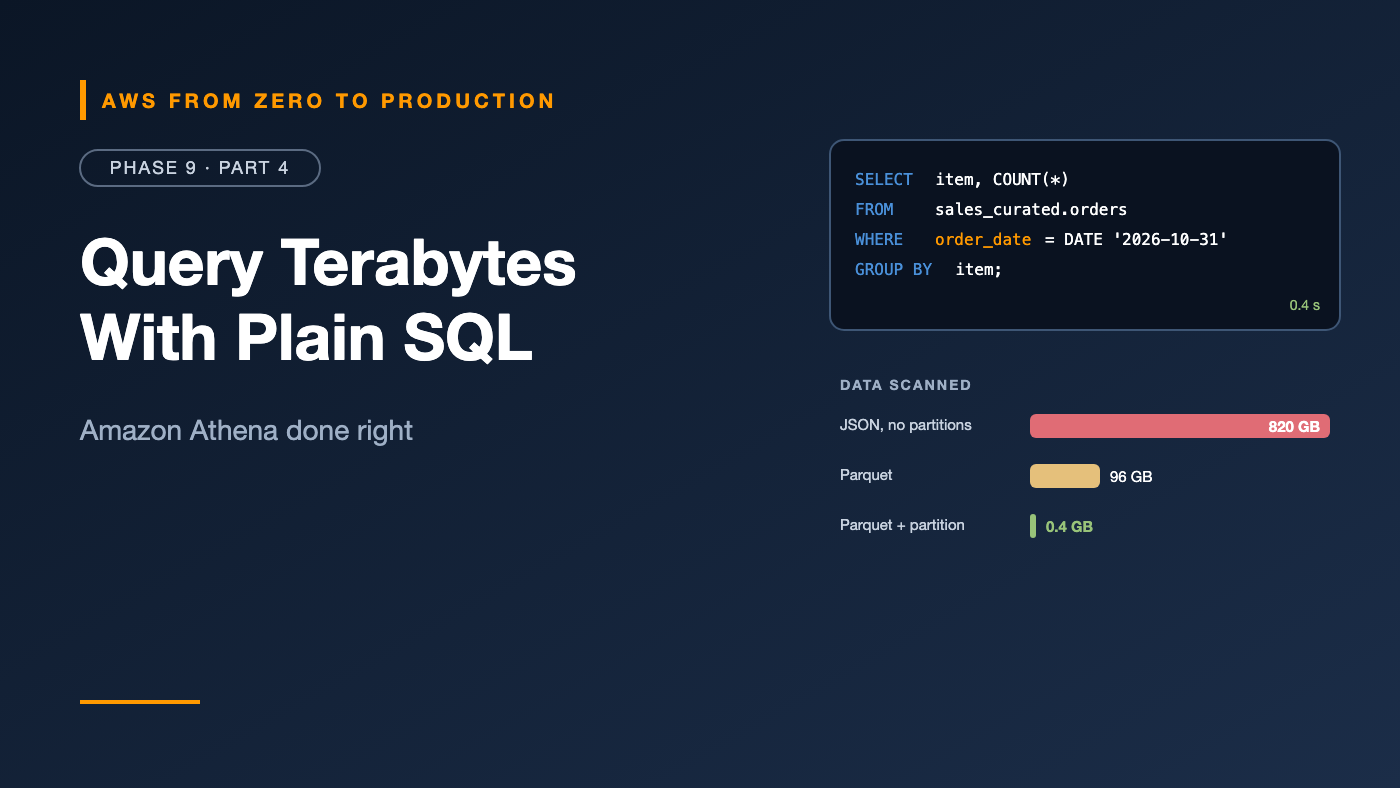
Same question, same data:
  JSON, unpartitioned, SELECT *                 scanned 820 GB
  Parquet, partitioned, 3 columns, 1 day filter scanned 0.4 GB
Cost controls
- Per-query data limits on every workgroup.
- Workgroup usage alarms through CloudWatch.
- Separate workgroups per team, for cost attribution.
- Lifecycle rules on query result buckets.
- Capacity reservations for steady, high query volumes, where predictable pricing is cheaper.
- Dashboards that refresh every minute should query small, pre-aggregated tables — built with CTAS — not raw data.
Common mistakes
SELECT *on wide, unpartitioned JSON tables.- Forgetting to filter on partition columns.
- Partitions created in S3 but never registered, so queries return nothing.
- No per-query limits.
- Query results kept forever.
- BI dashboards hammering raw tables.
- Partition projection on tables also read by Spectrum or EMR, which don’t use it.
Key takeaways
- Athena runs SQL directly on S3, billed by data scanned.
- External tables describe data; dropping them doesn’t delete it.
- Register partitions explicitly, or use partition projection for Athena-only tables.
- CTAS converts and aggregates data into efficient Parquet tables.
- Workgroups add result locations, limits, and cost separation.
- Iceberg adds updates, deletes, time travel, and compaction.
- Columnar formats, partition filters, and narrow selects keep queries fast and cheap.
Quick self-check
Test yourself before moving on:
- You added new partition folders in S3, but Athena returns no rows for them. Why?
- How do you convert a JSON table to partitioned Parquet in one statement?
- What stops a single query from scanning 5 TB by accident?
- Which table format lets Athena
UPDATE,DELETE, andMERGE?
Answers
- The partitions aren’t registered — use
ALTER TABLE ADD PARTITION,MSCK REPAIR TABLE, or partition projection. - A CTAS query with
format = 'PARQUET'andpartitioned_by. - A workgroup’s per-query data usage limit.
- Apache Iceberg.
What’s next
In Part 5, we meet Athena’s bigger sibling: Amazon Redshift — data warehousing, Redshift Serverless, distribution and sort keys, COPY and UNLOAD, Spectrum, workload management, materialized views, and data sharing.
What’s the most expensive Athena query you’ve ever seen? Confess in the comments.