AWS from Zero to Production — Phase 3, Part 2 of 5 · See the full series roadmap
Here’s a question that trips up a surprising number of engineers:
What makes a subnet public?
It’s not a checkbox called “public.” It’s not the name you gave it. It’s not even whether instances inside it have public IP addresses.
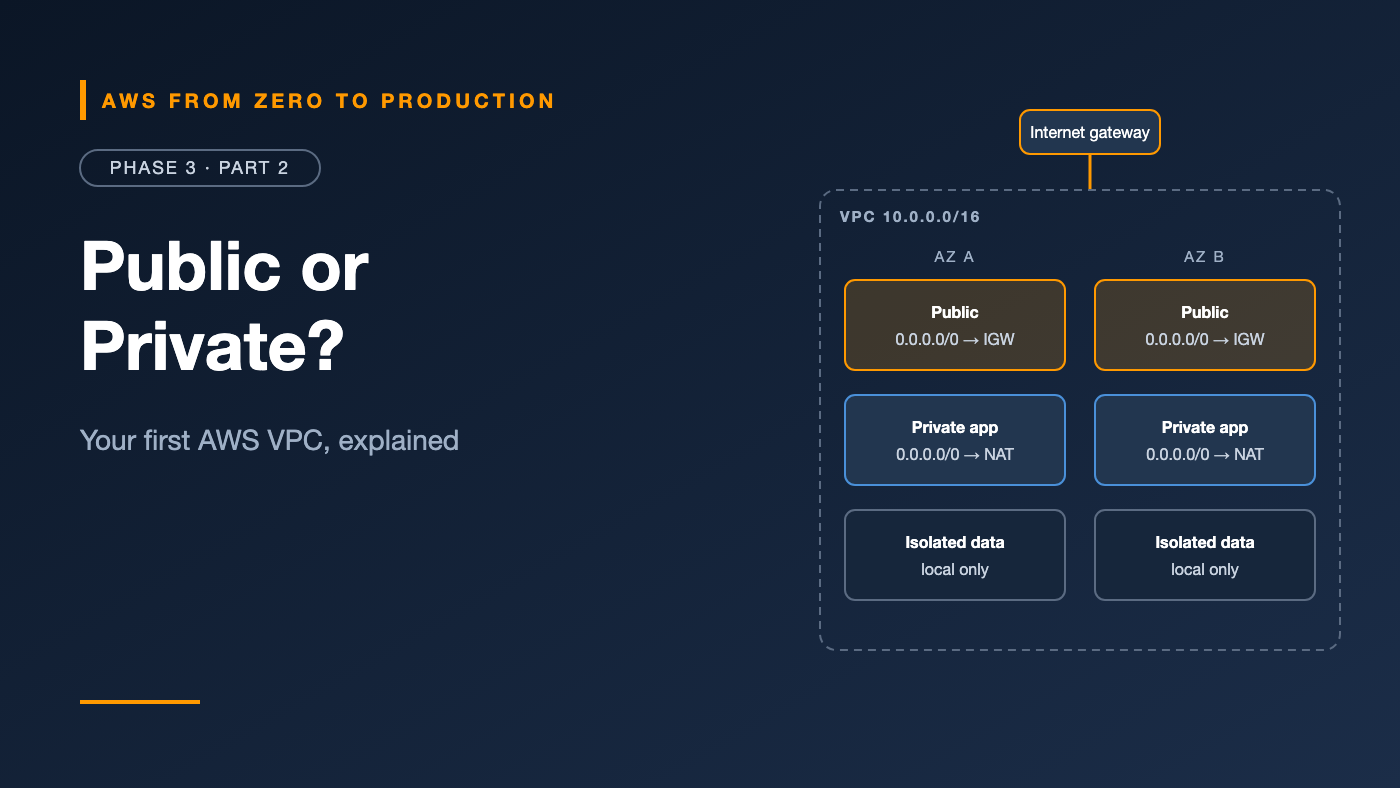
A subnet is public because its route table sends internet-bound traffic to an internet gateway. That’s it. One route.
Once that clicks, the rest of the Amazon VPC falls into place. This article walks through every building block — and how they fit together into a network you’d actually run production on.
What you’ll walk away with
- 🏠 What a VPC is, and default vs. custom VPCs
- 🧩 Public and private subnets across Availability Zones
- 🧭 Route tables, internet gateways, and NAT gateways
- 📌 Elastic IP addresses
- 🛡️ Security groups vs. network ACLs
- 🔍 VPC Flow Logs and DHCP option sets
What is a VPC?
An Amazon Virtual Private Cloud (VPC) is your own isolated network inside an AWS Region. You choose its IP range, split it into subnets, and decide what can reach what.
- A VPC lives in one Region and spans all its Availability Zones.
- You give it a CIDR block, such as
10.0.0.0/16. VPC IPv4 blocks can be between/16and/28. - Resources like EC2 instances, load balancers, RDS databases, and ECS tasks run inside subnets of a VPC.
Default vs. custom VPCs
Every Region in your account comes with a default VPC:
- It uses
172.31.0.0/16. - It has a public subnet in every AZ.
- Instances launched there get a public IP address by default.
That’s great for a quick test. It’s a poor fit for production, where you want private subnets, your own CIDR plan, and nothing public by accident.
Engineer’s note: For real workloads, create a custom VPC. Many teams also delete or lock down default VPCs so nobody launches resources there by mistake.
Subnets: where resources actually live
A subnet is a slice of your VPC’s CIDR block in one Availability Zone.
- A subnet can’t span AZs. For high availability, create matching subnets in at least two AZs.
- AWS reserves 5 addresses in every subnet: the first four and the last one. A
/24gives you 251 usable addresses, not 256.
The three-tier layout
Most production VPCs look like this:
VPC 10.0.0.0/16
|
+-- AZ a
|     public    10.0.1.0/24    load balancers, NAT gateway
|     app       10.0.11.0/24   app servers, containers
|     data      10.0.21.0/24   databases
|
+-- AZ b
      public    10.0.2.0/24
      app       10.0.12.0/24
      data      10.0.22.0/24
- Public subnets hold only what must face the internet: load balancers and NAT gateways.
- Private app subnets hold your application. It’s reachable only through the load balancer.
- Private data subnets hold databases. They’re reachable only from the app tier.
Route tables: the traffic rules
Every subnet is associated with exactly one route table. Each route says: “traffic for this destination goes to this target.”
Every route table includes a local route for the VPC’s own CIDR, so all subnets can reach each other by default. Security groups and network ACLs then decide what’s actually allowed.
Public subnet route table
Destination     Target
10.0.0.0/16     local
0.0.0.0/0       igw-0abc123     <- this line makes it public
Private subnet route table
Destination     Target
10.0.0.0/16     local
0.0.0.0/0       nat-0def456     <- outbound only, through NAT
Isolated subnet route table
Destination     Target
10.0.0.0/16     local           <- no internet at all
Data subnets are often isolated — no route to the internet in either direction.
Internet gateways
An internet gateway (IGW) connects a VPC to the internet.
- You attach one per VPC.
- It’s horizontally scaled and highly available — there’s nothing to size or manage.
- It has no hourly charge itself, although data transfer and public IPv4 addresses are charged.
For a resource to be reachable from the internet, it needs all three:
- A subnet whose route table sends
0.0.0.0/0to the IGW - A public IP or Elastic IP address
- A security group and network ACL that allow the traffic
Miss any one, and the connection fails.
NAT gateways: outbound-only internet
Private servers still need to reach the internet sometimes — to download packages, call external APIs, or reach AWS services without endpoints.
A NAT gateway lets them connect out while blocking connections in.
- You create it in a public subnet, with an Elastic IP address.
- Private subnets route
0.0.0.0/0to it. - A NAT gateway lives in one AZ. For high availability, create one per AZ and route each private subnet to the NAT gateway in its own AZ.
Cost warning: NAT gateways charge per hour and per GB processed. They’re one of the most common surprise line items on AWS bills. Delete them after labs, and consider VPC endpoints for AWS services (Part 3) to keep that traffic off the NAT gateway.
Elastic IP addresses
An Elastic IP address is a static public IPv4 address that you allocate to your account and can move between resources.
- Useful when a partner needs to allow-list a fixed IP, or for a NAT gateway.
- Like every public IPv4 address, it’s charged by the hour — including when it isn’t attached to anything.
Watch out: Release Elastic IPs you no longer need. An unattached one quietly costs money every hour.
Security groups: the firewall around each resource
A security group is a stateful firewall attached to a resource’s network interface — an EC2 instance, a load balancer, an RDS database, or an ECS task.
- Allow rules only. There’s no “deny” rule; anything not allowed is blocked.
- Stateful. If inbound traffic is allowed, the response is automatically allowed out, and vice versa.
- By default, new security groups allow all outbound traffic and no inbound traffic.
- Rules can reference another security group as the source. This is the superpower.
Chaining security groups
alb-sg     inbound 443 from 0.0.0.0/0
app-sg     inbound 8080 from alb-sg
db-sg      inbound 5432 from app-sg
Nobody hard-codes IP addresses. If the app scales from 2 to 20 servers, they all carry app-sg, and the database accepts all of them — and nothing else.
Network ACLs: the firewall around each subnet
A network ACL (NACL) filters traffic at the subnet boundary.
- Allow and deny rules.
- Stateless. Return traffic must be allowed explicitly, including ephemeral ports (typically 1024–65535).
- Rules are numbered and evaluated in order; the first match wins.
- The default NACL allows all traffic in both directions.
Security groups vs. NACLs
- Applies to: security groups apply to a resource; NACLs apply to a whole subnet.
- Rules: security groups allow only; NACLs allow and deny.
- State: security groups are stateful; NACLs are stateless.
- Typical use: security groups are your main control; NACLs are a coarse extra layer, such as blocking a known-bad IP range.
Engineer’s note: Most teams leave NACLs at the default and do everything with security groups. If you customize NACLs, test carefully — forgetting ephemeral ports is the classic outage.
VPC Flow Logs: who talked to whom
VPC Flow Logs record metadata about IP traffic: source, destination, ports, protocol, bytes, and whether it was ACCEPTED or REJECTED.
- Enable them for a VPC, a subnet, or a single network interface.
- Send them to CloudWatch Logs, Amazon S3, or Amazon Data Firehose.
- They don’t capture packet contents — only metadata.
A typical record looks like this:
2 123456789012 eni-0a1b2c3d 10.0.11.25 10.0.21.40 49152 5432 6 10 840 1735689600 1735689660 REJECT OK
That REJECT on port 5432 tells you a security group or NACL blocked a database connection. Flow logs turn “it doesn’t connect” into evidence.
Cost note: Flow logs are charged by data ingested at the destination. Send them to S3 for cheaper long-term storage, or filter to rejected traffic only while troubleshooting.
DHCP option sets
When resources start, they get network settings through DHCP: the DNS server, domain name, and NTP servers.
- By default, VPCs use the Amazon-provided DNS server, available at the VPC’s base address plus two (for example,
10.0.0.2). - A custom DHCP option set lets you point instances to your own DNS servers or domain name — common in hybrid networks with on-premises Active Directory.
Most VPCs never need to change this. Part 3 shows the more common hybrid approach: Route 53 Resolver.
Common mistakes
- Running production in the default VPC.
- Putting databases in public subnets “just to connect from my laptop.”
- One NAT gateway for all AZs — if its AZ fails, every private subnet loses outbound access.
- Leaving NAT gateways and Elastic IPs running after a lab.
- Hard-coding IP ranges in security groups instead of referencing other security groups.
- Customizing NACLs and forgetting ephemeral ports.
Key takeaways
- A VPC is your isolated network in one Region; subnets live in one AZ each.
- A subnet is public because its route table points
0.0.0.0/0at an internet gateway. - NAT gateways give private subnets outbound-only internet access — at a cost.
- Security groups are stateful, resource-level, and allow-only; chain them by reference.
- NACLs are stateless, subnet-level, and support deny rules.
- Flow logs show accepted and rejected traffic — your first stop for connectivity issues.
Quick self-check
Test yourself before moving on:
- How many usable IP addresses does a
/24subnet have on AWS? - An instance has a public IP, but its subnet routes
0.0.0.0/0to a NAT gateway. Can the internet reach it? - Why should the database security group reference
app-sginstead of an IP range? - You allowed inbound port 443 in a NACL, but responses never arrive. Why?
Answers
- 251 — AWS reserves five addresses.
- No. Without a route to an internet gateway, the subnet isn’t public.
- It automatically includes every app resource, however many there are, and nothing else.
- NACLs are stateless — you also need an outbound rule for the ephemeral ports.
What’s next
In Part 3, we connect VPCs to each other and to the outside world: peering, Transit Gateway, PrivateLink, VPC endpoints, VPNs, Direct Connect, and hybrid DNS.
Do you use network ACLs, or leave them at the default? Tell me in the comments.