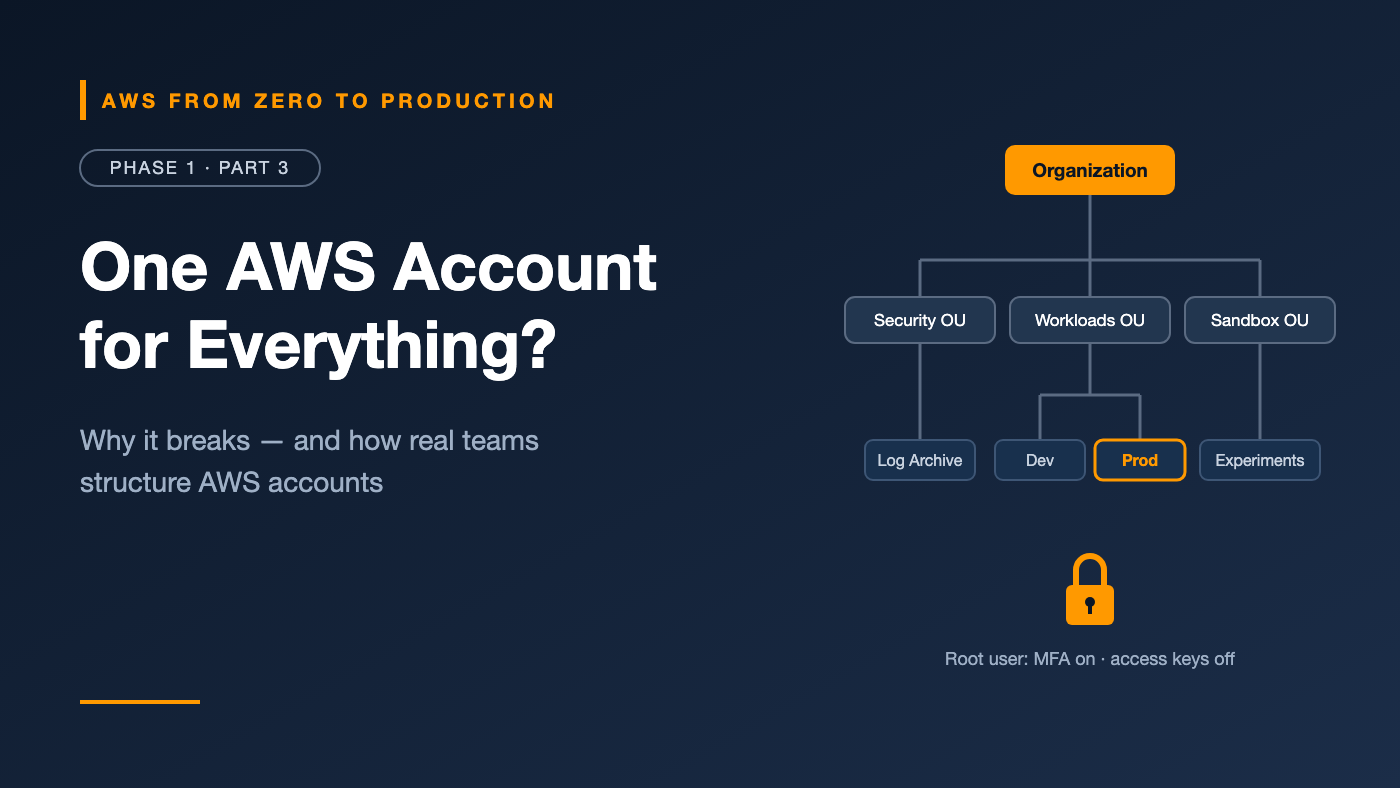
AWS from Zero to Production — Phase 1, Part 3 of 5 · See the full series roadmap
It’s 4:55 p.m. on a Friday.
A developer runs a cleanup script against what they think is the test environment. It’s the same AWS account as production. The script doesn’t know the difference.
You can guess the rest.
This kind of mistake rarely comes from bad engineers. It comes from bad boundaries. When development, testing, and production all share one AWS account, one wrong command, one leaked key, or one overly generous permission can reach everything.
The fix isn’t more caution. It’s better structure. And AWS gives you the tools to build it.
What you’ll walk away with
- 🔐 Why the root user is so powerful — and the 6 rules for locking it down
- 🧱 Why an AWS account is your strongest safety boundary
- 🗂️ How AWS Organizations groups accounts like folders
- 🚧 How Service Control Policies set limits nobody can bypass
- 💳 One bill for many accounts with consolidated billing
- 🏛️ What Control Tower and a “landing zone” really mean
- 📋 A practical account layout you can copy
What is an AWS account?
An AWS account is a container for AWS resources, with its own:
- Identity boundary: identities and permissions are defined per account, and access across accounts must be granted explicitly.
- Billing boundary: usage is metered per account.
- Service quotas: many limits, such as how many of a resource you can create, apply per account and Region.
- Blast radius: a mistake or compromise is contained to that account by default.
Each account has a 12-digit account ID. Treat it as an identifier, not a secret — but avoid publishing it unnecessarily.
Creating and securing an AWS account
When you sign up, AWS creates the account and its root user, identified by the email address you used.
What makes the root user special
The root user has complete, unrestricted access to the account. IAM policies inside the account can’t limit it. A small set of tasks can only be done by the root user, including:
- Changing the root email address or password, or closing the account (for standalone accounts outside AWS Organizations)
- Restoring IAM permissions if the only administrator accidentally locks themselves out
- A few billing tasks and service-specific settings, such as enabling MFA delete on an S3 bucket
AWS keeps the full list in the IAM documentation, and it changes over time.
Root user best practices
- Use a strong, unique password, ideally from a password manager.
- Enable MFA immediately. A hardware security key or authenticator app protects against password theft.
- Don’t create root access keys. If any exist, delete them.
- Use a shared, monitored email address for business accounts — such as a distribution list — not one person’s inbox.
- Don’t use the root user for daily work. Create a separate identity with appropriate permissions.
- Set alternate contacts for billing, operations, and security so AWS can reach the right people.
Engineer’s note: In an AWS Organization, the management account can centrally manage root access for member accounts, including removing their root credentials. That turns “protect 50 root passwords” into a much smaller problem. Check the current Organizations documentation for availability and setup.
Why multiple accounts?
As soon as more than one person or environment is involved, a single account gets risky.
- A development mistake can affect production → production lives in its own account.
- It’s hard to give developers freedom safely → developers get broad access in dev and little in prod.
- Bills are hard to attribute → each account’s costs are tracked separately.
- Service quotas are shared → each account gets its own quotas.
- Security incidents spread → a compromise is contained to one account.
Accounts are a coarse but very strong boundary. IAM permissions inside an account are fine-grained but easier to get wrong.
AWS Organizations
AWS Organizations lets you create and manage many AWS accounts centrally.
Key building blocks
- Organization: the top-level container for all your accounts.
- Management account: the account that creates the organization. It administers the organization and pays the combined bill.
- Member accounts: all other accounts in the organization, where workloads run.
- Organizational Units (OUs): folders that group accounts. OUs can be nested, and policies attached to an OU apply to every account inside it.
- Root: the top of the OU tree. (This is a different concept from the root user.)
An example structure
Root
├── Security OU
│   ├── Log Archive account
│   └── Security Tooling account
├── Infrastructure OU
│   └── Shared Networking account
├── Workloads OU
│   ├── NonProd OU
│   │   ├── Dev account
│   │   └── Staging account
│   └── Prod OU
│       └── Prod account
└── Sandbox OU
    └── Individual experiment accounts
Engineer’s note: Keep the management account almost empty. It can’t be restricted by SCPs, so anything running there is harder to govern. Use it for organization administration and billing only.
Service Control Policies (SCPs)
Service Control Policies set the maximum permissions available to accounts in an OU or organization.
What SCPs do — and don’t do
- SCPs don’t grant permissions. An identity still needs an IAM policy that allows an action.
- SCPs limit what is possible. If an SCP denies an action, no identity in that account can perform it — including the member account’s root user.
- SCPs don’t apply to the management account.
- SCPs don’t restrict service-linked roles, which AWS services use to act on your behalf.
Think of it as two gates: an action must be allowed by both the SCPs and the identity’s IAM permissions.
Common SCP use cases
- Deny actions outside approved Regions
- Prevent accounts from leaving the organization
- Prevent disabling security services such as CloudTrail
- Block creation of specific expensive or unapproved resource types
Example: restrict Regions
{
  "Version": "2012-10-17",
  "Statement": [
    {
      "Sid": "DenyOutsideApprovedRegions",
      "Effect": "Deny",
      "NotAction": [
        "iam:*",
        "organizations:*",
        "route53:*",
        "cloudfront:*",
        "support:*",
        "sts:*",
        "budgets:*",
        "ce:*",
        "health:*"
      ],
      "Resource": "*",
      "Condition": {
        "StringNotEquals": {
          "aws:RequestedRegion": ["eu-west-1", "eu-central-1"]
        }
      }
    }
  ]
}
The NotAction list exempts global services and billing tools such as Budgets and Cost Explorer, which run from us-east-1 and would otherwise break — including the budget alerts you’ll set up in Part 5. This is a simplified example. AWS publishes a more complete version in the Organizations documentation; start from that before using one in a real organization.
Warning: A badly written SCP can lock every account in an OU out of critical actions. Test SCPs on a sandbox OU first.
Other organization policy types
SCPs are the best known, but Organizations supports other policy types too. Two worth knowing early:
- Tag policies standardize tag keys and values across accounts — useful for the cost allocation tags you’ll meet in Part 4.
- Resource control policies (RCPs) set maximum permissions on resources, complementing SCPs, which limit identities.
Consolidated billing
Every organization uses consolidated billing:
- The management account receives one bill for all member accounts.
- You can still see costs per account.
- Usage is combined for volume pricing tiers, which can lower the effective price.
- Discounts from Savings Plans and Reserved Instances can be shared across accounts, depending on your settings.
AWS Control Tower and landing zones
A landing zone is a pre-configured, secure, multi-account environment that follows best practices — the “ground” new workloads land on.
You could build one manually with Organizations, IAM Identity Center, CloudTrail, and AWS Config. AWS Control Tower automates it.
What Control Tower sets up
- An organization structure with foundational OUs
- Shared accounts for log archive and audit
- Centralized logging of API activity
- IAM Identity Center for sign-in across accounts
- Controls (formerly called guardrails) of three kinds: preventive controls block disallowed actions, typically through SCPs; detective controls find non-compliant resources, typically through AWS Config rules; and proactive controls check resources before they are provisioned
- Account Factory to create new, pre-configured accounts consistently
Should you use Control Tower?
- Personal learning account: not needed; secure a single account well.
- Small team with a few accounts: Organizations plus a few SCPs is often enough.
- Growing company with many teams: Control Tower or an equivalent landing-zone solution.
- Regulated industry: a governed landing zone is strongly recommended.
A practical environment layout
For a team building the platform in this series:
- Dev — daily development and experiments. Access: broad developer access.
- Test — automated integration tests from CI/CD. Access: mostly the pipeline.
- Staging — production-like validation before release. Access: limited human access.
- Prod — live workloads and real data. Access: very restricted; changes go through CI/CD.
- Log Archive — centralized, tamper-resistant logs. Access: security team, read-only.
- Security — security tooling and audit access. Access: security team.
Engineer’s note: Not every organization needs separate Test and Staging accounts. The principle matters more than the exact count: production must be isolated, and changes to it should flow through automation.
Common mistakes
- Using the root user for everyday tasks.
- Running workloads in the management account.
- One account for everything, then struggling to separate environments later.
- Applying untested SCPs to production OUs.
- Assuming SCPs grant permissions. They only restrict.
- Losing access to the root user’s email or MFA device, which can make account recovery very difficult.
Key takeaways
- An AWS account is a strong boundary for security, billing, quotas, and blast radius.
- Protect the root user with MFA, no access keys, and minimal use.
- AWS Organizations groups accounts into OUs and provides consolidated billing.
- SCPs set permission guardrails; they never grant access and don’t apply to the management account.
- Control Tower automates a governed landing zone with logging, identity, and controls.
- Separate production from non-production accounts from the start.
Quick self-check
Test yourself before moving on:
- Can a Service Control Policy grant permissions?
- Does an SCP restrict users and roles in the management account?
- Name two tasks that require the root user.
- Why should the management account stay almost empty?
Answers
- No. SCPs only set the maximum permissions. An identity still needs an IAM policy that allows the action.
- No. SCPs apply only to member accounts.
- Any two of: changing the root email address or password of a standalone account, closing a standalone account, restoring IAM permissions after the only admin is locked out, or enabling MFA delete on an S3 bucket.
- Because SCPs can’t restrict it, anything running there is harder to govern — and the account controls your entire organization.
What’s next
In Part 4, we tackle the topic that worries most new AWS users: cost. We’ll cover pricing models, the Free Tier, the tools that keep your bill predictable, and AWS Support plans.
Do you use one AWS account or many? What made you switch? Tell me in the comments.