AWS from Zero to Production — Phase 9, Part 11 of 11 · See the full series roadmap
Ten articles of concepts. Now we build the real thing.
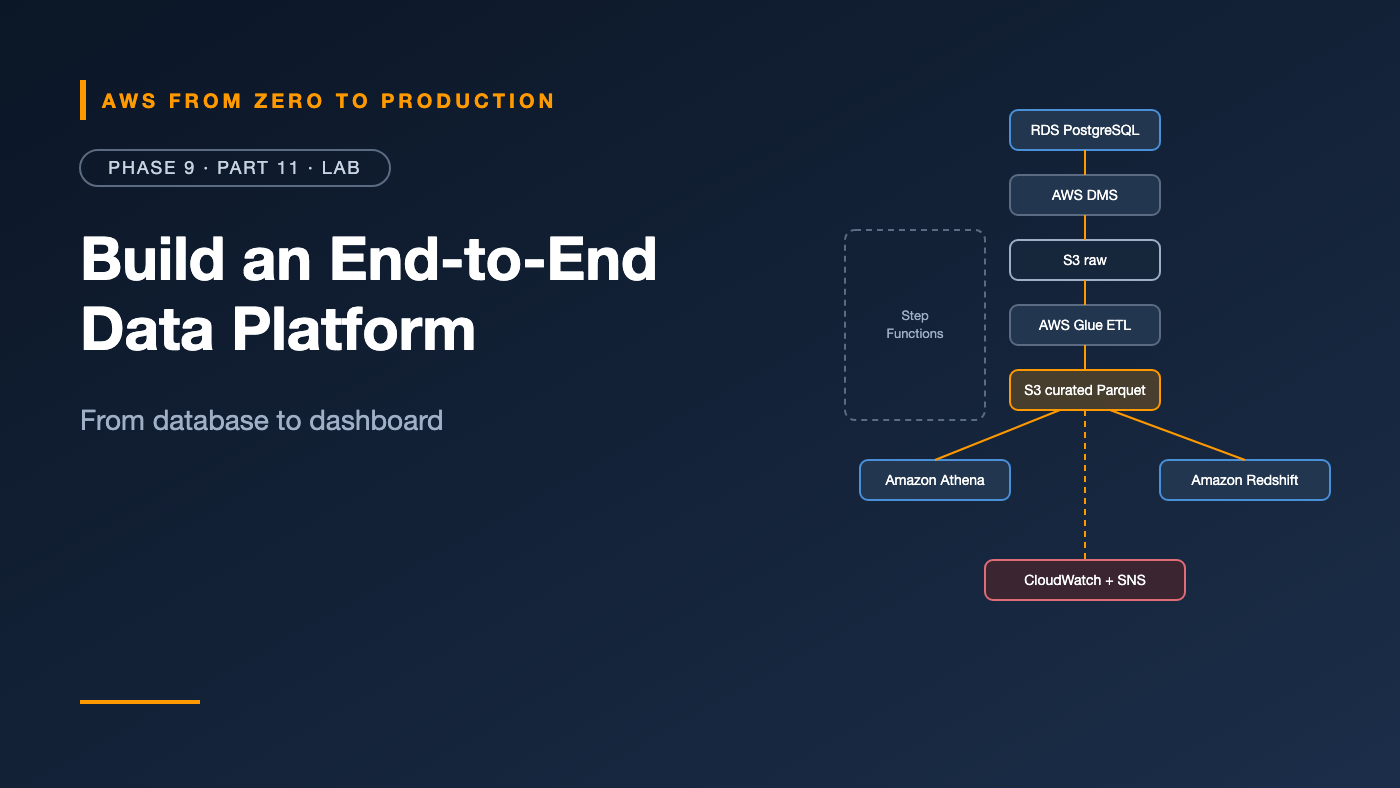
The orders API you’ve deployed since Phase 4 writes to a PostgreSQL database. In this lab, that database becomes the source for an analytics platform — without a single analytics query touching production:
Source database (RDS PostgreSQL — the orders app)
    |
    v
AWS DMS (Serverless, full load)
    |
    v
Amazon S3 raw zone (Parquet, as delivered)
    |
    v
AWS Glue ETL (clean, type, dedupe, partition by date)
    |
    v
Amazon S3 curated Parquet zone
    |
    +----> Amazon Athena (ad hoc SQL)
    |
    +----> Amazon Redshift Serverless (Spectrum, COPY, UNLOAD)
    |
    v
Step Functions orchestration + CloudWatch alarm + SNS alerts
It’s the most moving parts of any lab in the series. Take it one step at a time, and use the checkpoints.
What you’ll build
- 🪣 A data lake bucket with raw, curated, consumption, and query result prefixes
- 🚚 A DMS Serverless replication from RDS to S3
- 🕷️ A Glue crawler and a Glue PySpark ETL job
- 🔎 An Athena workgroup with a cost limit, and curated tables
- 🏛️ Redshift Serverless querying the lake with Spectrum, loading with COPY, and exporting with UNLOAD
- 🧭 A Step Functions pipeline with failure notifications
- 🚨 A CloudWatch alarm on pipeline failures
Prerequisites
- The Phase 6–8 Terraform stack deployed (
orders-dev), with some orders in the database — run the traffic loop from Phase 8, Step 6, if it’s empty - AWS CLI v2,
jq, and a bash or zsh terminal - Permissions for S3, DMS, Glue, Athena, Redshift Serverless, Step Functions, SNS, CloudWatch, IAM, and Secrets Manager
- About 2–3 hours
Cost note: This lab adds DMS Serverless capacity, Glue job DPU-hours, Athena scans (tiny here), Redshift Serverless RPU-hours, and a Secrets Manager secret — on top of the running Phase 6 stack. Redshift Serverless and DMS are the biggest items; they bill while running. Run the Cleanup section the same day. Check current pricing first.
Keep one terminal open. Later steps use shell variables from earlier ones.
Step 1: Set up variables and the lake bucket
export AWS_PROFILE=sandbox
export AWS_REGION=us-east-1
ACCOUNT_ID=$(aws sts get-caller-identity --query Account --output text)
LAKE="orders-lake-$ACCOUNT_ID-$AWS_REGION"

aws s3api create-bucket --bucket "$LAKE"
aws s3api put-public-access-block --bucket "$LAKE" \
  --public-access-block-configuration \
  BlockPublicAcls=true,IgnorePublicAcls=true,BlockPublicPolicy=true,RestrictPublicBuckets=true

cat > lifecycle.json <<'EOF'
{
  "Rules": [
    { "ID": "expire-athena-results", "Filter": { "Prefix": "athena-results/" },
      "Status": "Enabled", "Expiration": { "Days": 7 } },
    { "ID": "abort-multipart", "Filter": {}, "Status": "Enabled",
      "AbortIncompleteMultipartUpload": { "DaysAfterInitiation": 7 } }
  ]
}
EOF
aws s3api put-bucket-lifecycle-configuration --bucket "$LAKE" \
  --lifecycle-configuration file://lifecycle.json
The bucket uses prefixes for zones — raw/, curated/, consumption/ — plus scripts/ and athena-results/. In production, you’d likely use separate buckets per zone (Part 2).
Collect values from the existing stack:
VPC_ID=$(aws ec2 describe-vpcs --filters Name=tag:Name,Values=orders-dev \
  --query 'Vpcs[0].VpcId' --output text)
PRIVATE_SUBNETS=$(aws ec2 describe-subnets \
  --filters Name=vpc-id,Values="$VPC_ID" Name=tag:Name,Values='*private*' \
  --query 'Subnets[].SubnetId' --output text)
DB_SG=$(aws ec2 describe-security-groups \
  --filters Name=vpc-id,Values="$VPC_ID" Name=group-name,Values=orders-dev-db \
  --query 'SecurityGroups[0].GroupId' --output text)
DB_HOST=$(aws rds describe-db-instances --db-instance-identifier orders-dev-db \
  --query 'DBInstances[0].Endpoint.Address' --output text)
DB_SECRET_ARN=$(aws rds describe-db-instances --db-instance-identifier orders-dev-db \
  --query 'DBInstances[0].MasterUserSecret.SecretArn' --output text)

echo "$LAKE | $VPC_ID | $DB_SG | $DB_HOST"
✅ Checkpoint: All values print, and none says None.
Step 2: Prepare DMS access
The DMS VPC role
DMS needs a service role named exactly dms-vpc-role to manage network interfaces. Create it if it doesn’t exist:
cat > dms-trust.json <<'EOF'
{
  "Version": "2012-10-17",
  "Statement": [{
    "Effect": "Allow",
    "Principal": { "Service": ["dms.amazonaws.com", "dms.us-east-1.amazonaws.com"] },
    "Action": "sts:AssumeRole"
  }]
}
EOF

aws iam get-role --role-name dms-vpc-role >/dev/null 2>&1 || {
  aws iam create-role --role-name dms-vpc-role --assume-role-policy-document file://dms-trust.json
  aws iam attach-role-policy --role-name dms-vpc-role \
    --policy-arn arn:aws:iam::aws:policy/service-role/AmazonDMSVPCManagementRole
}
Outside
us-east-1? Change the Region in the second service principal.
A source secret for DMS
DMS can read source credentials from Secrets Manager, but it needs host and port in the secret. Build a new secret from the RDS-managed one — the password flows through a pipe and is never printed:
DMS_SECRET_ARN=$(aws secretsmanager get-secret-value --secret-id "$DB_SECRET_ARN" \
    --query SecretString --output text \
  | jq --arg host "$DB_HOST" '. + {host: $host, port: 5432}' \
  | aws secretsmanager create-secret --name lab9/dms-source \
      --secret-string file:///dev/stdin --query ARN --output text)
Production note: This copy won’t follow future rotations of the RDS-managed secret. In production, create a dedicated read-only replication user with its own rotated secret.
The DMS access role
One role lets DMS read that secret and write to the raw zone:
aws iam create-role --role-name lab9-dms-access \
  --assume-role-policy-document file://dms-trust.json

cat > dms-access.json <<EOF
{
  "Version": "2012-10-17",
  "Statement": [
    { "Effect": "Allow", "Action": "secretsmanager:GetSecretValue",
      "Resource": "$DMS_SECRET_ARN" },
    { "Effect": "Allow", "Action": ["s3:PutObject", "s3:DeleteObject"],
      "Resource": "arn:aws:s3:::$LAKE/raw/*" },
    { "Effect": "Allow", "Action": "s3:ListBucket",
      "Resource": "arn:aws:s3:::$LAKE" }
  ]
}
EOF
aws iam put-role-policy --role-name lab9-dms-access \
  --policy-name dms-access --policy-document file://dms-access.json
DMS_ROLE_ARN=$(aws iam get-role --role-name lab9-dms-access --query Role.Arn --output text)
Network
aws dms create-replication-subnet-group \
  --replication-subnet-group-identifier lab9-dms-subnets \
  --replication-subnet-group-description "orders-dev private subnets" \
  --subnet-ids $PRIVATE_SUBNETS

DMS_SG=$(aws ec2 create-security-group --vpc-id "$VPC_ID" \
  --group-name lab9-dms --description "DMS replication" \
  --query GroupId --output text)

aws ec2 authorize-security-group-ingress --group-id "$DB_SG" \
  --protocol tcp --port 5432 --source-group "$DMS_SG"
DMS runs in the private subnets, reaches the database through the database security group, and reaches S3 through the NAT gateway.
✅ Checkpoint: lab9-dms-access exists, and orders-dev-db allows port 5432 from lab9-dms.
Step 3: Replicate the database into the raw zone
Create the endpoints:
SOURCE_EP=$(aws dms create-endpoint \
  --endpoint-identifier lab9-orders-source \
  --endpoint-type source --engine-name postgres \
  --database-name orders --ssl-mode require \
  --postgre-sql-settings "SecretsManagerAccessRoleArn=$DMS_ROLE_ARN,SecretsManagerSecretId=$DMS_SECRET_ARN" \
  --query Endpoint.EndpointArn --output text)

TARGET_EP=$(aws dms create-endpoint \
  --endpoint-identifier lab9-lake-raw \
  --endpoint-type target --engine-name s3 \
  --s3-settings "{\"ServiceAccessRoleArn\":\"$DMS_ROLE_ARN\",\"BucketName\":\"$LAKE\",\"BucketFolder\":\"raw/orders_db\",\"DataFormat\":\"parquet\",\"ParquetVersion\":\"parquet-2-0\"}" \
  --query Endpoint.EndpointArn --output text)
Choose what to replicate:
cat > table-mappings.json <<'EOF'
{
  "rules": [{
    "rule-type": "selection",
    "rule-id": "1",
    "rule-name": "orders",
    "object-locator": { "schema-name": "public", "table-name": "orders" },
    "rule-action": "include"
  }]
}
EOF
Create and start a DMS Serverless replication:
REPL_ARN=$(aws dms create-replication-config \
  --replication-config-identifier lab9-orders-to-lake \
  --source-endpoint-arn "$SOURCE_EP" \
  --target-endpoint-arn "$TARGET_EP" \
  --replication-type full-load \
  --table-mappings file://table-mappings.json \
  --compute-config "MinCapacityUnits=1,MaxCapacityUnits=2,ReplicationSubnetGroupId=lab9-dms-subnets,VpcSecurityGroupIds=$DMS_SG" \
  --query ReplicationConfig.ReplicationConfigArn --output text)

aws dms start-replication --replication-config-arn "$REPL_ARN" \
  --start-replication-type start-replication
DMS Serverless provisions capacity first, so this takes a while — often 10–20 minutes. Check progress:
aws dms describe-replications \
  --filters Name=replication-config-arn,Values="$REPL_ARN" \
  --query 'Replications[0].[Status,ReplicationStats.FullLoadProgressPercent,StopReason]' \
  --output text
When it stops with a full-load-complete reason, look at the raw zone:
aws s3 ls "s3://$LAKE/raw/orders_db/" --recursive
✅ Checkpoint: You see a file like raw/orders_db/public/orders/LOAD00000001.parquet.
Want continuous replication? Use
full-load-and-cdcinstead. That requiresrds.logical_replication = 1in the database’s parameter group — and your Glue job would then need to merge inserts, updates, and deletes (Part 9).
Step 4: Catalog the raw data
Create a role for Glue:
cat > glue-trust.json <<'EOF'
{
  "Version": "2012-10-17",
  "Statement": [{
    "Effect": "Allow",
    "Principal": { "Service": "glue.amazonaws.com" },
    "Action": "sts:AssumeRole"
  }]
}
EOF

aws iam create-role --role-name lab9-glue --assume-role-policy-document file://glue-trust.json
aws iam attach-role-policy --role-name lab9-glue \
  --policy-arn arn:aws:iam::aws:policy/service-role/AWSGlueServiceRole

cat > glue-s3.json <<EOF
{
  "Version": "2012-10-17",
  "Statement": [
    { "Effect": "Allow", "Action": ["s3:GetObject", "s3:PutObject", "s3:DeleteObject"],
      "Resource": "arn:aws:s3:::$LAKE/*" },
    { "Effect": "Allow", "Action": "s3:ListBucket",
      "Resource": "arn:aws:s3:::$LAKE" }
  ]
}
EOF
aws iam put-role-policy --role-name lab9-glue --policy-name lake-access \
  --policy-document file://glue-s3.json
Create a database and crawl the raw table:
aws glue create-database --database-input Name=orders_raw

aws glue create-crawler \
  --name lab9-raw-orders \
  --role lab9-glue \
  --database-name orders_raw \
  --targets "{\"S3Targets\":[{\"Path\":\"s3://$LAKE/raw/orders_db/public/orders/\"}]}"

aws glue start-crawler --name lab9-raw-orders
Wait a minute or two, then:
aws glue get-tables --database-name orders_raw \
  --query 'TableList[].[Name,StorageDescriptor.Columns[].Name]' --output json
✅ Checkpoint: A table named orders with columns id, item, and created_at.
Step 5: Transform raw into curated with Glue
Write the job script, raw_to_curated.py:
import sys

from awsglue.context import GlueContext
from awsglue.job import Job
from awsglue.utils import getResolvedOptions
from pyspark.context import SparkContext
from pyspark.sql import functions as F

args = getResolvedOptions(sys.argv, ["JOB_NAME", "RAW_DB", "RAW_TABLE", "CURATED_PATH"])

glue = GlueContext(SparkContext.getOrCreate())
spark = glue.spark_session
job = Job(glue)
job.init(args["JOB_NAME"], args)

raw = glue.create_dynamic_frame.from_catalog(
    database=args["RAW_DB"], table_name=args["RAW_TABLE"]
).toDF()

curated = (
    raw.select(
        F.col("id").cast("bigint").alias("order_id"),
        F.trim(F.col("item")).alias("item"),
        F.col("created_at").cast("timestamp").alias("created_at"),
    )
    .filter(F.col("item").isNotNull() & (F.length("item") > 0))
    .dropDuplicates(["order_id"])
    .withColumn("order_date", F.to_date("created_at"))
)

if curated.limit(1).count() == 0:
    raise ValueError("No valid orders found in the raw zone; refusing to overwrite curated data.")

(
    curated.repartition("order_date")
    .write.mode("overwrite")
    .partitionBy("order_date")
    .parquet(args["CURATED_PATH"])
)

job.commit()
What it does:
- Types and renames columns, trims text, and drops empty items.
- Deduplicates by
order_id. - Adds
order_dateand partitions by it. - Overwrites the curated output — safe here because the source is a full load, so every run is idempotent.
- Refuses to publish an empty result — a simple quality gate.
Upload it and create the job:
aws s3 cp raw_to_curated.py "s3://$LAKE/scripts/raw_to_curated.py"

aws glue create-job \
  --name lab9-raw-to-curated \
  --role lab9-glue \
  --glue-version 5.0 \
  --worker-type G.1X \
  --number-of-workers 2 \
  --command "Name=glueetl,ScriptLocation=s3://$LAKE/scripts/raw_to_curated.py,PythonVersion=3" \
  --default-arguments "{\"--RAW_DB\":\"orders_raw\",\"--RAW_TABLE\":\"orders\",\"--CURATED_PATH\":\"s3://$LAKE/curated/sales/orders/\",\"--enable-metrics\":\"true\"}"

RUN_ID=$(aws glue start-job-run --job-name lab9-raw-to-curated --query JobRunId --output text)
Check it (a few minutes):
aws glue get-job-run --job-name lab9-raw-to-curated --run-id "$RUN_ID" \
  --query 'JobRun.[JobRunState,ExecutionTime,ErrorMessage]' --output text

aws s3 ls "s3://$LAKE/curated/sales/orders/"
✅ Checkpoint: The run SUCCEEDED, and you see folders like order_date=2026-10-31/.
Step 6: Query with Athena
Create a workgroup with a 1 GB per-query limit:
aws athena create-work-group --name lab9 --configuration "{
  \"ResultConfiguration\": {\"OutputLocation\": \"s3://$LAKE/athena-results/\"},
  \"EnforceWorkGroupConfiguration\": true,
  \"BytesScannedCutoffPerQuery\": 1073741824,
  \"PublishCloudWatchMetricsEnabled\": true
}"
A small helper to run SQL and print results:
athena_sql() {
  local qid state
  qid=$(aws athena start-query-execution --work-group lab9 \
    --query-string "$1" --query QueryExecutionId --output text)
  while true; do
    state=$(aws athena get-query-execution --query-execution-id "$qid" \
      --query QueryExecution.Status.State --output text)
    case "$state" in SUCCEEDED|FAILED|CANCELLED) break ;; esac
    sleep 2
  done
  echo "[$state]"
  if [ "$state" = "SUCCEEDED" ]; then
    aws athena get-query-results --query-execution-id "$qid" \
      --query 'ResultSet.Rows[].Data[*].VarCharValue' --output text
  else
    aws athena get-query-execution --query-execution-id "$qid" \
      --query QueryExecution.Status.StateChangeReason --output text
  fi
}
Define the curated table explicitly — no crawler needed for data you own:
athena_sql "CREATE DATABASE IF NOT EXISTS sales_curated"

athena_sql "CREATE EXTERNAL TABLE IF NOT EXISTS sales_curated.orders (
  order_id bigint,
  item string,
  created_at timestamp
)
PARTITIONED BY (order_date date)
STORED AS PARQUET
LOCATION 's3://$LAKE/curated/sales/orders/'"

athena_sql "MSCK REPAIR TABLE sales_curated.orders"
Now ask business questions:
athena_sql "SELECT order_date, COUNT(*) AS orders
FROM sales_curated.orders
GROUP BY order_date ORDER BY order_date"

athena_sql "SELECT item, COUNT(*) AS orders
FROM sales_curated.orders
WHERE order_date = current_date
GROUP BY item ORDER BY orders DESC LIMIT 5"
In the Athena console, open the lab9 workgroup’s recent queries and look at data scanned — kilobytes, thanks to Parquet and partitions.
✅ Checkpoint: You see order counts per day, and today’s top items.
Step 7: Query and load with Redshift Serverless
Create a role Redshift can use to read the lake and catalog, and write exports:
cat > redshift-trust.json <<'EOF'
{
  "Version": "2012-10-17",
  "Statement": [{
    "Effect": "Allow",
    "Principal": { "Service": ["redshift.amazonaws.com", "redshift-serverless.amazonaws.com"] },
    "Action": "sts:AssumeRole"
  }]
}
EOF
aws iam create-role --role-name lab9-redshift --assume-role-policy-document file://redshift-trust.json

cat > redshift-access.json <<EOF
{
  "Version": "2012-10-17",
  "Statement": [
    { "Effect": "Allow", "Action": ["s3:GetObject", "s3:ListBucket", "s3:GetBucketLocation"],
      "Resource": ["arn:aws:s3:::$LAKE", "arn:aws:s3:::$LAKE/curated/*"] },
    { "Effect": "Allow", "Action": ["s3:PutObject", "s3:DeleteObject", "s3:GetObject"],
      "Resource": "arn:aws:s3:::$LAKE/consumption/*" },
    { "Effect": "Allow", "Action": ["glue:GetDatabase", "glue:GetDatabases", "glue:GetTable",
        "glue:GetTables", "glue:GetPartition", "glue:GetPartitions", "glue:BatchGetPartition"],
      "Resource": "*" }
  ]
}
EOF
aws iam put-role-policy --role-name lab9-redshift --policy-name lake-read \
  --policy-document file://redshift-access.json
REDSHIFT_ROLE_ARN=$(aws iam get-role --role-name lab9-redshift --query Role.Arn --output text)
Create the namespace and workgroup. The admin password is generated and stored in Secrets Manager:
aws redshift-serverless create-namespace \
  --namespace-name lab9 \
  --admin-username lab9admin \
  --manage-admin-password \
  --db-name dev \
  --iam-roles "$REDSHIFT_ROLE_ARN" \
  --default-iam-role-arn "$REDSHIFT_ROLE_ARN"

aws redshift-serverless create-workgroup \
  --workgroup-name lab9 \
  --namespace-name lab9 \
  --base-capacity 8 \
  --no-publicly-accessible
Without subnet IDs, the workgroup uses your default VPC, which has subnets in enough AZs. Wait until it’s available:
aws redshift-serverless get-workgroup --workgroup-name lab9 \
  --query workgroup.status --output text
Cost control: Set a usage limit right away, in the console under Workgroup → Limits, or with
aws redshift-serverless create-usage-limit. Smaller base capacities may be available in your Region — check current options.
A helper for the Redshift Data API — no drivers or network access needed:
rs_sql() {
  local sid state
  sid=$(aws redshift-data execute-statement --workgroup-name lab9 --database dev \
    --sql "$1" --query Id --output text)
  while true; do
    state=$(aws redshift-data describe-statement --id "$sid" --query Status --output text)
    case "$state" in FINISHED|FAILED|ABORTED) break ;; esac
    sleep 2
  done
  echo "[$state]"
  if [ "$state" = "FAILED" ]; then
    aws redshift-data describe-statement --id "$sid" --query Error --output text
  elif [ "$(aws redshift-data describe-statement --id "$sid" --query HasResultSet --output text)" = "True" ]; then
    aws redshift-data get-statement-result --id "$sid" \
      | jq -r '.Records[] | map(.[]) | @tsv'
  fi
}
Query the lake with Spectrum
rs_sql "CREATE EXTERNAL SCHEMA IF NOT EXISTS lake
FROM DATA CATALOG DATABASE 'sales_curated'
IAM_ROLE default"

rs_sql "SELECT order_date, COUNT(*) FROM lake.orders GROUP BY 1 ORDER BY 1"
Redshift is reading the same Parquet files and catalog table as Athena — no copy.
Load into the warehouse with COPY
rs_sql "CREATE TABLE IF NOT EXISTS fact_orders (
  order_id   BIGINT,
  item       VARCHAR(200),
  created_at TIMESTAMP
) SORTKEY (created_at)"

rs_sql "TRUNCATE fact_orders"

rs_sql "COPY fact_orders
FROM 's3://$LAKE/curated/sales/orders/'
IAM_ROLE default
FORMAT AS PARQUET"

rs_sql "SELECT item, COUNT(*) AS orders FROM fact_orders GROUP BY item ORDER BY orders DESC LIMIT 5"
COPY reads every Parquet file under the prefix, in parallel. The partition column order_date lives in the folder names, not the files, so the table has three columns — and you can derive the date from created_at.
Export with UNLOAD
rs_sql "UNLOAD ('SELECT TRUNC(created_at) AS order_day, COUNT(*) AS orders FROM fact_orders GROUP BY 1')
TO 's3://$LAKE/consumption/sales/daily_orders/'
IAM_ROLE default
FORMAT AS PARQUET
ALLOWOVERWRITE"

aws s3 ls "s3://$LAKE/consumption/sales/daily_orders/"
✅ Checkpoint: Spectrum and fact_orders return the same counts, and Parquet files appear in the consumption zone.
Step 8: Orchestrate with Step Functions
Create an SNS topic for data alerts and subscribe your email:
TOPIC_ARN=$(aws sns create-topic --name lab9-data-alerts --query TopicArn --output text)
aws sns subscribe --topic-arn "$TOPIC_ARN" --protocol email --notification-endpoint you@example.com
Confirm the subscription from your inbox.
Create the state machine’s role:
cat > sfn-trust.json <<'EOF'
{
  "Version": "2012-10-17",
  "Statement": [{
    "Effect": "Allow",
    "Principal": { "Service": "states.amazonaws.com" },
    "Action": "sts:AssumeRole"
  }]
}
EOF
aws iam create-role --role-name lab9-pipeline --assume-role-policy-document file://sfn-trust.json

cat > sfn-access.json <<EOF
{
  "Version": "2012-10-17",
  "Statement": [
    { "Effect": "Allow",
      "Action": ["glue:StartJobRun", "glue:GetJobRun", "glue:GetJobRuns", "glue:BatchStopJobRun"],
      "Resource": "arn:aws:glue:$AWS_REGION:$ACCOUNT_ID:job/lab9-raw-to-curated" },
    { "Effect": "Allow",
      "Action": ["athena:StartQueryExecution", "athena:GetQueryExecution", "athena:StopQueryExecution"],
      "Resource": "arn:aws:athena:$AWS_REGION:$ACCOUNT_ID:workgroup/lab9" },
    { "Effect": "Allow",
      "Action": ["glue:GetDatabase", "glue:GetTable", "glue:GetPartitions",
                 "glue:BatchCreatePartition", "glue:CreatePartition"],
      "Resource": "*" },
    { "Effect": "Allow",
      "Action": ["s3:GetObject", "s3:PutObject", "s3:ListBucket", "s3:GetBucketLocation"],
      "Resource": ["arn:aws:s3:::$LAKE", "arn:aws:s3:::$LAKE/*"] },
    { "Effect": "Allow", "Action": "sns:Publish", "Resource": "$TOPIC_ARN" }
  ]
}
EOF
aws iam put-role-policy --role-name lab9-pipeline --policy-name pipeline \
  --policy-document file://sfn-access.json
SFN_ROLE_ARN=$(aws iam get-role --role-name lab9-pipeline --query Role.Arn --output text)
Define the pipeline:
cat > pipeline.json <<EOF
{
  "Comment": "Raw to curated orders, then refresh partitions",
  "StartAt": "TransformOrders",
  "States": {
    "TransformOrders": {
      "Type": "Task",
      "Resource": "arn:aws:states:::glue:startJobRun.sync",
      "Parameters": { "JobName": "lab9-raw-to-curated" },
      "Retry": [{ "ErrorEquals": ["Glue.AWSGlueException"], "IntervalSeconds": 60,
                  "MaxAttempts": 2, "BackoffRate": 2 }],
      "Catch": [{ "ErrorEquals": ["States.ALL"], "ResultPath": "\$.error", "Next": "NotifyFailure" }],
      "Next": "RefreshPartitions"
    },
    "RefreshPartitions": {
      "Type": "Task",
      "Resource": "arn:aws:states:::athena:startQueryExecution.sync",
      "Parameters": {
        "QueryString": "MSCK REPAIR TABLE sales_curated.orders",
        "WorkGroup": "lab9"
      },
      "Catch": [{ "ErrorEquals": ["States.ALL"], "ResultPath": "\$.error", "Next": "NotifyFailure" }],
      "Next": "NotifySuccess"
    },
    "NotifySuccess": {
      "Type": "Task",
      "Resource": "arn:aws:states:::sns:publish",
      "Parameters": { "TopicArn": "$TOPIC_ARN", "Message": "Orders pipeline succeeded." },
      "End": true
    },
    "NotifyFailure": {
      "Type": "Task",
      "Resource": "arn:aws:states:::sns:publish",
      "Parameters": {
        "TopicArn": "$TOPIC_ARN",
        "Message.$": "States.Format('Orders pipeline FAILED: {}', States.JsonToString(\$.error))"
      },
      "Next": "Failed"
    },
    "Failed": { "Type": "Fail" }
  }
}
EOF

SFN_ARN=$(aws stepfunctions create-state-machine \
  --name lab9-orders-pipeline \
  --definition file://pipeline.json \
  --role-arn "$SFN_ROLE_ARN" \
  --query stateMachineArn --output text)
The \$ escapes keep $.error literal inside the heredoc, while $TOPIC_ARN is filled in.
Success notifications: This lab sends one so you can see the pipeline work. In production, you’d usually drop it and alert on failures only (Part 8).
Run it:
EXEC_ARN=$(aws stepfunctions start-execution --state-machine-arn "$SFN_ARN" \
  --query executionArn --output text)
Open Step Functions in the console and watch the graph turn green, step by step.
✅ Checkpoint: The execution succeeds, and you receive the success email.
Step 9: Alarm on pipeline failures
aws cloudwatch put-metric-alarm \
  --alarm-name lab9-pipeline-failed \
  --alarm-description "The orders data pipeline failed" \
  --namespace AWS/States \
  --metric-name ExecutionsFailed \
  --dimensions Name=StateMachineArn,Value="$SFN_ARN" \
  --statistic Sum --period 300 --evaluation-periods 1 \
  --threshold 0 --comparison-operator GreaterThanThreshold \
  --treat-missing-data notBreaching \
  --alarm-actions "$TOPIC_ARN"
Now break it on purpose. Point the job at a table that doesn’t exist, and run the pipeline:
aws glue update-job --job-name lab9-raw-to-curated --job-update "{
  \"Role\": \"lab9-glue\",
  \"Command\": {\"Name\": \"glueetl\", \"ScriptLocation\": \"s3://$LAKE/scripts/raw_to_curated.py\", \"PythonVersion\": \"3\"},
  \"GlueVersion\": \"5.0\", \"WorkerType\": \"G.1X\", \"NumberOfWorkers\": 2,
  \"DefaultArguments\": {\"--RAW_DB\": \"orders_raw\", \"--RAW_TABLE\": \"does_not_exist\",
    \"--CURATED_PATH\": \"s3://$LAKE/curated/sales/orders/\", \"--enable-metrics\": \"true\"}
}"

aws stepfunctions start-execution --state-machine-arn "$SFN_ARN"
✅ Checkpoint: The Glue step fails, the pipeline’s NotifyFailure sends an email with the error, and a few minutes later the CloudWatch alarm fires too. The curated data is untouched — the failed job never overwrote it.
Fix the job by running the same update-job command with "--RAW_TABLE": "orders", then run the pipeline again.
Step 10 (optional): Refresh with new data
Generate more orders through the API (Phase 8, Step 6), then reload the raw zone and rerun the pipeline:
aws dms start-replication --replication-config-arn "$REPL_ARN" \
  --start-replication-type reload-target

# Wait until the reload finishes, then:
aws stepfunctions start-execution --state-machine-arn "$SFN_ARN"
Re-run the Athena and Redshift queries — the new orders appear. Because each step is idempotent, running the pipeline twice gives the same result, not double counts.
Going further: Schedule the pipeline daily with EventBridge Scheduler, switch DMS to full load + CDC with an Iceberg
MERGE, add Glue Data Quality rules, and govern the curated database with Lake Formation (Part 10).
Cleanup
Work through this list — several of these resources bill by the hour.
# Redshift Serverless
aws redshift-serverless delete-workgroup --workgroup-name lab9
# wait until the workgroup is gone, then:
aws redshift-serverless delete-namespace --namespace-name lab9

# DMS
aws dms stop-replication --replication-config-arn "$REPL_ARN" 2>/dev/null
aws dms delete-replication-config --replication-config-arn "$REPL_ARN"
aws dms delete-endpoint --endpoint-arn "$SOURCE_EP"
aws dms delete-endpoint --endpoint-arn "$TARGET_EP"
aws dms delete-replication-subnet-group --replication-subnet-group-identifier lab9-dms-subnets
aws ec2 revoke-security-group-ingress --group-id "$DB_SG" \
  --protocol tcp --port 5432 --source-group "$DMS_SG"
aws ec2 delete-security-group --group-id "$DMS_SG"
aws secretsmanager delete-secret --secret-id "$DMS_SECRET_ARN" --force-delete-without-recovery

# Orchestration and alerts
aws cloudwatch delete-alarms --alarm-names lab9-pipeline-failed
aws stepfunctions delete-state-machine --state-machine-arn "$SFN_ARN"
aws sns delete-topic --topic-arn "$TOPIC_ARN"

# Glue and Athena
aws glue delete-job --job-name lab9-raw-to-curated
aws glue delete-crawler --name lab9-raw-orders
aws glue delete-database --name orders_raw
aws glue delete-database --name sales_curated
aws athena delete-work-group --work-group lab9 --recursive-delete-option

# IAM roles (inline policies first)
aws iam delete-role-policy --role-name lab9-pipeline --policy-name pipeline
aws iam delete-role --role-name lab9-pipeline
aws iam delete-role-policy --role-name lab9-redshift --policy-name lake-read
aws iam delete-role --role-name lab9-redshift
aws iam delete-role-policy --role-name lab9-glue --policy-name lake-access
aws iam detach-role-policy --role-name lab9-glue \
  --policy-arn arn:aws:iam::aws:policy/service-role/AWSGlueServiceRole
aws iam delete-role --role-name lab9-glue
aws iam delete-role-policy --role-name lab9-dms-access --policy-name dms-access
aws iam delete-role --role-name lab9-dms-access

# The lake bucket and everything in it
aws s3 rb "s3://$LAKE" --force
Keep dms-vpc-role if you’ll use DMS again — it has no cost. Finally, if you’re done with the application stack too:
cd infra && terraform destroy
✅ Final checkpoint: No Redshift Serverless workgroups, DMS replications, Glue jobs, or lab9 resources remain.
Troubleshooting
DMS fails to connect to the source
Cause: the database security group doesn’t allow the DMS security group, the secret is missing host or port, or SSL isn’t set. Fix: check the ingress rule, the secret’s keys (without printing values), and --ssl-mode require.
DMS can’t write to S3
Cause: the access role’s policy or trust. Fix: check s3:PutObject on raw/*, and that the trust allows dms.amazonaws.com.
The Glue job fails with AccessDeniedException on the catalog
Cause: Lake Formation permissions are enforced in your account. Fix: grant lab9-glue permissions on the databases in Lake Formation, or use the default IAM-only settings in a sandbox.
Athena returns zero rows
Cause: partitions aren’t registered. Fix: run MSCK REPAIR TABLE sales_curated.orders again.
Redshift COPY fails
Cause: column count or types don’t match the Parquet files, or the role isn’t the namespace default. Fix: check sys_load_error_detail, and the namespace’s IAM roles.
Query exhausted resources or a query is cancelled in Athena
Cause: the workgroup’s 1 GB limit. Fix: that’s the guardrail working — narrow the query.
What you accomplished
- ✅ Replicated an operational database into an S3 raw zone with DMS Serverless — no queries against production
- ✅ Cataloged raw data and transformed it into clean, deduplicated, partitioned Parquet with Glue
- ✅ Queried the lake with Athena, under a cost limit
- ✅ Queried the same files from Redshift with Spectrum, loaded them with COPY, and exported with UNLOAD
- ✅ Orchestrated the pipeline with retries, failure handling, and notifications
- ✅ Alarmed on pipeline failure — and proved a failure couldn’t corrupt curated data
This is the data half of the capstone architecture.
Quick self-check
Test yourself before moving on:
- Why replicate with DMS instead of querying the orders database directly?
- What makes the Glue job safe to run twice?
- How can Athena and Redshift Spectrum query the same data without copying it?
- What stopped the broken run from wiping out curated data?
Answers
- Analytics queries would load the production OLTP database; DMS reads it once and lands a copy in the lake.
- It overwrites curated output from a full raw load — the same input always produces the same output.
- They share the Glue Data Catalog table pointing at the same S3 files.
- The job failed before writing, and the empty-result check refuses to publish nothing.
What’s next
Phase 10 zooms out to architecture: event-driven design, distributed systems patterns, high availability and disaster recovery, and cost and performance optimization.
Which part of the platform took you longest to get working? Tell me in the comments — I’ll add it to Troubleshooting.