AWS from Zero to Production — Phase 9, Part 9 of 11 · See the full series roadmap
A data platform is only as good as the data that reaches it.
And data lives everywhere: a PostgreSQL database behind your app, an Oracle system in the data center, files on a network share, a partner who only speaks SFTP, Salesforce, Zendesk, and a dozen other SaaS tools.
Each source needs a different on-ramp. Pick the wrong one, and you’ll spend months fighting it: nightly dumps that take nine hours, CSVs emailed by partners, or a production database brought to its knees by an analytics query.
This article maps every common source to the right AWS ingestion service — starting with the most important one for databases: AWS Database Migration Service.
What you’ll walk away with
- 🚚 AWS DMS: full load, change data capture, and how it works
- 🔄 Schema conversion for heterogeneous migrations
- 📁 AWS DataSync for files
- 📮 AWS Transfer Family for SFTP and partner feeds
- 🔌 Amazon AppFlow for SaaS data
- 🐘 RDS-to-S3 exports and zero-ETL integrations
- 🏢 Hybrid migrations and validation
AWS Database Migration Service (DMS)
AWS DMS moves data from databases to databases, data lakes, and warehouses — while the source keeps running.
The pieces
- Source endpoint: where data comes from — PostgreSQL, MySQL, Oracle, SQL Server, MongoDB, and many more, on premises or on AWS.
- Target endpoint: where it goes — RDS, Aurora, Redshift, S3, DynamoDB, Kinesis, OpenSearch, and others.
- Replication compute: either a replication instance you size, or DMS Serverless, which provisions and scales capacity automatically.
- Task or replication configuration: what to move — table mappings, selection rules, and transformations — and how.
Source DB --(network)--> DMS replication --(write)--> Target (S3 / Redshift / RDS / ...)
Migration types
- Full load: copy everything once.
- CDC only: replicate ongoing changes from a point in time.
- Full load + CDC: copy everything, then keep replicating changes — the most common choice for migrations and analytics feeds.
Full load
DMS reads each selected table and writes it to the target.
- Tables load in parallel — tune how many at once.
- Large tables can be split into segments with parallel load settings.
- During full load, DMS caches changes that happen on the source, and applies them afterward if CDC is enabled.
Table mappings
Choose what to move — and rename or filter along the way:
{
  "rules": [
    {
      "rule-type": "selection",
      "rule-id": "1",
      "rule-name": "orders-only",
      "object-locator": { "schema-name": "public", "table-name": "orders" },
      "rule-action": "include"
    }
  ]
}
Change data capture (CDC)
CDC reads the source database’s transaction log — PostgreSQL’s WAL, MySQL’s binlog, Oracle’s redo logs — and replicates every insert, update, and delete as it happens.
Why it matters:
- Low impact on the source — no heavy queries, just reading logs.
- Near real-time data in the target.
- Minimal downtime migrations: keep the target in sync, then cut over in minutes.
Source prerequisites
CDC needs the source configured for it. For example:
- PostgreSQL: logical replication enabled — on RDS, set
rds.logical_replication = 1in the parameter group — and a user with replication permissions. - MySQL: binary logging in
ROWformat, with enough log retention.
CDC to S3
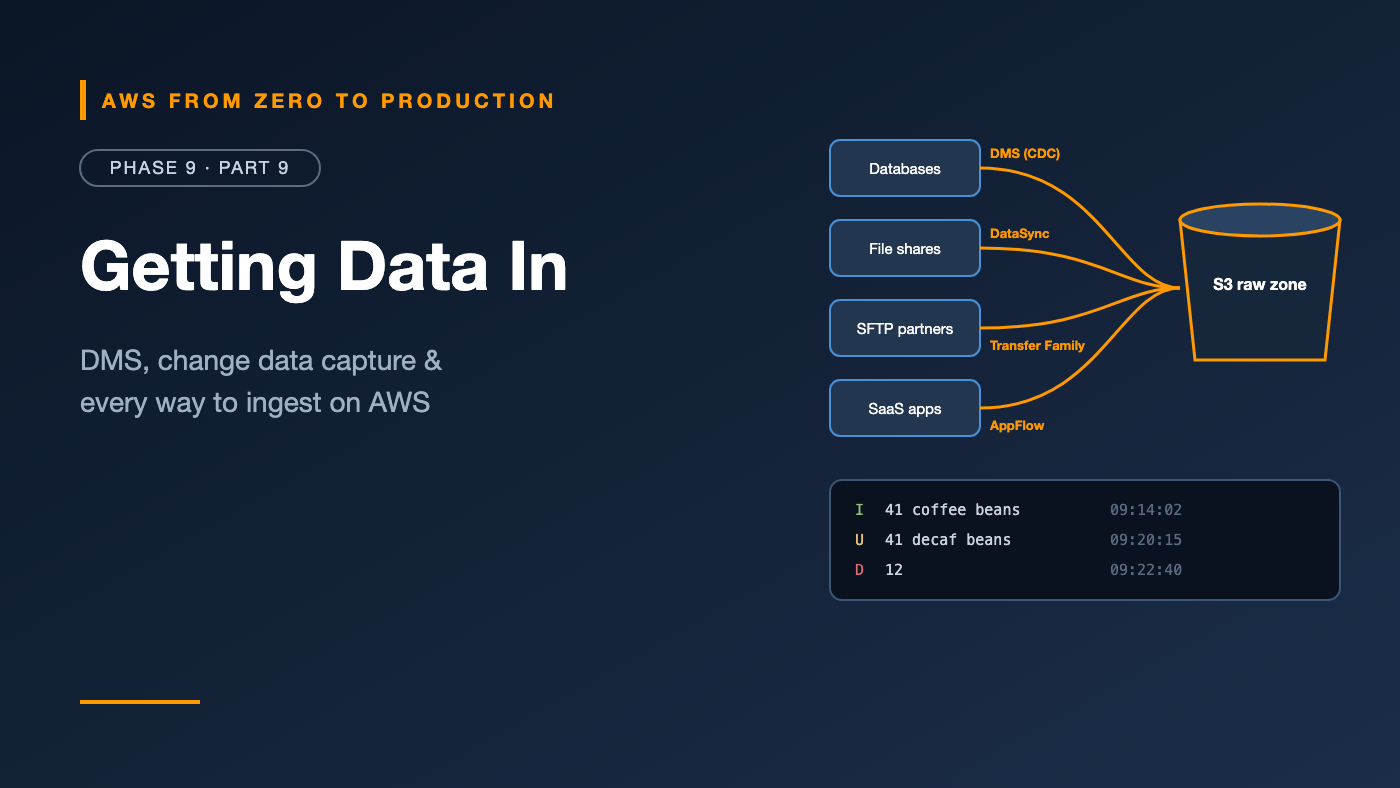
When the target is S3, each change becomes a row in a file with an operation column:
Op, id, item,          created_at
I,  41, coffee beans,  2026-10-31 09:14:02
U,  41, decaf beans,   2026-10-31 09:20:15
D,  12, ,              2026-10-31 09:22:40
Downstream — in Glue, EMR, or Athena with Iceberg — you MERGE these changes into a curated table. That turns a stream of changes into a current-state table you can query.
Schema conversion
Moving between different engines — like Oracle or SQL Server to PostgreSQL or Aurora — means converting schemas, stored procedures, functions, and data types.
- DMS Schema Conversion (in the DMS console) and the AWS Schema Conversion Tool (a desktop application) analyze the source, convert what they can automatically, and produce an assessment report listing what needs manual work.
- Generative AI-assisted conversion can help with complex code objects.
- Expect to rewrite some procedural code by hand — the assessment report tells you how much before you commit.
For homogeneous migrations — PostgreSQL to PostgreSQL — native tools like pg_dump and logical replication are often simpler.
AWS DataSync: files at scale
AWS DataSync moves files between storage systems — fast and verified:
- Sources and targets: NFS, SMB, HDFS, object storage, S3, EFS, FSx, and other clouds.
- An agent — a VM on premises — connects to local storage; agentless for AWS-to-AWS transfers.
- Incremental transfers, integrity verification, scheduling, filtering, and bandwidth limits.
Use it for: migrating file shares, moving Hadoop data to S3, and recurring transfers from on-premises storage into the lake.
AWS Transfer Family: SFTP without servers
Partners and legacy systems often deliver data via SFTP, FTPS, FTP, or AS2. AWS Transfer Family gives them a managed endpoint that writes directly to S3 or EFS:
- No SFTP servers to patch.
- Authenticate users with service-managed keys, a custom identity provider, or Active Directory.
- Managed workflows run post-upload steps — like copying, tagging, or invoking a Lambda function to validate the file.
- Combine with S3 event notifications to kick off processing as files arrive.
Partner --SFTP--> Transfer Family --> s3://acme-lake-raw/partners/acme_logistics/
                                         -> EventBridge -> Step Functions -> Glue
Amazon AppFlow: SaaS data
Amazon AppFlow pulls data from SaaS applications — Salesforce, ServiceNow, Zendesk, Google Analytics, Slack, SAP, and many more — into S3, Redshift, and other targets:
- No code: configure a flow with a source object, field mappings, filters, and a schedule or event trigger.
- Incremental pulls of only changed records.
- Writes Parquet or CSV to S3, with partitioning.
- Data can travel over AWS PrivateLink for supported sources.
For SaaS tools AppFlow doesn’t support, use the vendor’s export API with Lambda or Glue, or a third-party ingestion tool.
RDS-to-S3 integration
Sometimes you just need a periodic copy of a database in the lake:
- Export snapshots to S3: RDS and Aurora can export a snapshot to S3 as Parquet, without touching the running database. Great for analytics and archives.
- Zero-ETL integrations: Aurora, RDS for MySQL, and DynamoDB can replicate continuously into Amazon Redshift — no pipeline to build or run. Increasingly the first option to check for database-to-warehouse feeds.
- Native exports: like
aws_s3.query_export_to_s3in RDS for PostgreSQL, for exporting query results.
SaaS and API ingestion patterns
For sources without a managed connector:
- Scheduled Lambda for small APIs — EventBridge Scheduler → Lambda → S3.
- Glue Python shell or ECS tasks for larger or longer extractions.
- Webhooks → API Gateway → Lambda or Firehose → S3, for sources that push events.
Rules for any custom ingestion:
- Land raw responses unchanged in the raw zone first.
- Track a high-water mark — like
updated_at— for incremental pulls. - Respect rate limits, with retries and backoff.
- Store API credentials in Secrets Manager.
Hybrid data migration
Moving large datasets from on premises to AWS:
- Network: Direct Connect or Site-to-Site VPN (Phase 3) for ongoing replication.
- Bandwidth math: 100 TB over a 1 Gbps link takes well over a week at full speed. Plan for it.
- Offline transfer: AWS Snowball devices for very large datasets when the network can’t keep up.
- Phased approach: bulk copy first — DataSync or Snowball — then incremental sync — DataSync or DMS CDC — then cut over.
Migration validation
“It copied without errors” isn’t the same as “the data is correct.”
- DMS data validation: compares source and target rows during and after migration, and reports mismatches.
- Row counts per table, per partition, per day.
- Checksums or aggregates —
SUM(total),COUNT(DISTINCT id)— on both sides. - Sample comparisons of individual records.
- Application testing against the target before cutover.
- A rollback plan — and, for migrations, a period of reverse replication so you can fall back.
Choosing the right tool
Source                                    Tool
----------------------------------------  ----------------------------------------
Relational DB -> lake, ongoing            AWS DMS (full load + CDC)
Relational DB -> Redshift, ongoing        Zero-ETL integration, or DMS
Relational DB -> another engine           DMS + Schema Conversion
DB snapshot -> lake, periodic             RDS snapshot export to S3
File shares / HDFS -> S3                  AWS DataSync (Snowball if very large)
Partner SFTP / AS2 feeds                  AWS Transfer Family
SaaS apps (Salesforce, Zendesk, ...)      Amazon AppFlow
App events, logs, clickstream             Kinesis / Firehose / MSK (Part 7)
Custom APIs                               Lambda, Glue, or ECS + Scheduler
Common mistakes
- Nightly full dumps of large databases when CDC would be lighter and fresher.
- Forgetting CDC prerequisites — logical replication, binlog format, and log retention.
- Treating CDC files as tables without merging them into current state.
- Running analytics queries against the source instead of replicating it.
- No validation beyond “the task succeeded.”
- Underestimating transfer time for large hybrid migrations.
Key takeaways
- DMS moves databases with full load, CDC, or both — onto S3, Redshift, and other targets.
- CDC reads transaction logs, has low source impact, and produces insert, update, and delete records to merge.
- Schema conversion tools assess and convert heterogeneous migrations.
- DataSync moves files; Transfer Family receives SFTP; AppFlow pulls SaaS data.
- Snapshot exports and zero-ETL are the simplest database-to-analytics paths when they fit.
- Always validate: counts, checksums, samples, and a rollback plan.
Quick self-check
Test yourself before moving on:
- What does CDC read on the source database?
- What’s the most common DMS migration type for a live system?
- A partner can only send files over SFTP. Which service do you use?
- What extra step do CDC files in S3 need before analysts can query current state?
Answers
- The transaction log — WAL, binlog, or redo logs.
- Full load + CDC.
- AWS Transfer Family.
- Merge them — applying inserts, updates, and deletes — into a curated table, for example with Iceberg
MERGE.
What’s next
In Part 10, we govern all this data: Lake Formation permissions down to columns and rows, data sharing, KMS, Amazon Macie for PII detection, masking, retention, audit logging, lineage, and quality controls.
What’s the hardest data source you’ve ever had to ingest? Tell me in the comments.