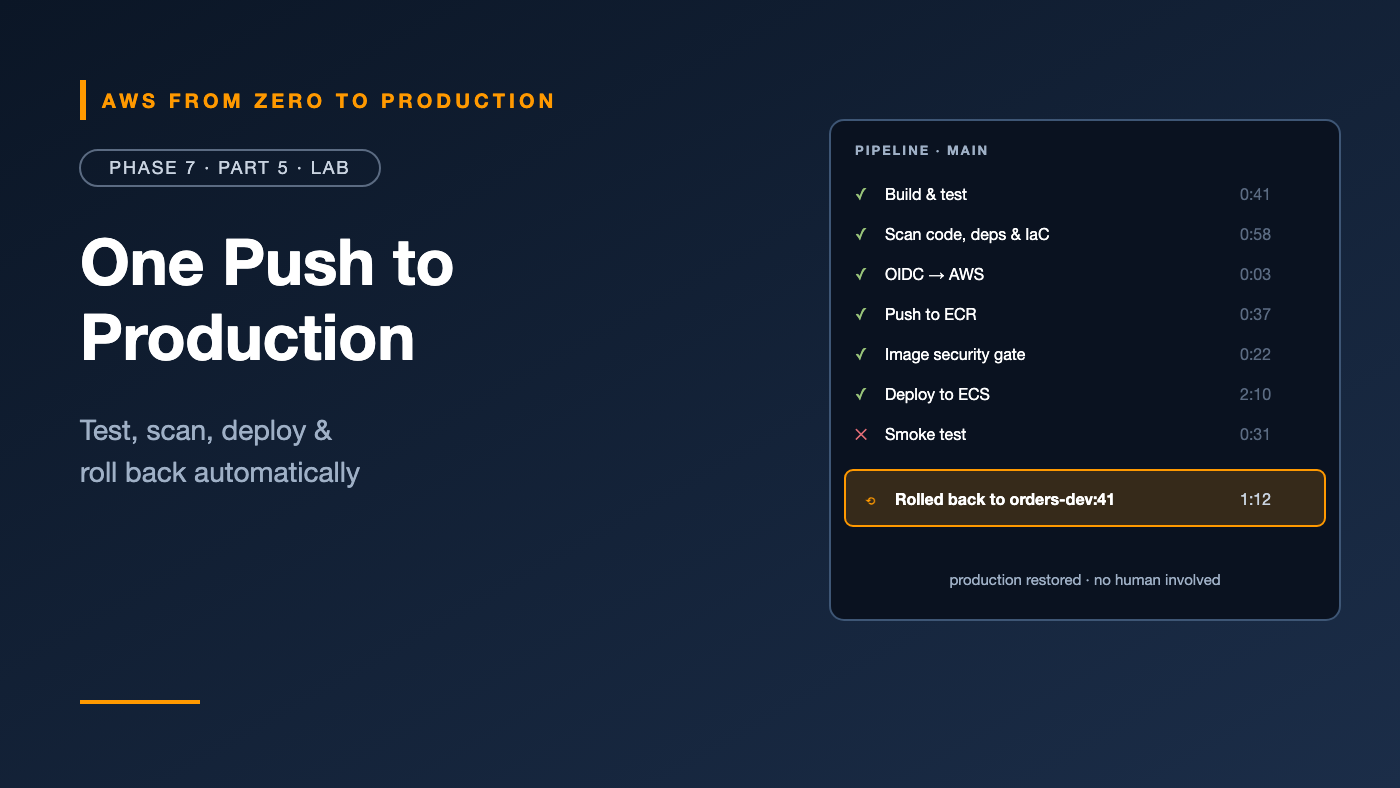
AWS from Zero to Production — Phase 7, Part 5 of 5 · See the full series roadmap
Everything comes together in this lab.
The OIDC trust from Phase 2. The network from Phase 3. The ECS service from Phase 4. The database and secret from Phase 5. The Terraform from Phase 6. And the CI/CD and security ideas from this phase.
By the end, git push will be the only thing you do to ship. The pipeline will build, test, scan, deploy, verify — and if the new version breaks, put the old one back without you lifting a finger.
What you’ll build
A single GitHub Actions workflow that:
- ✅ Builds and tests the API with pytest
- 🔍 Scans the code (Bandit), dependencies (pip-audit), and Terraform (Checkov)
- 🔐 Authenticates to AWS with OIDC — no stored keys
- 🐳 Pushes the image to ECR, tagged with the commit SHA
- 🚧 Gates on the ECR scan — critical vulnerabilities block the deploy
- 📝 Updates the ECS task definition
- 🚀 Deploys the ECS service and waits for it to be stable
- 🧪 Runs a smoke test against the load balancer
- ⏪ Rolls back automatically if anything after the deploy fails
push to main
   |
   +--> test (pytest) ----------+
   |                            |
   +--> scan (bandit, pip-audit,+--> deploy (environment: production)
        checkov)                     |  OIDC -> IAM role
                                     |  build + push to ECR
                                     |  wait for scan -> gate on CRITICAL
                                     |  render + deploy task definition
                                     |  smoke test
                                     |  on failure -> roll back
Prerequisites
- The Phase 6 lab Terraform code (
orders-infra) and state bucket, and theorders-apiapp from Phase 5 - The GitHub OIDC provider from Phase 2 still in your AWS account
- A GitHub account, Git, Docker, Terraform 1.11+, and the AWS CLI
- Optional: the GitHub CLI (
gh) - About 90 minutes
Cost note: The deployed stack costs the same as in Phase 6 — NAT gateway, load balancer, Fargate, and RDS — until you destroy it. GitHub Actions minutes are free for public repositories and included in your plan for private ones.
Step 1: Create the repository
Create a new GitHub repository called orders-platform, and lay it out like this:
orders-platform/
  app/
    app.py
    requirements.txt
    requirements-dev.txt
    Dockerfile
    tests/
      test_app.py
  infra/
    (all the .tf files from the Phase 6 lab)
  .github/
    workflows/
      pipeline.yml
    dependabot.yml
  .gitignore
Copy the Phase 5 app into app/ and the Phase 6 Terraform files into infra/. Don’t copy .terraform/ or any state files. Use the .gitignore from Phase 6.
Step 2: Make the app testable
The Phase 5 app connects to the database and creates an AWS client the moment it’s imported — which makes unit tests impossible without AWS. Two small changes fix that.
In app/app.py, read the database settings with .get():
DB_HOST = os.environ.get("DB_HOST")
DB_NAME = os.environ.get("DB_NAME", "orders")
SECRET_ARN = os.environ.get("DB_SECRET_ARN")
Create the Secrets Manager client lazily, on first use:
_secrets = None
_creds = None


def get_creds(refresh=False):
    global _secrets, _creds
    if _secrets is None:
        _secrets = boto3.client("secretsmanager")
    if _creds is None or refresh:
        value = _secrets.get_secret_value(SecretId=SECRET_ARN)
        _creds = json.loads(value["SecretString"])
    return _creds
And only initialize the database when one is configured — replace the bare init_db() call:
if DB_HOST:
    init_db()
Create app/requirements-dev.txt:
pytest==8.*
Create app/tests/test_app.py:
from app import app


def test_health():
    response = app.test_client().get("/health")
    assert response.status_code == 200
    assert response.get_json() == {"status": "ok"}


def test_index_reports_version():
    response = app.test_client().get("/")
    assert response.status_code == 200
    assert "version" in response.get_json()


def test_create_order_rejects_missing_item():
    response = app.test_client().post("/orders", json={})
    assert response.status_code == 400


def test_create_order_rejects_long_item():
    response = app.test_client().post("/orders", json={"item": "x" * 201})
    assert response.status_code == 400
Run them locally:
cd app
python -m venv .venv && source .venv/bin/activate
pip install -r requirements.txt -r requirements-dev.txt
pytest -q
cd ..
Add .venv/ to .gitignore.
✅ Checkpoint: 4 passed.
Step 3: Hand image deployments to the pipeline
From now on, two tools touch the ECS service:
- Terraform owns the infrastructure — and the first task definition.
- The pipeline owns image rollouts, registering a new task definition revision on every deploy.
Without a rule, Terraform would see the pipeline’s new revisions as drift and try to undo them. Tell Terraform to leave that one attribute alone. In infra/ecs.tf, add to aws_ecs_service.app:
  lifecycle {
    ignore_changes = [task_definition]
  }
Why this is OK: This is a deliberate, documented ownership split — not a hidden manual change. Everything else about the service is still managed by Terraform.
Step 4: Add the deployment role to Terraform
Create infra/github-oidc.tf. It defines an IAM role that only your repository’s production environment can assume, with only the permissions the pipeline needs:
variable "github_owner" {
  type = string
}

variable "github_repo" {
  type    = string
  default = "orders-platform"
}

variable "github_owner_id" {
  type = string
}

variable "github_repo_id" {
  type = string
}

data "aws_iam_openid_connect_provider" "github" {
  url = "https://token.actions.githubusercontent.com"
}

data "aws_iam_policy_document" "github_trust" {
  statement {
    actions = ["sts:AssumeRoleWithWebIdentity"]

    principals {
      type        = "Federated"
      identifiers = [data.aws_iam_openid_connect_provider.github.arn]
    }

    condition {
      test     = "StringEquals"
      variable = "token.actions.githubusercontent.com:aud"
      values   = ["sts.amazonaws.com"]
    }

    condition {
      test     = "StringEquals"
      variable = "token.actions.githubusercontent.com:sub"
      values = [
        "repo:${var.github_owner}@${var.github_owner_id}/${var.github_repo}@${var.github_repo_id}:environment:production",
        "repo:${var.github_owner}/${var.github_repo}:environment:production",
      ]
    }
  }
}

resource "aws_iam_role" "github_deploy" {
  name               = "${local.prefix}-github-deploy"
  assume_role_policy = data.aws_iam_policy_document.github_trust.json
}

data "aws_iam_policy_document" "github_deploy" {
  statement {
    sid       = "EcrAuth"
    actions   = ["ecr:GetAuthorizationToken"]
    resources = ["*"]
  }

  statement {
    sid = "EcrPushAndScan"
    actions = [
      "ecr:BatchCheckLayerAvailability",
      "ecr:InitiateLayerUpload",
      "ecr:UploadLayerPart",
      "ecr:CompleteLayerUpload",
      "ecr:PutImage",
      "ecr:BatchGetImage",
      "ecr:DescribeImages",
      "ecr:DescribeImageScanFindings",
    ]
    resources = [aws_ecr_repository.app.arn]
  }

  statement {
    sid       = "TaskDefinitions"
    actions   = ["ecs:DescribeTaskDefinition", "ecs:RegisterTaskDefinition"]
    resources = ["*"]
  }

  statement {
    sid       = "Service"
    actions   = ["ecs:DescribeServices", "ecs:UpdateService"]
    resources = [aws_ecs_service.app.id]
  }

  statement {
    sid       = "PassTaskRoles"
    actions   = ["iam:PassRole"]
    resources = [aws_iam_role.execution.arn, aws_iam_role.task.arn]

    condition {
      test     = "StringEquals"
      variable = "iam:PassedToService"
      values   = ["ecs-tasks.amazonaws.com"]
    }
  }
}

resource "aws_iam_role_policy" "github_deploy" {
  name   = "deploy-orders"
  role   = aws_iam_role.github_deploy.id
  policy = data.aws_iam_policy_document.github_deploy.json
}

output "github_deploy_role_arn" {
  value = aws_iam_role.github_deploy.arn
}
Notice what the role can’t do: it can’t touch the database, the network, IAM policies, or any other repository or service. It can push one image repository and update one service.
Deleted the OIDC provider after Phase 2? Replace the
datablock with anaws_iam_openid_connect_providerresource withurl = "https://token.actions.githubusercontent.com"andclient_id_list = ["sts.amazonaws.com"], and update the reference.
Get your GitHub IDs — as in Phase 2, Step 3:
gh api repos/YOUR_GITHUB_USER/orders-platform --jq '{repo_id: .id, owner_id: .owner.id}'
Add them to infra/terraform.tfvars:
github_owner    = "YOUR_GITHUB_USER"
github_owner_id = "12345678"
github_repo_id  = "987654321"
Step 5: Apply the infrastructure
If you destroyed the Phase 6 stack, this rebuilds it. If it’s still running, this adds the role and the lifecycle rule.
cd infra
export AWS_PROFILE=sandbox
terraform init
terraform plan -out=tfplan
terraform apply tfplan
If the stack is brand new, push the first image exactly as in Phase 6, Step 9 — the pipeline needs a running service to update.
Collect the values the pipeline needs:
terraform output -raw github_deploy_role_arn
terraform output -raw alb_url
cd ..
✅ Checkpoint: The role orders-dev-github-deploy exists, and the app responds at the ALB URL.
Step 6: Configure GitHub
In the repository settings:
- Environments → New environment →
production. Optional: add yourself as a required reviewer. Under Deployment branches and tags, choose Selected branches and allow onlymain. - In the
productionenvironment, add three variables:AWS_ROLE_ARN(the role ARN from Step 5),AWS_REGION(us-east-1), andALB_URL(the load balancer URL from Step 5). - Advanced Security (or Code security): enable Dependabot alerts, secret scanning, and push protection, where available for your repository and plan.
- Branch protection or rulesets for
main: require a pull request and require thetestandscanchecks to pass.
No secrets. Not one.
Step 7: Add Dependabot
Create .github/dependabot.yml, so dependencies, actions, and the base image stay current:
version: 2
updates:
  - package-ecosystem: pip
    directory: /app
    schedule:
      interval: weekly
  - package-ecosystem: docker
    directory: /app
    schedule:
      interval: weekly
  - package-ecosystem: github-actions
    directory: /
    schedule:
      interval: weekly
Step 8: Write the pipeline
Create .github/workflows/pipeline.yml:
name: pipeline

on:
  pull_request:
  push:
    branches: [main]

permissions:
  contents: read

concurrency:
  group: pipeline-${{ github.ref }}
  cancel-in-progress: false

env:
  ECR_REPOSITORY: orders
  ECS_CLUSTER: orders-dev
  ECS_SERVICE: orders
  CONTAINER_NAME: orders

jobs:
  test:
    runs-on: ubuntu-latest
    defaults:
      run:
        working-directory: app
    steps:
      - uses: actions/checkout@v5
      - uses: actions/setup-python@v6
        with:
          python-version: "3.12"
          cache: pip
          cache-dependency-path: app/requirements*.txt
      - run: pip install -r requirements.txt -r requirements-dev.txt
      - run: pytest -q

  scan:
    runs-on: ubuntu-latest
    steps:
      - uses: actions/checkout@v5
      - uses: actions/setup-python@v6
        with:
          python-version: "3.12"
      - run: pip install bandit pip-audit checkov
      - name: SAST (Bandit)
        run: bandit -r app -x app/tests -ll
      - name: Dependency audit (pip-audit)
        run: pip-audit -r app/requirements.txt
      - name: IaC scan (Checkov)
        run: checkov -d infra --framework terraform --quiet --compact --soft-fail

  deploy:
    if: github.event_name == 'push' && github.ref == 'refs/heads/main'
    needs: [test, scan]
    runs-on: ubuntu-latest
    environment: production
    permissions:
      contents: read
      id-token: write
    steps:
      - uses: actions/checkout@v5

      - name: Authenticate to AWS (OIDC)
        uses: aws-actions/configure-aws-credentials@v6
        with:
          role-to-assume: ${{ vars.AWS_ROLE_ARN }}
          aws-region: ${{ vars.AWS_REGION }}

      - name: Log in to Amazon ECR
        id: ecr
        uses: aws-actions/amazon-ecr-login@v2

      - name: Build and push the image
        id: image
        env:
          IMAGE: ${{ steps.ecr.outputs.registry }}/${{ env.ECR_REPOSITORY }}:${{ github.sha }}
        run: |
          docker build --platform linux/amd64 -t "$IMAGE" app
          docker push "$IMAGE"
          echo "image=$IMAGE" >> "$GITHUB_OUTPUT"

      - name: Security gate (ECR scan)
        env:
          TAG: ${{ github.sha }}
        run: |
          aws ecr wait image-scan-complete \
            --repository-name "$ECR_REPOSITORY" --image-id imageTag="$TAG"
          aws ecr describe-image-scan-findings \
            --repository-name "$ECR_REPOSITORY" --image-id imageTag="$TAG" \
            --query 'imageScanFindings.findingSeverityCounts' --output table || true
          CRITICAL=$(aws ecr describe-image-scan-findings \
            --repository-name "$ECR_REPOSITORY" --image-id imageTag="$TAG" \
            --query 'imageScanFindings.findingSeverityCounts.CRITICAL' --output text)
          if [ "$CRITICAL" != "None" ] && [ "$CRITICAL" -gt 0 ]; then
            echo "::error::Blocked: $CRITICAL critical vulnerabilities in the image"
            exit 1
          fi

      - name: Save the current task definition
        id: current
        run: |
          CURRENT=$(aws ecs describe-services \
            --cluster "$ECS_CLUSTER" --services "$ECS_SERVICE" \
            --query 'services[0].taskDefinition' --output text)
          echo "taskdef=$CURRENT" >> "$GITHUB_OUTPUT"
          aws ecs describe-task-definition --task-definition "$CURRENT" \
            --query taskDefinition > taskdef.json

      - name: Render the new task definition
        id: render
        uses: aws-actions/amazon-ecs-render-task-definition@v1
        with:
          task-definition: taskdef.json
          container-name: ${{ env.CONTAINER_NAME }}
          image: ${{ steps.image.outputs.image }}
          environment-variables: |
            APP_VERSION=${{ github.sha }}

      - name: Deploy to ECS
        uses: aws-actions/amazon-ecs-deploy-task-definition@v2
        with:
          task-definition: ${{ steps.render.outputs.task-definition }}
          cluster: ${{ env.ECS_CLUSTER }}
          service: ${{ env.ECS_SERVICE }}
          wait-for-service-stability: true
          wait-max-delay-seconds: 15

      - name: Smoke test
        env:
          ALB_URL: ${{ vars.ALB_URL }}
          EXPECTED: ${{ github.sha }}
        run: |
          for attempt in 1 2 3 4 5; do
            VERSION=$(curl -fsS "$ALB_URL/" | jq -r .version) || VERSION=""
            [ "$VERSION" = "$EXPECTED" ] && break
            echo "Waiting for the new version (got: $VERSION)"; sleep 6
          done
          [ "$VERSION" = "$EXPECTED" ] || { echo "::error::Expected $EXPECTED, got $VERSION"; exit 1; }
          curl -fsS "$ALB_URL/health"
          curl -fsS "$ALB_URL/orders" > /dev/null
          echo "Smoke test passed for $EXPECTED"

      - name: Roll back on failure
        if: failure() && steps.current.outputs.taskdef != ''
        env:
          PREVIOUS: ${{ steps.current.outputs.taskdef }}
        run: |
          echo "::warning::Rolling back to $PREVIOUS"
          aws ecs update-service --cluster "$ECS_CLUSTER" --service "$ECS_SERVICE" \
            --task-definition "$PREVIOUS" > /dev/null
          aws ecs wait services-stable --cluster "$ECS_CLUSTER" --services "$ECS_SERVICE"
          echo "Rolled back to $PREVIOUS"
How it works
- Pull requests run
testandscanonly. They never get AWS credentials — thedeployjob only runs on pushes tomain, and only theproductionenvironment can assume the role. - The image tag is the commit SHA. Every running version traces back to an exact commit.
- The security gate waits for ECR’s scan and blocks on critical findings before anything is deployed.
- The previous task definition is saved before deploying, so the rollback step knows exactly where to go back to.
- Two layers of rollback: the ECS circuit breaker handles tasks that never become healthy; the rollback step handles versions that start fine but fail the smoke test.
- Checkov runs with
--soft-failfor now, because the lab infrastructure intentionally skips production settings like Multi-AZ. Fix or suppress its findings with documented reasons, then remove--soft-failto make it a real gate.
Pin by SHA in production. The workflow uses major version tags for readability. In real pipelines, pin third-party actions to full commit SHAs, and let Dependabot update them.
Step 9: Ship it
git add .
git commit -m "Add orders platform with CI/CD pipeline"
git push origin main
Open the Actions tab. Watch test and scan run in parallel, then deploy — waiting for your approval if you added a reviewer.
When it finishes:
curl -s "$(cd infra && terraform output -raw alb_url)/"
✅ Checkpoint: The version field is the full SHA of your commit. The ECS service is on a new task definition revision registered by the pipeline.
Step 10: Break it on purpose — and watch it roll back
Introduce a bug that passes the unit tests and passes the health check, but breaks a real endpoint. In app/app.py, misspell the table name in list_orders:
"SELECT id, item, created_at FROM orderz ORDER BY id DESC LIMIT 20"
Commit and push:
git commit -am "Refactor orders query"
git push origin main
Watch the pipeline:
- Tests pass — they don’t hit the database.
- The deploy succeeds —
/healthis fine, so the tasks are healthy. - The smoke test fails —
GET /ordersreturns a 500. - The rollback step runs and puts the previous task definition back.
✅ Checkpoint: The workflow run is red, the warning shows Rolling back to ..., and curl $ALB_URL/ reports the previous commit SHA. Production was broken for well under a couple of minutes, with no human involved.
Fix the typo, push again, and watch it go green.
Lesson: Health checks tell you the app is running. Smoke tests tell you it’s working. You need both.
Step 11 (optional): Trip the dependency gate
Add a known-vulnerable package to app/requirements.txt in a branch:
requests==2.19.0
Open a pull request. The scan job fails at pip-audit, listing the CVEs — and branch protection stops the merge.
Close the pull request without merging.
Cleanup
cd infra
terraform destroy
This removes the whole stack, including the deployment role. Then, in GitHub, delete the orders-platform repository or keep it as a reference.
Keep the GitHub OIDC provider if you want to keep experimenting — it has no additional charge. Delete the Terraform state bucket as described in Phase 6 if you’re finished with it.
✅ Final checkpoint: terraform destroy reports Destroy complete!
Troubleshooting
Not authorized to perform sts:AssumeRoleWithWebIdentity
Cause: the sub doesn’t match — wrong owner or repository name, wrong IDs, or the job isn’t using environment: production. Fix: check CloudTrail’s AssumeRoleWithWebIdentity event for the actual sub, as in Phase 2.
AccessDeniedException on iam:PassRole
Cause: the task definition references a role the policy doesn’t list. Fix: make sure the task definition uses the Terraform-created execution and task roles.
aws ecr wait image-scan-complete times out
Cause: scan-on-push is off, or the repository uses enhanced scanning, which reports differently. Fix: check the repository’s scan settings.
Terraform wants to change the task definition back
Cause: the ignore_changes lifecycle rule is missing. Fix: add it as in Step 3.
The deploy job never starts
Cause: it’s waiting for a required reviewer, or the push wasn’t to main. Fix: approve the deployment, or check the branch.
The smoke test fails on the first deploy after a fresh terraform apply
Cause: the database table doesn’t exist yet, or tasks are still starting. Fix: wait a minute and re-run the job.
What you accomplished
- ✅ A pipeline that builds, tests, and scans every change
- ✅ Deployments with zero stored AWS credentials, locked to one repository and environment
- ✅ A least-privilege deployment role, defined in Terraform
- ✅ A vulnerability gate on the actual image being deployed
- ✅ Immutable, traceable images tagged by commit
- ✅ Automatic rollback when a release passes health checks but fails real traffic
This is the capstone’s delivery path: GitHub Actions → OIDC → IAM role → ECR → ECS.
Quick self-check
Test yourself before moving on:
- Why can’t a pull request from a fork deploy to production?
- Why does Terraform ignore changes to the service’s task definition?
- Which failure does the circuit breaker catch, and which does the smoke test catch?
- Why is
--soft-failon Checkov acceptable for now, and what should replace it?
Answers
- The deploy job only runs on pushes to
main, and only theproductionenvironment’s OIDCsubcan assume the role. - The pipeline owns image rollouts; without the rule, Terraform would revert every deployment.
- The circuit breaker catches tasks that never become healthy; the smoke test catches versions that run but don’t work.
- The lab infrastructure intentionally skips some production settings. Replace it with fixes and documented suppressions, then remove
--soft-fail.
What’s next
Phase 8 is about running what you’ve built: CloudWatch metrics, logs, alarms, and dashboards; auditing and troubleshooting; reliability engineering; and the AWS Well-Architected Framework. Its lab builds a dashboard for this exact service.
How long did your automatic rollback take? Post your numbers in the comments.