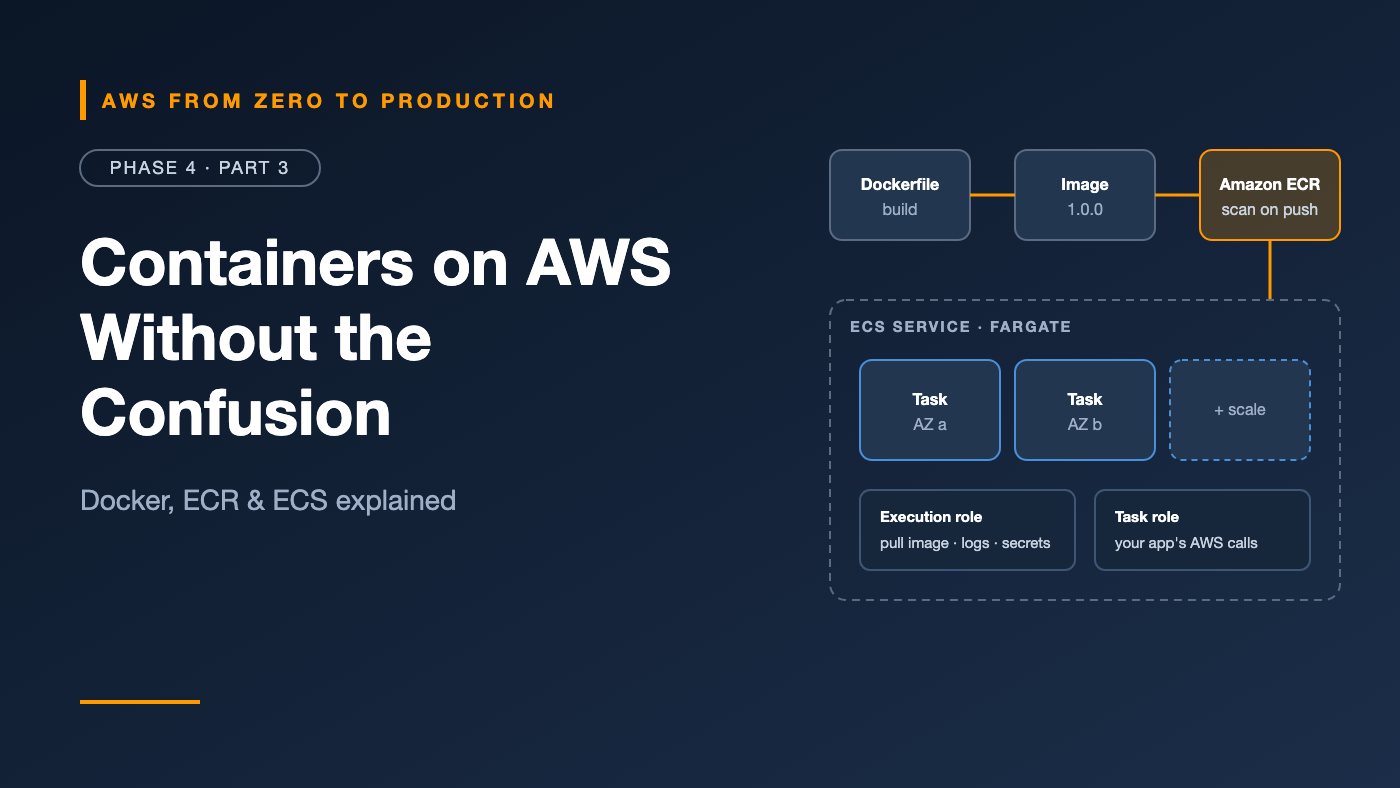
AWS from Zero to Production — Phase 4, Part 3 of 6 · See the full series roadmap
“It works on my machine.”
Every engineer has said it. Every engineer has heard it. Containers exist to make it go away: you package the app with its runtime, libraries, and configuration, and it runs the same way on your laptop, in CI, and in production.
The confusing part isn’t Docker. It’s what happens next on AWS: ECR, ECS, Fargate, clusters, tasks, services, task definitions, two different IAM roles, capacity providers, and deployment settings.
This article untangles all of it. By the end, you’ll know exactly what each piece does — and you’ll be ready for Part 6, where you deploy a containerized API for real.
What you’ll walk away with
- 📦 Containers, images, Dockerfiles, and registries
- 🗄️ Amazon ECR, image scanning, and lifecycle policies
- 🧩 ECS clusters, task definitions, tasks, and services
- 🔐 Task roles vs. execution roles — the most confused pair in ECS
- ⚙️ ECS on EC2 vs. AWS Fargate
- 🚀 Deployment strategies, service discovery, ECS Exec, and logging
Container fundamentals
A container is a lightweight, isolated process that runs an app with everything it needs. Unlike a virtual machine, it shares the host’s operating system kernel, so it starts in seconds and uses little overhead.
- An image is the read-only template: your code, runtime, libraries, and settings.
- A container is a running instance of an image.
- A registry stores and distributes images.
Dockerfiles
A Dockerfile is the recipe for an image:
FROM public.ecr.aws/docker/library/python:3.12-slim

WORKDIR /app
COPY requirements.txt .
RUN pip install --no-cache-dir -r requirements.txt
COPY . .

USER 1000
EXPOSE 8080
CMD ["gunicorn", "-b", "0.0.0.0:8080", "app:app"]
Each instruction creates a layer. Layers are cached and shared, so ordering matters: copy dependency files and install them before copying your code, and rebuilds stay fast.
Image best practices
- Use small, trusted base images, like
-slimor distroless variants. - Use multi-stage builds to keep compilers and build tools out of the final image.
- Run as a non-root user.
- Never bake secrets into images. Anyone who can pull the image can read every layer.
- Tag images with something unique and traceable, like the Git commit SHA — not just
latest. - Build for the right CPU architecture:
linux/amd64for x86,linux/arm64for Graviton.
Mac users: Apple silicon builds
arm64images by default. If your ECS task runs on x86, build withdocker build --platform linux/amd64, or run the task on Arm. Mismatches cause the crypticexec format error.
Amazon Elastic Container Registry (ECR)
Amazon ECR is a managed container registry, integrated with IAM.
- Private repositories for your own images; ECR Public for sharing publicly.
- Authentication with IAM:
aws ecr get-login-passwordgives Docker a temporary token. - Tag immutability: once
v1.4.2is pushed, nobody can overwrite it. Turn this on. - Lifecycle policies automatically delete old, untagged, or excess images to control storage costs.
- Replication to other Regions and accounts.
aws ecr get-login-password --region us-east-1 \
  | docker login --username AWS --password-stdin \
    111122223333.dkr.ecr.us-east-1.amazonaws.com

docker tag orders-api:1.0.0 \
  111122223333.dkr.ecr.us-east-1.amazonaws.com/orders-api:1.0.0

docker push 111122223333.dkr.ecr.us-east-1.amazonaws.com/orders-api:1.0.0
Image scanning
ECR can scan images for known vulnerabilities (CVEs):
- Basic scanning: scans on push or on demand for operating system package vulnerabilities.
- Enhanced scanning: powered by Amazon Inspector. Scans continuously, includes language packages like pip and npm, and re-evaluates images when new CVEs are published.
Phase 7 turns scan results into a security gate in your pipeline.
Amazon Elastic Container Service (ECS)
Amazon ECS is AWS’s container orchestrator. It decides where containers run, keeps the right number running, replaces failed ones, and integrates with load balancers, IAM, and CloudWatch.
The four core concepts
Cluster           a logical group of capacity and services
  |
  +-- Service     keeps N copies of a task running, behind a load balancer
        |
        +-- Task          a running copy of a task definition
              |
              +-- Task definition   the blueprint (image, CPU, memory,
                                    ports, roles, logging, env vars)
- Task definition: a versioned JSON blueprint. Every change creates a new revision, like
orders-api:7. - Task: one running instance of a task definition. Can contain one or more containers — for example, an app plus a sidecar.
- Service: keeps a desired count of tasks running, replaces unhealthy ones, registers them with a load balancer, and manages deployments.
- Cluster: groups services and tasks together.
A minimal task definition:
{
  "family": "orders-api",
  "networkMode": "awsvpc",
  "requiresCompatibilities": ["FARGATE"],
  "cpu": "256",
  "memory": "512",
  "executionRoleArn": "arn:aws:iam::111122223333:role/ecsTaskExecutionRole",
  "taskRoleArn": "arn:aws:iam::111122223333:role/orders-api-task",
  "containerDefinitions": [
    {
      "name": "orders-api",
      "image": "111122223333.dkr.ecr.us-east-1.amazonaws.com/orders-api:1.0.0",
      "portMappings": [{ "containerPort": 8080 }],
      "logConfiguration": {
        "logDriver": "awslogs",
        "options": {
          "awslogs-group": "/ecs/orders-api",
          "awslogs-region": "us-east-1",
          "awslogs-stream-prefix": "app"
        }
      }
    }
  ]
}
With the awsvpc network mode, every task gets its own network interface, private IP, and security group — just like an EC2 instance.
Task role vs. execution role
This is the part almost everyone gets wrong at least once. ECS uses two IAM roles, for two different jobs:
Execution role — used by ECS, before your app starts
- Pulls the image from ECR.
- Writes logs to CloudWatch Logs.
- Fetches secrets from Secrets Manager or Parameter Store to inject as environment variables.
- Usually based on the
AmazonECSTaskExecutionRolePolicymanaged policy, plus access to specific secrets.
Task role — used by your application code, while it runs
- Whatever your app calls: reading from S3, writing to DynamoDB, sending to SQS.
- Credentials are delivered to the container automatically; the AWS SDK picks them up.
- Scope it to exactly what the app needs.
"CannotPullContainerError" or missing logs     -> check the EXECUTION role
"AccessDenied" when your code calls S3         -> check the TASK role
Engineer’s note: Never give the task role the execution role’s permissions “to be safe,” and vice versa. Each has a clear, separate job — keep them least privilege.
ECS on EC2 vs. AWS Fargate
ECS needs compute capacity to run tasks. You have two main options:
ECS on EC2
- You run EC2 instances (usually in an Auto Scaling group) registered to the cluster.
- You manage the instances: AMIs, patching, scaling, and bin-packing tasks efficiently.
- More control: GPUs, specific instance types, and potentially lower cost at large, steady scale.
AWS Fargate
- Serverless compute for containers. No instances to manage.
- You choose CPU and memory per task, and pay for what tasks request while they run.
- Each task runs in its own isolated environment.
- Fargate Spot runs interruptible tasks at a discount.
Capacity providers let a service mix them — for example, a baseline on Fargate and extra tasks on Fargate Spot.
Default choice: Start with Fargate. Move to EC2 when you have a specific reason: GPUs, very large steady workloads, or special host requirements.
Service discovery
Services need to find each other. Hard-coding IPs doesn’t work, because tasks come and go.
- Load balancer: put the service behind an internal ALB, and call its DNS name.
- ECS Service Connect: gives services short names, like
http://orders:8080, with built-in traffic metrics and retries, using AWS Cloud Map under the hood. - Cloud Map DNS service discovery: registers task IPs as DNS records in a private namespace.
Deployment strategies
When you update a service to a new task definition revision, ECS can deploy it in several ways:
- Rolling update (default): replace tasks gradually.
minimumHealthyPercentandmaximumPercentcontrol how many old and new tasks run at once. - Blue/green: run the new version (green) alongside the old one (blue), shift traffic once it’s healthy, and keep blue for a bake time so rollback is instant. ECS supports this natively and through AWS CodeDeploy.
- Linear and canary: shift traffic in steps, or send a small percentage first.
The deployment circuit breaker
Turn this on for rolling updates. If new tasks keep failing to start or pass health checks, ECS stops the deployment and, with rollback enabled, returns to the last working revision automatically.
--deployment-configuration \
  "deploymentCircuitBreaker={enable=true,rollback=true},minimumHealthyPercent=100,maximumPercent=200"
ECS Exec: a shell in a running container
ECS Exec opens an interactive shell — or runs a single command — in a running container, through Systems Manager. No SSH, no open ports.
aws ecs execute-command \
  --cluster prod \
  --task 0123456789abcdef0 \
  --container orders-api \
  --interactive \
  --command "/bin/sh"
It requires enableExecuteCommand on the service and SSM permissions on the task role. Sessions can be logged for auditing.
Container logging
Containers should write logs to stdout and stderr. Then:
- The
awslogslog driver sends them to CloudWatch Logs — the simplest option. - FireLens routes logs through Fluent Bit to CloudWatch, S3, Amazon OpenSearch Service, or third-party tools, with filtering and parsing.
Cost tip: Set a retention period on every log group. The default is to keep logs forever.
Common mistakes
- Building
arm64images on a Mac and running them on x86 tasks. - Mixing up task and execution roles.
- Secrets in environment variables in plain text in the task definition. Use the
secretsfield with Secrets Manager or Parameter Store. - Mutable
latesttags in production. - No circuit breaker, so a bad deploy keeps retrying forever.
- Log groups without retention.
- Running containers as root.
Key takeaways
- Images are built from Dockerfiles, stored in ECR, and run as tasks.
- Task definitions are versioned blueprints; services keep tasks running and deploy new revisions.
- The execution role is for ECS (pull, logs, secrets); the task role is for your code.
- Fargate removes server management; ECS on EC2 gives more control.
- Enable the deployment circuit breaker with rollback.
- Use ECR tag immutability and scanning from day one.
Quick self-check
Test yourself before moving on:
- A task fails with
CannotPullContainerError. Which role do you check? - Your app gets
AccessDeniedwriting to S3. Which role do you check? - What happens when the deployment circuit breaker detects failure with rollback enabled?
- Why should you avoid the
latesttag in production?
Answers
- The execution role — and the network path to ECR.
- The task role.
- ECS stops the deployment and rolls back to the last working revision.
- It’s mutable, so you can’t tell which code is running, and rollbacks are unreliable.
What’s next
In Part 4, we look at the other big container option: Kubernetes on AWS with Amazon EKS — pods, deployments, node groups, Fargate profiles, Pod Identity, and the AWS Load Balancer Controller.
ECS or Kubernetes — which does your team use, and why? Tell me in the comments.